Public demo
A limited, view-only shared sandbox where you can click through a synthetic fleet without installing PiHerder.
| URL | https://piherder-demo.hacknow.info |
| Username | demo@hacknow.info |
| Password | PiHerder@123?_ |
| Role | Shared viewer — same menus as a production read-only user (not admin) |
| Your fleet | This is not your private herder — synthetic data only |
Password may rotate
The shared password is rotated from time to time. This live wiki page always has the current password. If login fails after a rotate, refresh this page (or re-open it from piherder-docs.hacknow.info) rather than relying on an old screenshot, blog post, or cached README.
Login path
- Open https://piherder-demo.hacknow.info.
- Sign in with the shared email/password above (Turnstile may appear on the form).
- Explore the UI — dashboard, hosts, jobs, maps, integrations — under the non-dismissible demo banner.
Some deployments also use Cloudflare Access as an outer email gate before the app login. If you see an Access prompt, complete that step first (project site / invite process), then use the shared demo account.
What to expect
- Full clickable UI with sample hosts, jobs, maps, and integrations
- Banner: shared account · data may reset · some actions simulated
- You cannot onboard real machines, use API tokens, or reach anyone’s home lab
- Job actions succeed as demos only (no live SSH)
- No new accounts — use the shared credentials only
- Password / 2FA on the shared user stay locked (visitors cannot lock each other out)
- Fleet config changes blocked like production viewers; simulated jobs still work for the tour
- Data re-seeds on a schedule (and after operator maintenance) — treat everything as disposable
- Audit client IPs are scrubbed — login and other events still appear, but real visitor addresses are stored/shown as
redacted(column and the details body, including consoleip=…). Seeded lab IPs like10.42.xmay remain. The shared account must not leak other people’s IPs. - OpenAPI is off —
/openapi.json,/docs, and/redocreturn 404 on the public demo (API tokens are disabled anyway). Use your own install for the interactive schema. The demo is not an MCP target (/mcpis refused with the rest of the token API). - Web SSH console is simulated on the public demo — open Console from a host for a toy shell (help / ls / whoami). No live SSH, no network, no real keys. Host mux never runs on demo. Settings → Console / Security writes 403 (not a multi-tenant shell farm). Your own install uses real Paramiko shells when
PIHERDER_SSH_CONSOLE=true. - Host Files is simulated on the public demo — same chrome as a real explorer, canned tree (no SFTP, no host disk). Shared viewer may browse and open small files / image preview. Upload / delete / zip / privileged are refused. Your own install uses jailed SFTP only when
PIHERDER_HOST_FILES=true(leave that off on the public VPS).
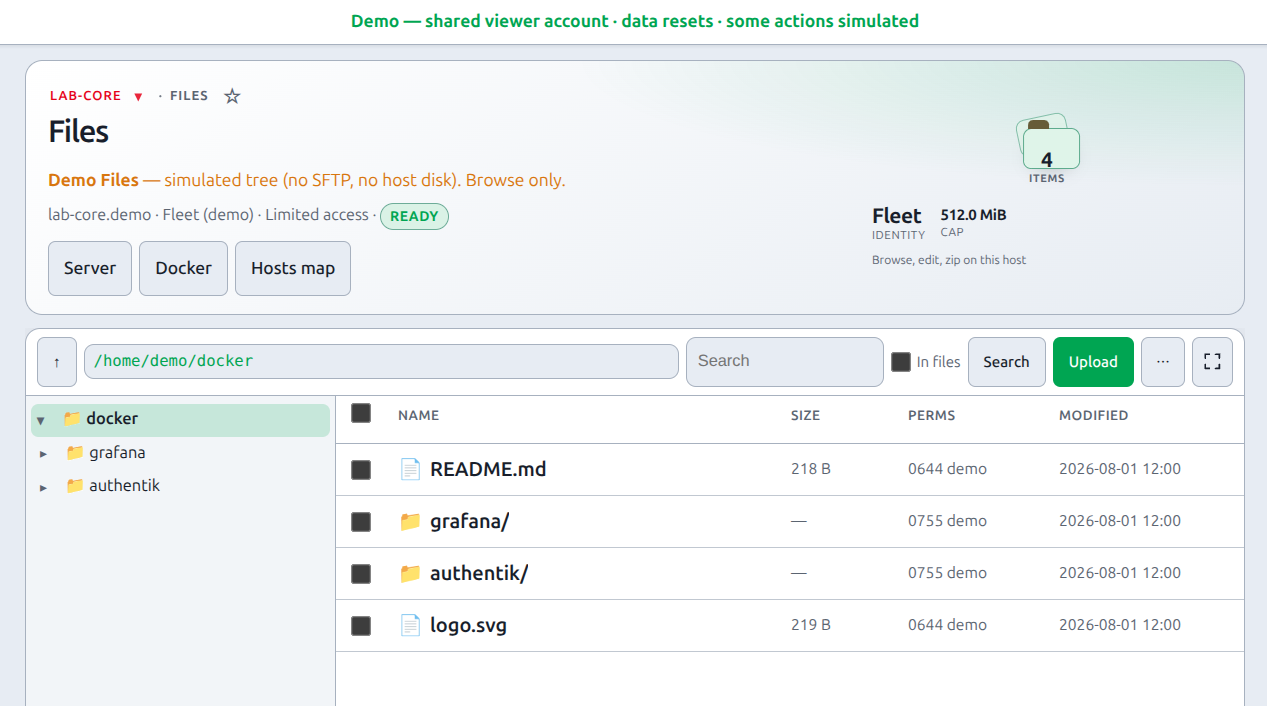
- Service migrate is off — no dest picker, no dataset copy, no Undo move. Host lock / unlock exists on a real install without the migrate flag. Move a service.
- This sandbox tracks production v1.6.0 (main). About / footer say 1.6.0. Script policy is report-only (a missed inline script is reported, not blocked). Your own install enforces the nonce policy. Do not treat the demo as the CSP or Move test bed. The header stays official PiHerder, Catalog stays in the nav, and demo mode ignores an instance name, accent, or Catalog hide (including PIHERDER_INSTANCE_NAME and PIHERDER_ACCENT on a newer build).
Demo screens are not always 100% aligned with a real fleet
Some screens and highlighted features on the demo will not match a real self-hosted implementation pixel-for-pixel. Hosts, inventory, jobs, maps, and integrations are seeded or simulated so the sandbox stays safe and disposable. You may see canned job results, static sample data, or simplified / empty panels where a live deploy would talk to real Pis, Docker, or external services. Treat the demo as a UI tour — your own install against real hosts is the accurate product experience.
What this is not
- Not multi-tenant SaaS for your own fleet
- Not a place to store real config or secrets
- Not an admin sandbox — viewer-only RBAC by design
- Not a guarantee that every panel looks identical to production data
The public demo and this docs site load an X (Twitter) conversion tag so we can see that marketing visits reached the sandbox. Self-hosted installs do not — there is no ad pixel in the image you deploy at home.
To run your own instance, see Install.
Maintainer ops (VPS, seed, Cloudflare, cron): docs/DEMO_SITE.md in the repo (not required for self-hosting).