API tokens (/api/v1)
What this is
Long-lived Bearer tokens for automating PiHerder from n8n, Home Assistant, or scripts. The browser UI uses session cookies separately.
Why it exists
Operators want “backup host X every night from HA” without storing a human password. Tokens are scoped, rotatable, revocable, and audited — admin only.
Where: Settings → API management (/herder-backups?tab=api) — admin only.
Catalog tab: scopes and endpoints render as a dense list (not a wide table).
Interactive OpenAPI: on your instance at /docs (Swagger — Authorize with Bearer ph_…) and /redoc (ReDoc). Those two paths allow jsDelivr so the stock FastAPI UI can load; the rest of the app stays self-hosted CSP. Settings → API also has a Try a token panel for a quick same-origin smoke check after create/rotate.
Long reference: docs/API.md in the repo.
Auth
- Secret shown once at create or rotate; only a hash is stored.
- That one-shot secret is an HttpOnly cookie named
api_token_once(5 minutes, JWT claimats). The Settings redirect never putstoken_secreton the query string, so the secret is not in browser history or access logs. A later load does not show it again. - Creating a token opens an admin alert. It names the admin and the client IP. It does not include the secret or the token prefix. The Settings form,
POST /api/v1/tokens, and a browser MCP sign-in all open it. Refreshing an MCP token does not. - Rotate issues a new secret immediately. The new secret uses the same cookie and stays off the redirect URL.
- Revoke soft-disables; row kept for audit.
- Optional expires (never / 30d / 90d / custom). Expired tokens fail lookup the same as revoked.
Mint for an MCP agent
In Settings → API management → Create new token, tick MCP agent. The name fills in as mcp-… and only read stays checked. Add jobs, edit, or files if this agent should do more than look. Leave the IP allowlist empty for a roaming laptop; use a LAN CIDR for a fixed agent host.
After create or rotate, copy the secret and the one-time hosted MCP block (URL ending in /mcp, plus Authorization: Bearer). The token is not a query parameter. A collapsed Local / air-gapped block still shows uvx piherder-mcp. The plaintext is never shown again. Details: Agents (MCP).
Scopes
| Scope | Allows |
|---|---|
read | Catalog, health, servers, jobs GET |
jobs | POST …/servers/{id}/jobs (start work units) |
edit | PATCH …/features (feature flags) |
files | Host Files fleet list / download / upload / mkdir / rename / empty-delete — not in default scopes. Privileged, zip, edit, chmod, recursive delete stay UI + 2FA. Richer Files token API is still out of 1.4. |
admin | GET users, API tokens, and the audit log. Off unless you tick it. read does not include it. Responses omit the password hash, the TOTP secret, the token secret, the token hash, and the token prefix. No write route. |
feature:backup | Restrict jobs to backup-related types when any feature:* is set |
feature:os | OS patch / OS update-check jobs (apt or HAOS ha CLI when os_type=haos) |
feature:docker | Container patch, container update-check, compose stack check/deploy/stop/start/restart, and template deploy/redeploy jobs |
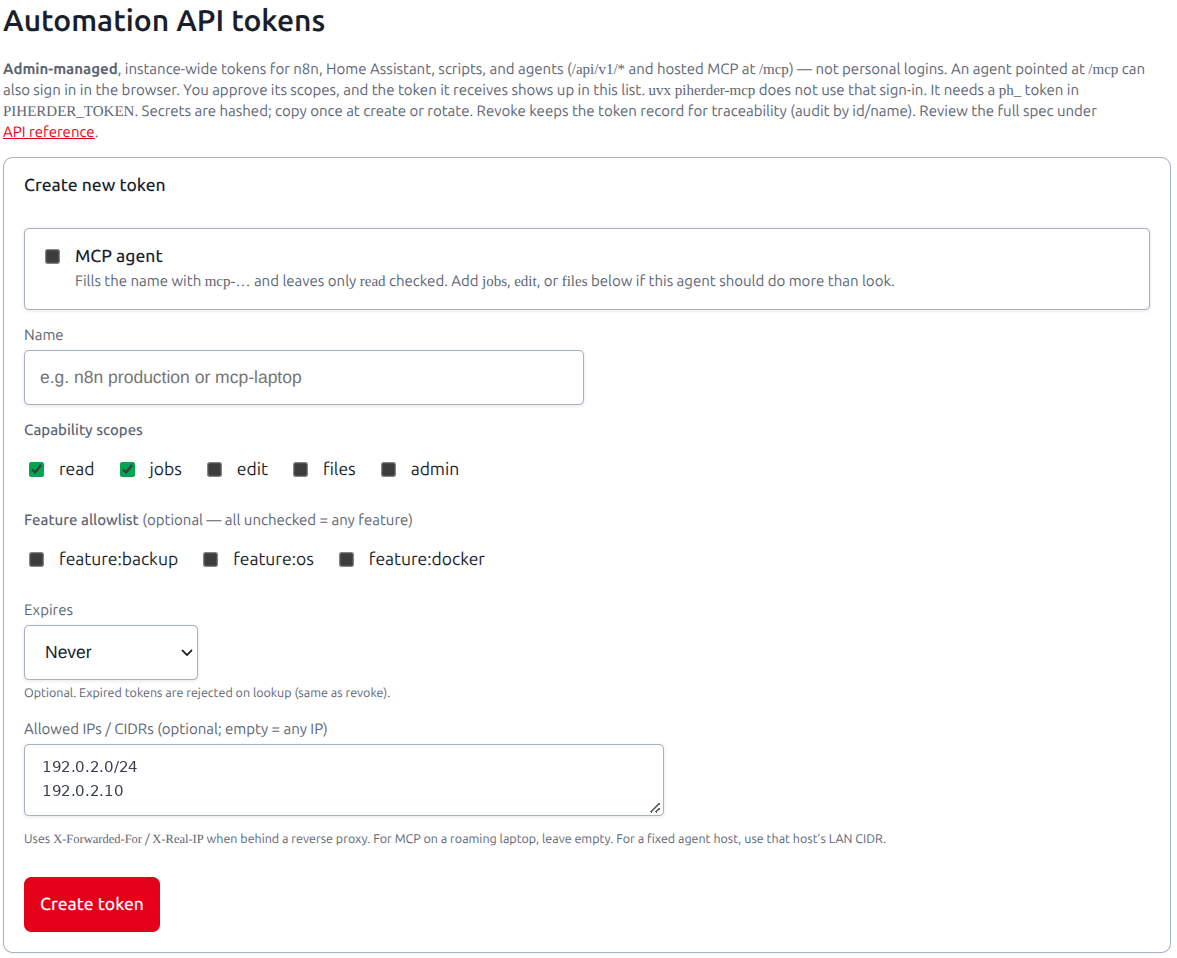
If no feature:* scopes are set, any job type allowed by jobs may run (still subject to server feature flags). Prefer least privilege: e.g. n8n backups = read + jobs + feature:backup. A token that sets any feature:* scope cannot start a LAN Discovery scan. A jobs token with no feature:* scope can.
409 / exclusive jobs: a second start of the same exclusive type on a host returns HTTP 409 with the existing job_id (same rule as the UI).
A read call writes an audit row only when Settings, Security policy, API and MCP read audit is on. The row stores the token id and name, and the client IP. It does not store the token. Those rows stay off the default Audit list and keep their own retention (1-90 days, default 7). Turning the flag on or off writes its own audit row. Hosted /mcp reads follow the same flag. Writes stay audited either way. Admin GETs under /api/v1/admin write an api_read row when that flag is on, at most one per token and path every 5 minutes, including the audit log. MCP sign-in cannot receive admin.
IP allowlist
Optional IPs/CIDRs per token. Enforced using Caddy-forwarded client IP — call via ports 8888/8443.
CORS
Off by default. Server-side n8n/HA/curl do not need CORS. Set CORS_ORIGINS only for browser apps on other origins (exact origins; never *). A first-class HACS integration (HA dashboard of the fleet) is v1.6 Must. Operator page: Home Assistant, PiHerder. Token read. YAML rest remains possible (API.md).
Examples
export PH_TOKEN='ph_…'
export PH_URL='https://piherder.example.com'

curl -sS -H "Authorization: Bearer $PH_TOKEN" "$PH_URL/api/v1" | jq .
curl -sS -H "Authorization: Bearer $PH_TOKEN" "$PH_URL/api/v1/servers" | jq .

curl -sS -X POST -H "Authorization: Bearer $PH_TOKEN" \
  -H "Content-Type: application/json" \
  -d '{"job_type":"backup"}' \
  "$PH_URL/api/v1/servers/1/jobs"
Prefer least privilege: e.g. n8n backup token = read + jobs + feature:backup + n8n host IP.
Agents (MCP)
Cursor, Grok Build, Claude Code, and Codex call this same token API through hosted MCP at POST /mcp (Streamable HTTP). They can paste a Bearer header, or sign in in the browser against that URL. Scopes above are the tool list: read always, and jobs / edit / files only when the token has them. admin is not an MCP tool and browser sign-in does not grant it. uvx piherder-mcp is the optional air-gapped client. It does not sign in in the browser. It needs PIHERDER_TOKEN set to a ph_ secret you mint here. Operator page: Agents (MCP).