Pi-hole integration
What this is
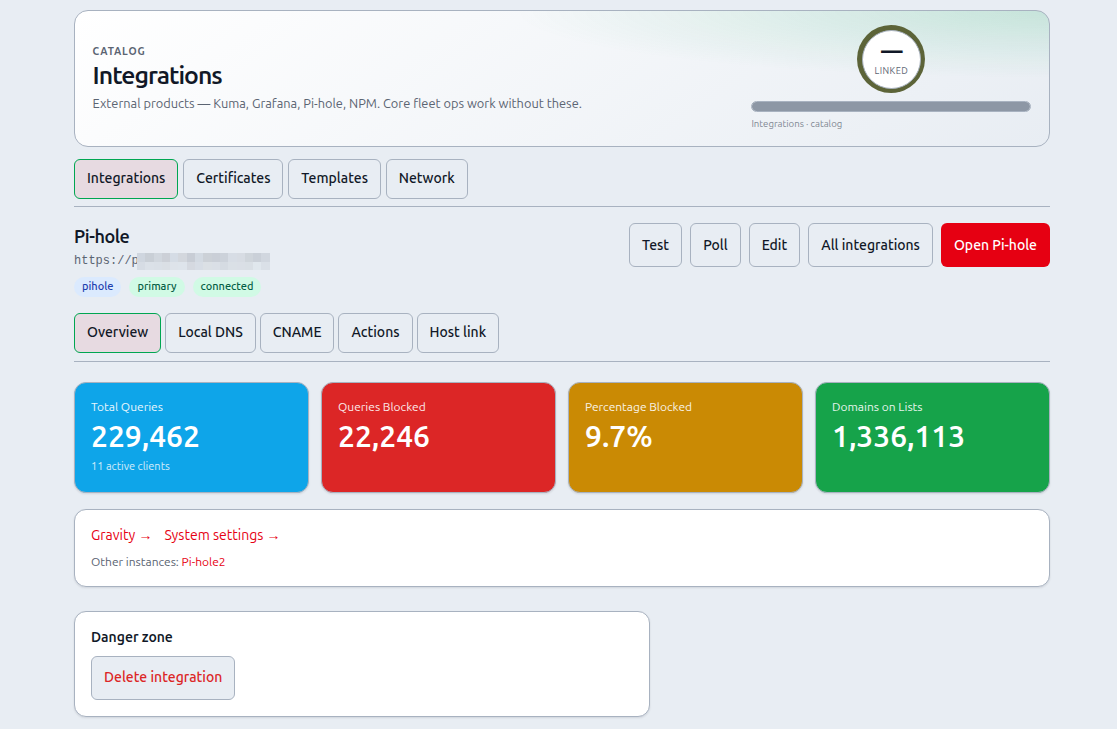
Connect one or more Pi-hole v6 instances so PiHerder can show stats, manage local DNS / CNAME (fan-out to all enabled instances), and run gravity / DNS actions — with deep links into the Pi-hole admin UI.
Why it exists
LAN DNS is the glue between friendly names and hosts. Managing A/CNAME records on every Pi-hole by hand drifts. PiHerder fans changes from a primary workflow and feeds Network maps so topology matches reality.
End-to-end: manage a host A record
- Connect Pi-hole (v6 API password) under Catalog → Integrations.
- Mark Primary on the instance that should own truth first.
- Server Edit → General: set FQDN + IP; enable Manage A on all Pi-holes.
- Confirm the A appears on each Pi-hole admin (or via Catalog → Network → DNS records).
- Open Catalog → Network to adopt existing names and see Hosts/Path maps.
Requirements
- Pi-hole v6 (REST API under
/api). v5 is not supported. - Web UI password or app password (Settings → API).
- Network path from the PiHerder container to each Pi-hole.
Connect
- Catalog → Integrations → + Pi-hole
- Base URL = origin only (e.g.
https://pihole.example.com— no/admin) - Password → Save & connect
- Mark Primary on the instance that owns DNS truth (first instance is primary by default)
Features
| Feature | Notes | Why |
|---|---|---|
| Stats tiles | Total queries, blocked, %, domains on lists, active clients | Health of DNS path |
| Multi summary | Integrations list sums queries/blocked across instances | Multi-hole labs |
| Deep links | Open admin, Gravity, System settings | Escape hatch to full UI |
| Local DNS / CNAME | Dense list on the integration (per instance); add/remove applies to all enabled Pi-holes (primary first) | Keep holes in sync |
| Update Gravity | Long-running; audited | Controlled list refresh |
| Restart DNS / Flush network | Audited; optional “all instances” | Ops actions without SSH |
Partial fan-out failures are reported in the flash message and audit trail.
Related
- Network (Catalog → Network): adopt existing local DNS/CNAMEs into host/service topology, Hosts map + Path map — Network maps
- Deploy Pi-hole via Templates
- Env fallback
PIHOLE_URLstill works if no integration exists