LAN Discovery (nmap)
What this is
LAN Discovery is an opt-in Catalog integration that scans your configured CIDR(s) with nmap, auto-creates discovered device records, and feeds an end-to-end Hosts map of the whole LAN — without linking every device to a managed Server.
Devices are not managed fleet servers until you link or promote them. Naming, kind badges, and Hosts map chips are for orientation; promote only when you want SSH/backups/Docker management.
Where: Catalog → Integrations → add / open LAN Discovery (/integrations/{id}?tab=…).
Hosts map (whole network): Catalog → Network → Hosts map (/dns/physical) — fleet servers and unlinked discoveries together. See Network maps.
Why it exists
PiHerder already manages hosts you onboarded. Discovery answers: what else is on my LAN, and which of those do I want to manage? Scans never run silently: you configure CIDRs and start work manually, via schedules you enable, or from hosted /mcp.
An agent with read can read the saved ranges and recent scans (read_discovery). An agent with jobs can start a scan of those ranges (start_discovery, confirm true). The agent does not choose the ranges. Vulnerability scripts stay off. Schedules and the console stay on this page. An agent with edit can rename a device, mark it known, new, or ignored, link it to a fleet server, and purge one device or the offline rows. A linked device cannot be purged. An agent with jobs can scan one device that already sits inside the saved ranges (scan_discovery_device). Vulnerability scripts stay off. Adapter 0.4.4 lists these device tools, sends confirm=true on purge, and lists replace_stale_mac. uvx piherder-mcp installs 0.4.4. A cached 0.4.3 does not list replace_stale_mac. A cached 0.4.2 does not list prune_docker. A cached 0.4.1 omits confirm=true on purge. See Agents (MCP).
Prerequisites
| Requirement | Notes |
|---|---|
| nmap worker | Compose profile nmap — not started by default |
| nmap image | Build: docker build -f Dockerfile.nmap -t piherder:nmap-local . |
| Start worker | docker compose --profile nmap up -d celery-worker-nmap |
| Worker fence | Compose sets PIHERDER_NMAP_WORKER=0 on web/main celery and =1 on the nmap worker. Tasks refuse when marker is 0 or nmap is missing. Usually not in .env — see env reference · .env.example |
| Vuln pack volume | Host dir ./piherder_nmap_vuln (or PIHERDER_NMAP_VULN_PATH) mounted into web (ro) + nmap worker (rw) |
| Host networking | Worker uses host network so ARP/MAC and LAN reachability work; Postgres/Redis must listen on host loopback (127.0.0.1) as in stock compose |
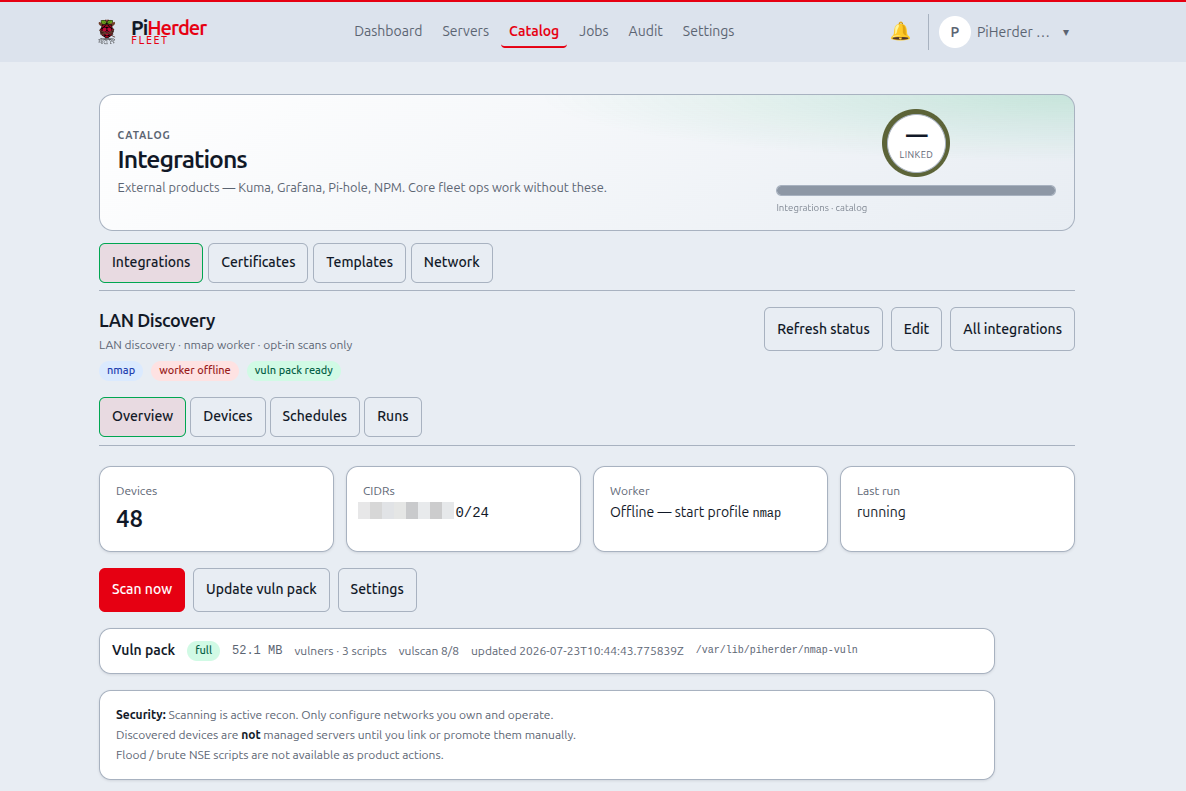
Without the worker, Overview shows scanner offline. Without the vuln pack, deep vuln scripts stay gated. Never add -Q nmap to the main celery-worker.
Active recon
Scans are intentional reconnaissance on your networks only. Stay inside configured CIDRs. Do not point PiHerder at networks you do not own.
End-to-end: first discovery week
- Build and start the nmap worker (commands above).
- Catalog → Integrations → Add → LAN Discovery → set CIDR(s) (e.g.
192.168.1.0/24) and optional excludes. - Optional: enable vuln scripts on the integration when you want deep scans to use NSE vuln packs.
- Overview → download / update vulnerability database if you plan deep vuln scans (Jobs page shows progress).
- Run Discovery (who is up), then Inventory (ports — top N or all ports) so chips and kind heuristics have data.
- Devices tab — List or Map view — click a host → edit modal: map name, fix device type, mark gateway if the row is your router, Mark known for reviewed noise.
- Open Catalog → Network → Hosts map — fleet + discovered together (no per-device link required). Use the radar toggle for outer chips; 1:1 fits the window (tight when discovered is off).
- Link or promote only hosts you want to manage.
- Optional: Schedules — discovery daily / inventory weekly; leave disabled until manual runs look good.
Journey: Operator scenarios — Journey H.
Tabs
| Tab | Purpose |
|---|---|
| Overview | Worker status, CIDRs, vuln pack strip; Scan now / Update vuln pack open in-app modals; Settings link |
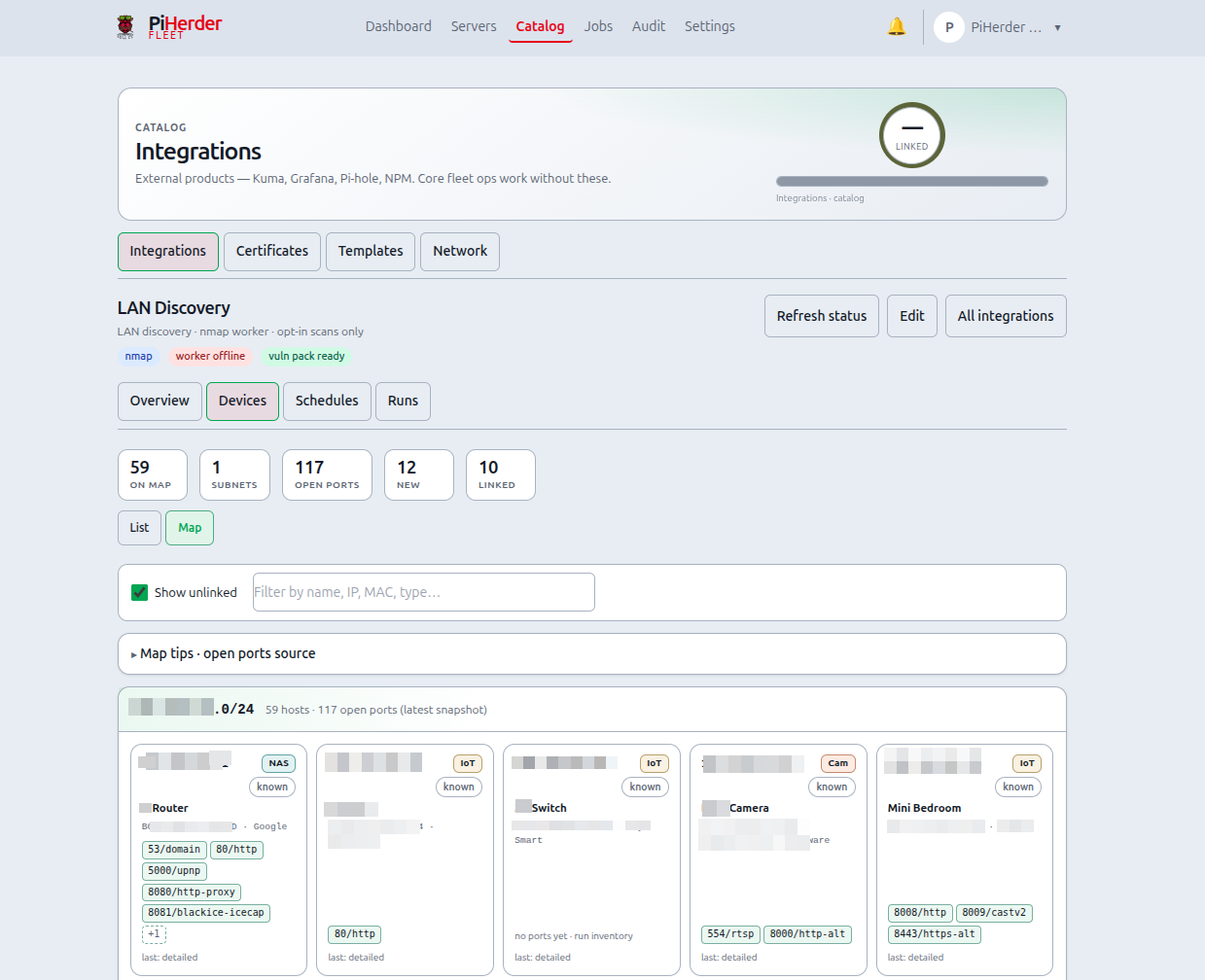
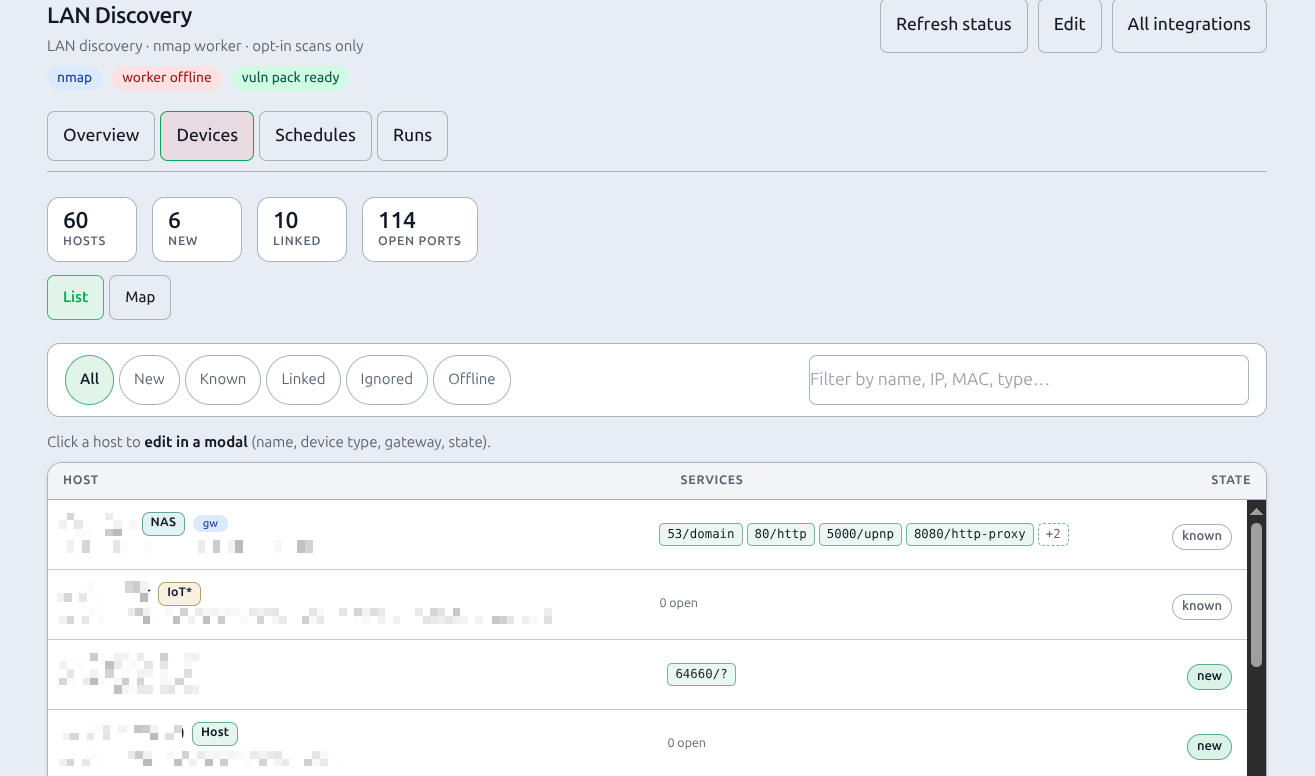
| Devices | List and Map views (toggle): host list + filters, or subnet-grouped discovery cards; edit modal |
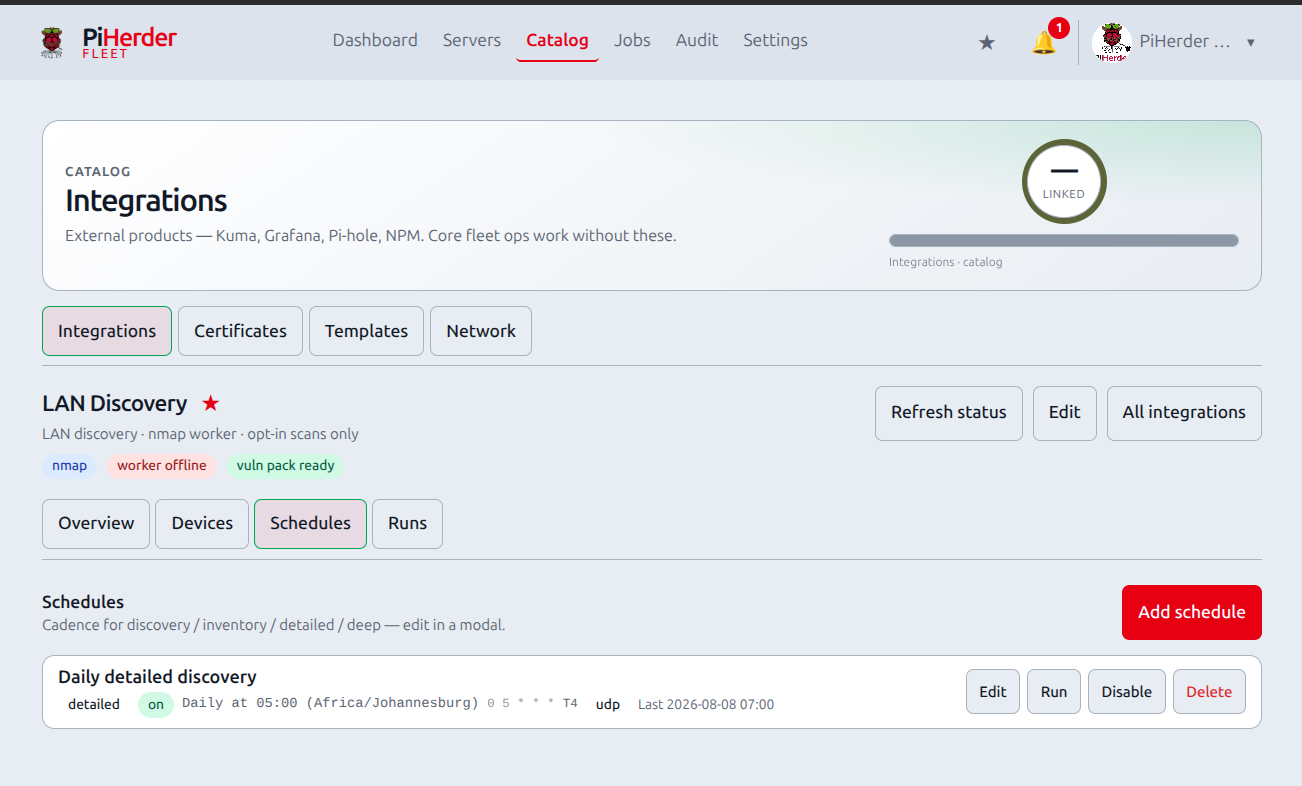
| Schedules | Multiple named schedules — one dense list (full actions on every width); add/edit modal |
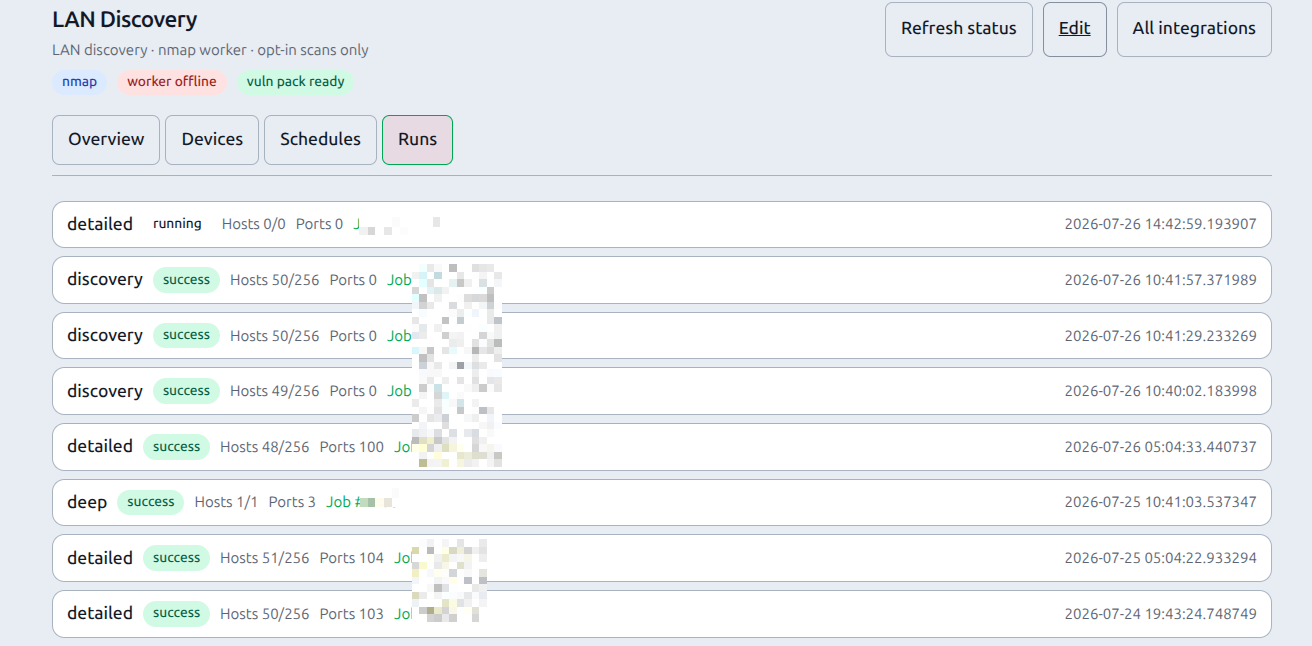
| Runs | Scan history — one dense list (intensity, status, hosts, ports, Job link; no run ID) |
List + Map in one place
Devices and the map share one Devices tab with a List | Map toggle. Bookmarks to ?tab=network still open Map view.
Alerts (v1.3)
New devices and offline (stale last-seen) can open Alerts inbox rows. Webhooks get a digest per scan for new devices, not one POST each. Mute LAN discovery under Settings → Alerts → Alert policy before the first large CIDR scan. Port churn is not an alert. See Alerts.
Possible NIC change
A scan that inserts a new MAC, when another non-ignored row has the same hostname and the same IP and has been stale for longer than one scan interval, shows a possible NIC change badge. The same event opens a lan_discovery notification at info. Device identity stays the MAC. Rows are not merged and are not auto-ignored.
Replace stale MAC marks that stale row ignored and copies a non-empty display name, kind override, and notes onto the new MAC row. It writes one audit row, nmap_replace_stale_mac. The same step is POST /api/v1/discovery/{id}/devices/{device_id}/replace-stale-mac (edit, body stale_device_id) and hosted MCP replace_stale_mac. A row that is not that pair is refused. GET /api/v1/discovery/{id}/devices sets nic_change on the new row. This ships in 1.13.0. 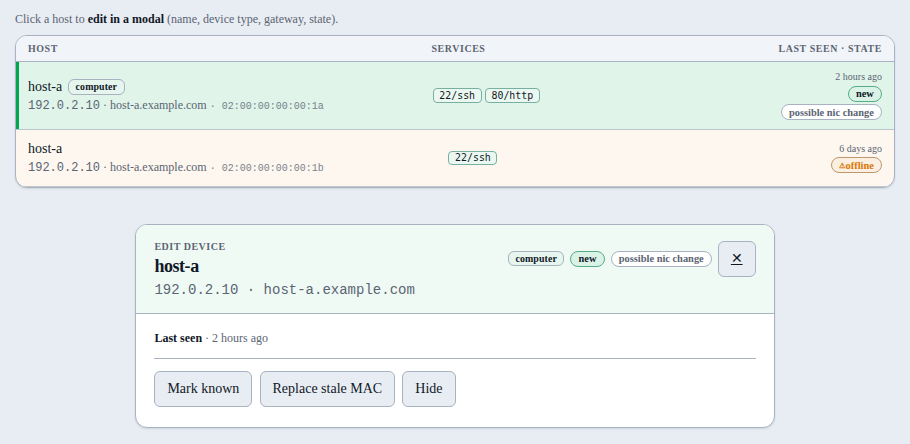
There are two maps:
| Map | URL | What it shows |
|---|---|---|
| LAN Discovery → Devices → Map | /integrations/{id}?tab=devices&view=map (legacy ?tab=network) | Discovery-only subnet cards (scanned devices) |
| Catalog → Network → Hosts map | /dns/physical | End-to-end: Internet → router → LAN → fleet + unlinked discoveries + app paths |
Scan intensities
| Profile | Intent | Typical use |
|---|---|---|
| Discovery | Who is alive | Frequent light sweeps (-sn-class) |
| Inventory | Ports + services | Daily top-ports or all-ports + version detect |
| Detailed | Broader map | Weekly wider ports / OS-ish depth |
| Deep | Single-host full audit | Manual or scheduled; optional script preset + SYN |
On-demand: Overview → Scan now opens a modal (intensity, targets, timing, port scope, UDP, script preset) — no free-form nmap flags. Queue scan enqueues a Job on the nmap worker.
Heavy scan confirm: for detailed or deep intensity, PiHerder shows an in-app confirm (not a browser popup). Cancel leaves the Scan now modal as-is — no “Queueing scan” wait overlay and no job. Only Queue scan on the confirm dialog starts the wait + POST.
Scan this device (deep) still uses the device edit path / curated deep actions where offered.
Deep script presets
| Preset | What runs | When to use |
|---|---|---|
| none | No NSE vuln scripts | Inventory-like deep ports only |
| cpe | Stock vulners (CPE/version, online API) | Quieter version triage |
| offline | Pack vulscan only | Offline tables; needs pack |
| full | Stock vuln category + vulscan + helpers | Noisy; many clear/error rows expected |
Device detail classifies script rows: finding · clear · script error · info. Each finding shows the port/service it ran on (or was inferred for from CPE/product). Ports with issues are highlighted in the port table. Errors mean the probe failed (often irrelevant apps), not “unknown vulnerability”. Version/CPE matches still need human verification.
Timing (nmap -T)
| Value | Meaning | When |
|---|---|---|
| T3 | Normal — slower, quieter | Fragile IoT, WAN edges |
| T4 | Aggressive — default | Typical home/lab LAN |
| T5 | Insane — fastest | Speed over thoroughness; may miss or stress hosts |
Port scope (inventory / detailed / deep)
| Mode | nmap shape | Notes |
|---|---|---|
| Top ports | --top-ports N (default 100) | Fast inventory of common services |
| All ports | -p- | Full TCP 1–65535 — slower; use when top-N is not enough |
| Custom list | -p 22,80,443 or ranges | Curated only (digits, commas, hyphens) |
Detailed and deep default to all ports unless you pick top or custom.
Targets & excludes
- Scan now pre-fills configured LAN CIDR(s) so you do not re-type the subnet.
- Always exclude — every intensity (including discovery).
- Exclude from port/vuln scans — inventory / detailed / deep skip these hosts; discovery still finds them.
- Exclude from deep only — inventory can still map ports; deep/vuln skips them.
Excludes are passed as nmap --exclude so a single IP does not block scanning the rest of the CIDR.
Map identity (name, type, gateway)
Any discovered device (Pi, printer, IoT, router, TV…) can be labelled for the Hosts map — not only fleet-manageable hosts. You do not need to promote a Server just to name a chip.
| Field | Purpose |
|---|---|
| Map name | Chip / spine label (e.g. cctv1, udm-pro) |
| Device type | Override busted heuristics (e.g. auto Printer → Raspberry Pi) |
| Map role | Default LAN device, or Gateway / router for the Hosts map spine |
| Set | Devices (List or Map) → click host → centered edit modal → name / type / role → Save and close |
| Survives | Re-scans (nmap hostname may still update separately; override stays) |
| Shown on | Hosts map chips, Devices list, Map cards; gateway → Router spine |
| Name priority | display name → scan hostname → IP |
| Save side-effect | Saving map identity also marks New → Known (reviewed) |
Clear the name field and save to fall back to hostname/IP. Kind Auto returns to the heuristic.
Gateway / router role
Mark the device that is your LAN gateway (router IP). That:
- Sets Network map → gateway IP to this device’s IP (if different).
- Labels the Hosts map Router spine node with the map name (or hostname).
- Hides that IP as a separate LAN discovery chip (avoids double-draw on the rim).
Only one device is gateway at a time. You can still set gateway IP manually under Catalog → Network map settings.
Device type (looks like + override)
PiHerder guesses a device kind from:
| Signal | Source |
|---|---|
| MAC vendor | nmap address@vendor when MAC is seen (same L2 / host-network worker) |
| OUI prefix | Small curated table (Pi, Espressif, printers, Ubiquiti, …) — not full IEEE |
| Open ports / services | e.g. 9100+631 → printer; 5000/5001 → NAS; 554 → camera; 445+3389 → Windows |
| Hostname / OS | e.g. pi-*, DiskStation, “Windows …” |
Shown as a kind badge on Devices list, edit modal, Map cards, Hosts map chips, and linked server soft-embed. Heuristic is advisory only — never auto-links or promotes.
When discovery is wrong (e.g. OUI says printer but the box is a Pi), set Device type in the edit modal. Override is sticky across rescans; the auto guess is still shown as “auto was …”. An asterisk on the kind badge means operator override.
Run inventory (or detailed/deep) so ports feed the classifier and Hosts map port expand; discovery alone often only yields MAC vendor when available.
Shipped (v1.1 map interactivity): canned kind icons on Hosts map chips; lock a device for open ports on the map (progressive callout). Sticky port roles via the edit table. Custom icon pack remains roadmap — map interactivity plan.
Edit modal (Devices List + Map)
Click a Map card or a List row to open a centered floating modal (same shell as jobs / wait modals — not a bottom sheet). Stays on Devices (same view); no full-page jump.
| Control | What it does |
|---|---|
| Map name | Label for Hosts map chip / list title |
| Device type | Sticky kind override, or Auto to clear |
| Map role | LAN device (default) or Gateway / router |
| Save and close | Writes identity, marks Known if was New, closes modal (return path below) |
| Cancel / ✕ | Close without save — follows the same return path |
| Mark known | New/Stale → Known; closes modal |
| Mark new | Known → New; closes modal (not for Linked — unlink first) |
| Ignore / Unignore | Hide from maps / restore; closes modal |
| Link / Unlink | Soft-attach to Server / detach; closes modal |
| Promote | Add-host wizard prefilled with device IP (+ name when set) — still manual create |
| ← Back to server | When opened from a fleet server LAN chip (return=server:{id}) — Save/close returns to that host |
| ← Hosts map | When opened from Hosts chip (return=hosts); Save/lifecycle can return to /dns/physical |
| Open ports / findings | Expandable detail (latest port snapshot + classified scripts) |
Where you land after close
| Opened from | return query | After Save / Cancel / ✕ |
|---|---|---|
| Devices List or Map | (none) | Same Devices view (list or map), focus flash when applicable |
| Hosts map chip | hosts | Catalog → Hosts map |
| Server detail LAN chip / strip | server:{id} | That fleet host (/servers/{id}) — not Integrations |
Operators can mutate; viewers see read-only identity. Map view restores scroll after save so long subnet grids do not jump to the top.
Devices → Map view
- Hosts grouped by /24 (or IPv6 /64), with client-side search (map is not paged).
- List | Map toggle on the Devices toolbar (shared stats strip).
- Click a host card → edit modal (above). Stays on Map view.
- Show unlinked (default on): include unlinked hosts (
new/known/stale). Uncheck to keep only linked devices. Preference is browser-local (separate from Hosts map radar). - Toolbar shows counts (on map / subnets / open ports / new / linked).
- Port chips show the latest snapshot per host (from the last inventory/detailed/deep that recorded ports), not a merge of all historical scans.
- Card titles use map name when set.
Devices → List view
- Shared filter bar: All / New / Known / Linked / Hidden / Offline + counts + server-side search (
q) and pager (10 / 20 / 50 / 100, sameph_per_pagecookie as Servers). Search matches IP, hostname, display name, MAC, vendor, OS, notes, kind (ha/rpialiases). Chip counts stay fleet-wide. - Each row shows Last seen (relative; absolute in title) and state.
- Offline = not seen recently (stale after ~14 days without
last_seen; warning colour). Devices are never auto-deleted. - Hide (modal) = ignore — off Devices map and Hosts overlay; still in DB under Hidden (Unhide restores).
- Purge device (modal) permanently removes the row + findings; a later scan may re-discover it as new. Unlink first if linked.
- On the Offline filter, operators can Purge N offline… (bulk, confirm).
- Pin the integration with ★ next to the LAN Discovery name for the header pin menu.
- Click a row → same edit modal.
- Empty states when filters hide every host.
Hosts map (Catalog → Network)
Unlinked discoveries appear automatically on the end-to-end Hosts map:
| Behaviour | Detail |
|---|---|
| No link required | Do not link 50 devices just to “see” them |
| Layout | Fleet hosts keep the inner fan. Discovered devices sit on outer multi-rings as small chips when the radar is on |
| Dual layout | Discovered off = compact zone (fleet fan, router on compact rim). On = expanded zone + outer chips; Internet / Router / apps shift with the zone |
| Dedup | Same IP as a fleet server, already linked, or map-role gateway → fleet / spine only |
| Ignored | Stay off the map |
| Label | Map name → hostname → IP |
| Tap chip | Opens LAN Discovery device edit modal (return=hosts) |
Fleet server LAN chip + Network path row
On server detail:
| Surface | What you see |
|---|---|
| Hero LAN pill | Link-style chip (accent border + arrow — not an inert status chip). Opens the device edit modal with ← Back to server; Save / Cancel / ✕ return to that host |
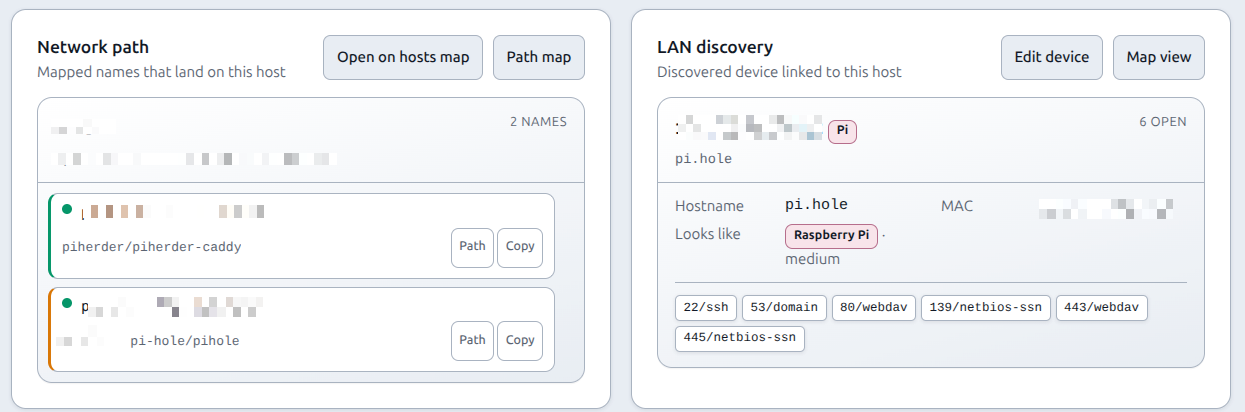
| LAN discovery card | Sits beside Network path (two-column on desktop, stacked on phone). Always open (same outer card + inner fabric-rack chrome as Network path) — header Edit device / Map view; body shows linked device, IP · ports chip, scripts |
| Network path | Mapped FQDNs on this host; Open on hosts map and Path map are matching secondary buttons |
Hosts map toolbar (what each control does)
One-line chrome at the top of the map (no horizontal scroll on typical phones):
| Control | Action |
|---|---|
| Hide map (list icon, mobile) | Leave SVG → host list first |
| Discovered (radar icon) | On (accent) = show outer discovery chips + expanded LAN zone. Off (muted) = compact fleet-only fan. Count lives in the footer + tooltip, not a “Disc. 45” badge. Preference: localStorage |
| − / % / + | Zoom out · current zoom · zoom in (SVG viewBox, stays sharp) |
| 1:1 | Fit map to window. With discovered on = designed full canvas. With discovered off = tight fit around the compact fleet so content fills the map pane (not a tiny cluster in empty space). Double-click the map does the same |
| Full screen (corners icon) | Expand map; Esc / icon again to exit. Hamburger exits fullscreen so the drawer is usable |
Also: pinch / scroll-wheel zoom, drag to pan. Footer shows fleet · discovered counts and map legend (solid LAN, dashed WAN/NPM, dashed-border chips = discovered).
Ports on discovered chips: after inventory (or deeper) scans, lock a discovered device on the Hosts map to open the same progressive ports flow as fleet hosts — compact callout → tap for ports-only list (nmap open ports) → Edit sticky roles when needed. No Server link required. Details: Network maps — ports expand.
Full layout notes: Network maps — LAN discovery.
Devices & onboarding
Lifecycle states
| State | Meaning |
|---|---|
| New | Unreviewed inbox — first seen (or re-flagged). Rescans keep New until you act. |
| Known | Reviewed / acknowledged — still not a managed Server. Filter out of the New inbox. |
| Linked | Soft-attached to an existing fleet Server |
| Ignored | Hidden from active discovery focus and Hosts map |
| Stale | Not seen for 14 days (auto on Devices/Network list); next resight → Known |
| Action | Meaning |
|---|---|
| Mark known | Reviewed — leave the New filter (also auto when you Save and close map identity) |
| Mark new | Put back in the inbox (not for linked devices — unlink first) |
| Map identity | Name / type / gateway role (not a Server) |
| Ignore / dismiss | Hide from active discovery focus |
| Link | Attach discovered device to an existing Server row (soft embed) |
| Promote | Add-host wizard prefilled with IP (+ name) — still manual; no silent SSH enable |
Discovery ≠ fleet membership. Hostnames and MACs depend on scan privileges and host-network worker mode.
Identity & DHCP
| Rule | Detail |
|---|---|
| Stable key | Prefer MAC (mac:AA:BB:…); if no MAC yet, fall back to IP (ip:…) |
| IP churn | Same MAC at a new DHCP address updates ip_address on the same row — map name, kind override, notes, and state stay |
| First MAC | When a previously IP-only row is later seen with a MAC at that IP, it is upgraded to MAC identity |
| No MAC ever | Pure IP identity can fork if the host moves IP before a MAC is learned — host-network worker helps MACs appear |
Ignore/link/map name survive IP updates when identity is MAC-based.
Soft embed (fleet)
Linked discovery devices appear on:
- Servers list — LAN chip
- Server detail — hero LAN pill + always-open LAN discovery card next to Network path (inner rack: IP, ports, kind, scripts; header Edit device / Map view)
Schedules
- All schedules are off by default.
- Intensities: discovery · inventory · detailed · deep (deep may set vuln scripts and SYN override).
- Provide cron (5 fields, app timezone) or interval hours.
- Create and Edit (list → Edit → same form prefilled → Save).
- Options stored per schedule (
options_json): script preset, timing, top-ports, UDP, port list, SYN vs inherit. - Changes resync APScheduler; audit records configure/scan actions.
Runs
History of completed/failed scan jobs for this integration.
| Column | Notes |
|---|---|
| Intensity | discovery · inventory · detailed · deep |
| Status | success / failed / … |
| Hosts | up / total from that run |
| Ports | open count (hidden on very narrow viewports) |
| Job | Link into fleet Jobs (live log while running) |
| Finished | Finished (or started) timestamp |
There is no run ID column — use the Job link for correlation. One dense list at all widths (not a separate mobile table markup). Optional Settings → Stale data cleanup can purge old run rows + XML.
Vulnerability pack
| Item | Detail |
|---|---|
| Location | Host volume → /var/lib/piherder/nmap-vuln in containers |
| Update | Overview → Update vulnerability database → Job nmap_vuln_db_update on the nmap queue |
| Progress | Jobs page detail (log lines / progress), same pattern as OS updates |
| Gate | Deep vuln scripts need pack READY + integration vuln enablement |
Jobs
| Job type | Runner |
|---|---|
nmap_discover / nmap_inventory / nmap_detailed / nmap_host_deep | celery-worker-nmap (-Q nmap) |
nmap_vuln_db_update | nmap worker |
Web only enqueues. Cancel and progress follow the fleet Jobs UI (finished jobs keep the modal open with a done banner instead of forcing a full page reload).
Security & ops notes
- RBAC: operator+ mutate; viewer read.
- Targets outside configured CIDRs are refused.
- SYN / raw scans need appropriate privileges in the nmap container (stock image runs as root with caps for reliable LAN + inventory). Connect-scan (
-sT) is the fallback. - Default install: no nmap worker, no vuln DB in image layers.
- Worker fence:
PIHERDER_NMAP_WORKERis compose-owned (0web /1nmap worker);worker_guardrefuses misrouted tasks. - Detailed/deep whole-LAN Scan now asks for an in-app confirm (blast-radius); Cancel does not queue a job.
- CI never live-scans real networks (fixtures / mock XML only).
Related
- Network maps (Hosts map + discovery overlay)
- Environment reference — nmap
- Integrations overview
- Add a server — promote path
- Jobs, audit & notifications
- Settings — Stale data cleanup — optional purge of old nmap runs
- Reports — live devices per day (
hosts_up, carry-forward) - Volumes