Network (hosts ↔ apps ↔ proxy ↔ internet)
What this is
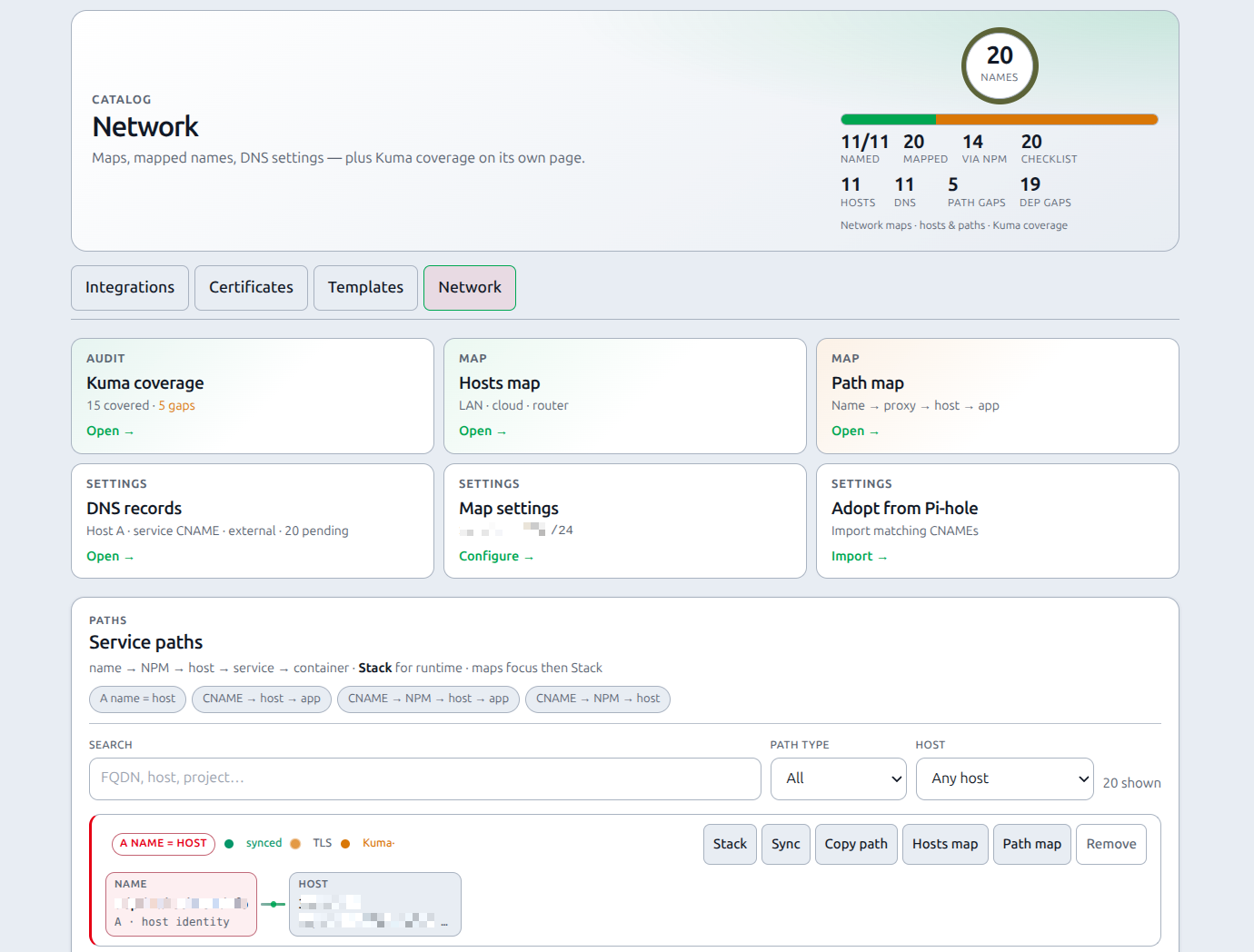
Network is PiHerder’s view of how names reach hosts and apps: Pi-hole records, fleet FQDNs, NPM edges, LAN/gateway/public IP, optional Kuma status, and Docker project links — shown as path cards and topology maps.
It is not a Kubernetes-style service mesh. It is a homelab map of DNS + proxy + inventory.
UI label: Catalog → Network (URL slug remains /dns for compatibility).
Pages: Network hub · Hosts map · Path map · Kuma coverage (/dns/coverage)
Why it exists
After a few years of “this CNAME points somewhere,” operators lose the picture of name → proxy? → host → container. Network maps rebuild that picture so you can answer “where does grafana.example.com go?” without opening three admin UIs.
End-to-end: first useful Hosts map
- Connect Pi-hole; set host FQDNs + manage A where appropriate.
- On the Network hub, set LAN subnet, gateway, and public IP (or Lookup).
- Optional: bind Router / Public IP Kuma monitors (these can raise map infra alerts when down).
- Import all from Pi-hole or Adopt candidates.
- Open Hosts map — confirm home ring vs cloud hosts.
- Open Path map for a specific FQDN flow.
Journey: Operator scenarios — Journey E.
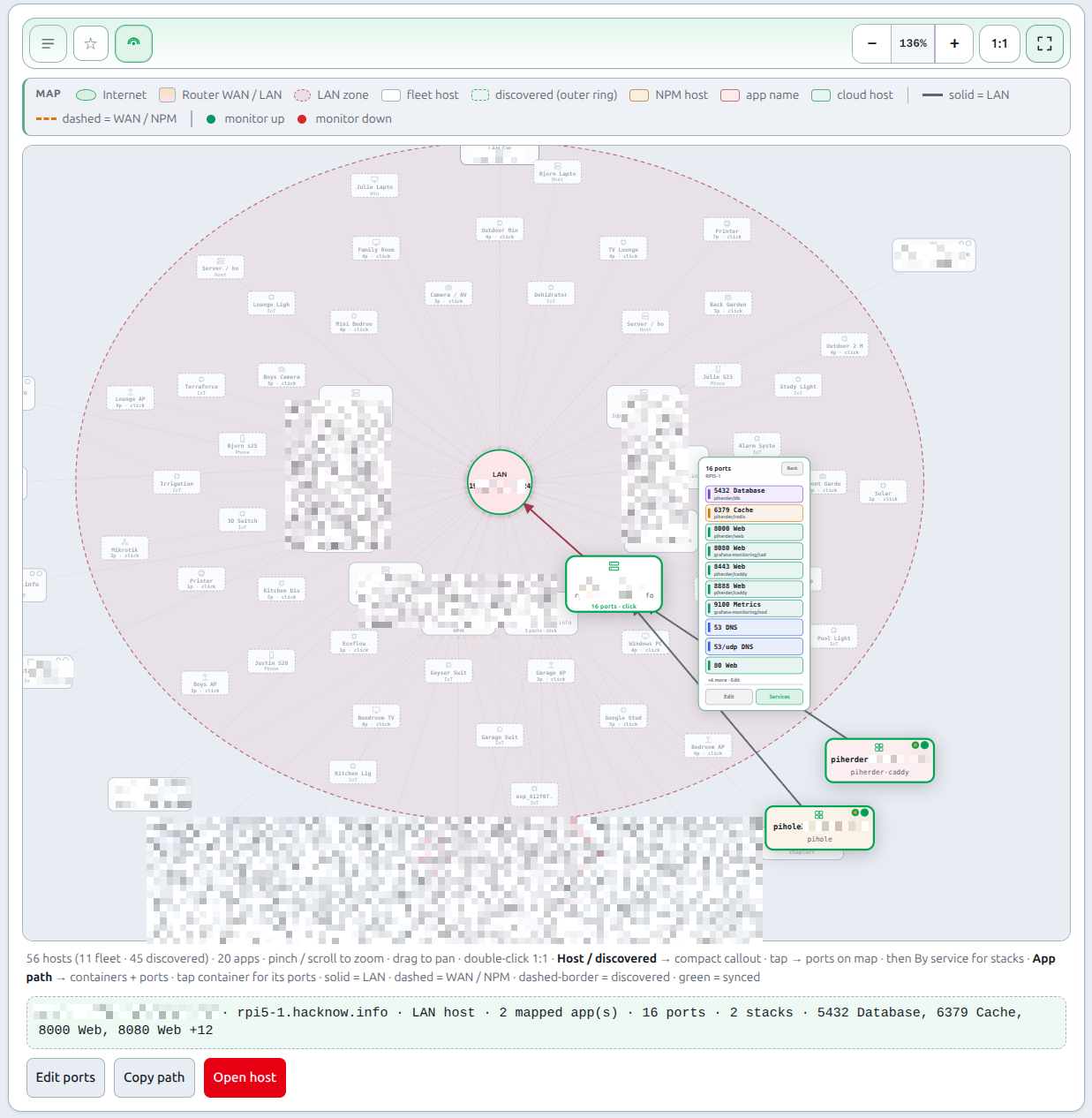
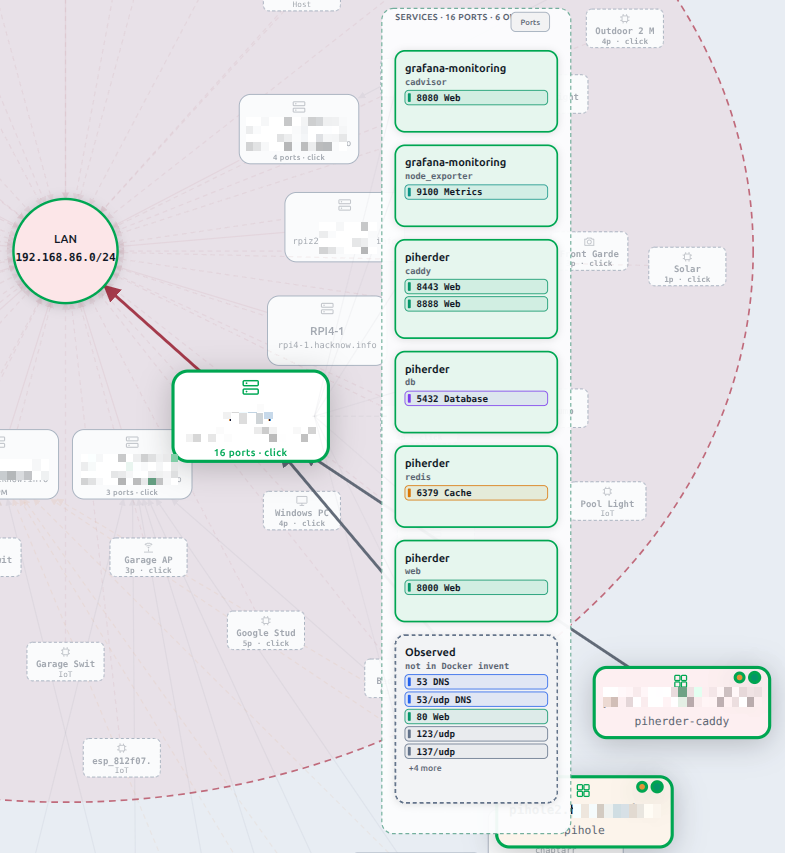
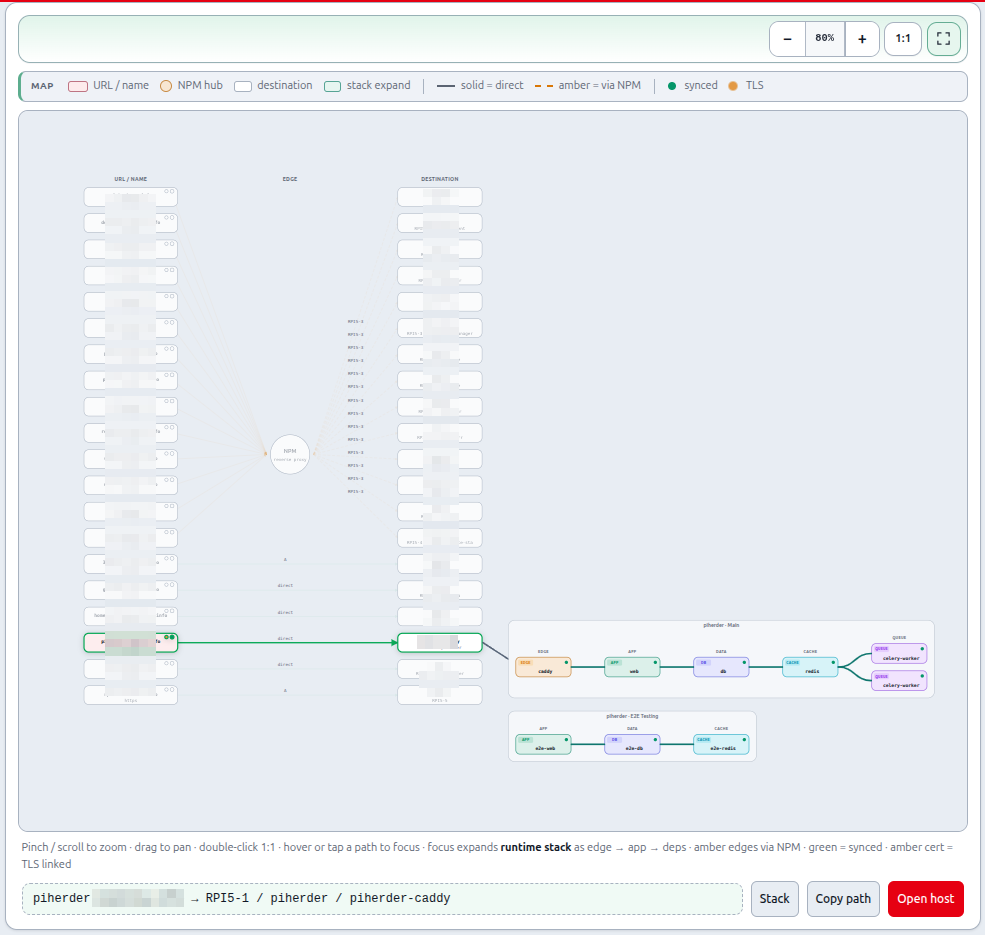
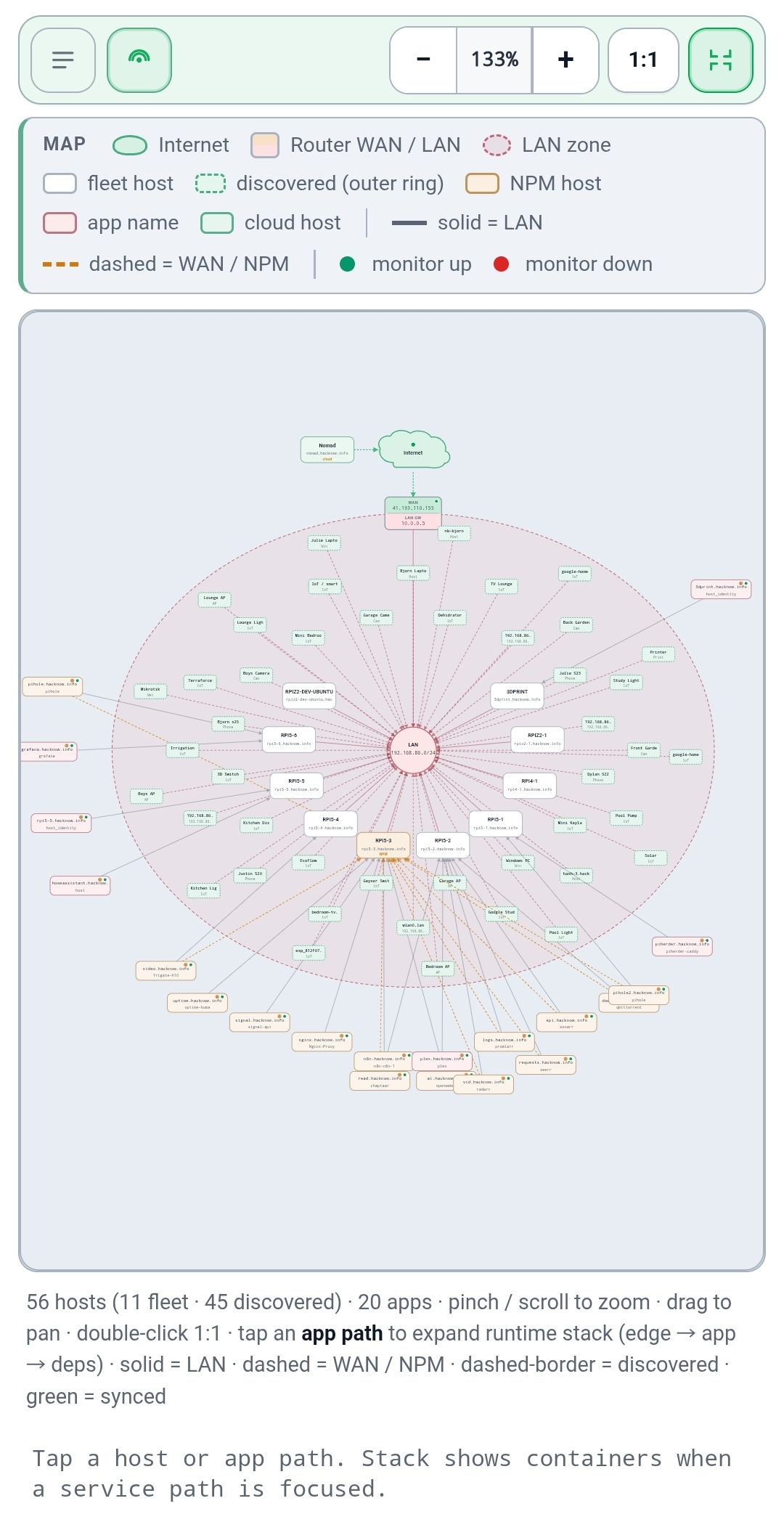
Mental model — entities & relationships
One published name maps through optional layers:
| Entity | Example | Notes |
|---|---|---|
| Name | grafana.example.com | CNAME, or host identity A when name = host FQDN |
| NPM | host-c | Only when proxied (edge host) |
| Host | host-f | Fleet server + A record |
| Service | grafana | Compose project (Kuma / NPM / deploy) |
| Container | grafana | Runtime container |
A path only fans a container on the Hosts map when a compose project is linked (ServiceDnsRecord.docker_project), usually from Kuma / NPM / adopt — or explicitly from Stack → Use this project.
Path kinds
| Kind | UI label (hub stats) | Meaning |
|---|---|---|
| host_identity | Host | Name is the host A record (e.g. 3dprint.example.com) — no CNAME |
| app | App | CNAME → host → Docker project/container (e.g. Grafana) |
| npm_host / npm_app | NPM | CNAME → NPM edge → host (and optional project/container) |
On the Network hub stat strip, By path type shows counts for Host / App / NPM (how published names reach a host). Hover the card for a short definition. Service path filters still use the finer path-kind chips (All / Via NPM / Direct / Host identity).
Network hub layout
The hub (/dns) is path-first: destination cards + DNS/settings cards, then the long service-path list. Host A / service CNAME / external records share one DNS records modal (filter All by default). Map settings and Pi-hole adopt open in their own modals.
| Block | What it is |
|---|---|
| Destination cards | Jump to Kuma coverage, Hosts map, Path map (same compact card language as the rest of Catalog) |
| DNS & settings cards | DNS records (Host A · CNAME · External), Map settings, Adopt |
| Service paths | Searchable path cards (name → layers → Stack / maps) |
| Modal | Content |
|---|---|
| DNS records | Unified list with filters: All (default) · Host A · CNAME · External — see record types |
| Map settings | LAN CIDR, gateway, public IP, optional Kuma binds (formerly “Network map” / “LAN map”) |
| Adopt | Import / candidates from Pi-hole |
DNS records — three different things
The DNS records modal opens from the hub settings card. It is easy to confuse three kinds of “DNS”:
| Filter | What it means | Where you edit it |
|---|---|---|
| Host A | Fleet host FQDN → LAN IP. Badge Pi-hole A = PiHerder pushes that A to all Pi-holes; manual = you maintain the A outside; unset = no FQDN yet | Server Edit → General (deep link Edit host DNS → on each row) |
| CNAME | Service path names (grafana.example.com → host or NPM). Pi-hole badge when PiHerder manages the CNAME; mapped when the path exists in PiHerder only | Path card on this hub, Sync, or Adopt from Pi-hole; deep links to path card / Path map / host |
| External | Public DNS (Cloudflare, registrar, …) — checklist only, not automated | Operator checklist + base domain field for name suggestions |
Maps (Hosts / Path) still support second click to clear focus on desktop (same as mobile toggle).
Runtime stack reorder
On Hosts / Path maps, open the stack panel and drag the ⋮⋮ handle to reorder containers. One Pointer Events path (mouse, pen, and touch) — handle has touch-action: none so the list can still scroll elsewhere.
Network map settings
On the Network hub (/dns), configure home topology used by the Hosts map:
| Field | Example | Used for |
|---|---|---|
| LAN subnet | 192.0.2.0/24 | Home host ring; IPs outside CIDR → cloud |
| Gateway / router IP | 192.0.2.1 | Router node between Internet and LAN |
| Public (WAN) IP | looked up or manual | Shown on Internet / Public IP nodes |
| Lookup public IP now | — | Outbound check from the PiHerder host |
| Router Kuma monitor | optional | Status chip + deep link on Router |
| Public IP Kuma monitor | optional | Status on Public IP / Internet |
Hosts map layout
Internet (☁) ── WAN ── Router (on zone rim)
                         │
                    LAN badge (centre)
                   /  |  |  \
            fleet hosts on a **fan / circle**   ← compact zone
         · · · discovered chips on outer rings · · ·  ← expands when “Network / discovered” is on

Mapped apps fan **outside** the zone from fleet hosts.
- Spine always drawn when fleet hosts exist (even if LAN/gateway settings are empty).
- Without a LAN CIDR: RFC1918 / CGNAT addresses stay on LAN; other addresses are cloud.
- Fleet fan — managed hosts on a ring around the LAN badge (size scales with fleet count).
- Discovered (radar) toggle — off = compact zone (fleet only); on = zone expands to outer rings of discovery chips. Internet / Router sit on the active zone rim; fleet fan positions stay fixed.
- Cloud hosts sit beside the Internet cloud (not on the LAN fan).
Map pages
| Page | URL | Shows |
|---|---|---|
| Network hub | /dns | Path cards · By path type stats · filters · DNS/settings cards · adopt · unified DNS records modal |
| Hosts map | /dns/physical | Host list + optional SVG (Internet → Router → LAN fan + apps); Show map / Hide map same on all widths; graph defaults open on desktop |
| Path map | /dns/logical | Path list + optional SVG (URL → NPM hub → destination); same open/closed map chrome; hub multi-path focus |
LAN discovery on Hosts map
After LAN Discovery has scanned, unlinked devices appear on the Hosts map automatically. You do not need to link each device to a Server for it to show — that is the whole-LAN end-to-end view.
| Topic | Behaviour |
|---|---|
| Toggle | Radar icon in the one-line map chrome (next to zoom / full screen), default on; browser localStorage. Count is in the footer + tooltip, not a toolbar badge |
| Layout | Fleet on compact fan; toggle expands zone to outer discovery rings; apps / spine dual-layout with the zone |
| Labels | Operator map name (e.g. cctv1) → scan hostname → IP — set in LAN Discovery edit modal (Devices List or Map) |
| Kind | Heuristic or operator override badge (printer, Pi, camera, …) — never auto-promotes |
| Gateway | Device map role Gateway / router labels the Router spine and sets network gateway IP; that IP is not double-drawn as a LAN chip |
| Dedup | Same IP as a fleet server, already linked, or map-role gateway / network gateway IP → not a second discovery chip |
| Ignored | Stay off the map |
| Tap | Opens LAN Discovery edit modal with ← Hosts map return after save/close |
| Requires | nmap integration + devices from a scan |
| Stack expand | Tap an app path to expand runtime containers/deps; fan anchors to the visible service chip (including when Discovered radar is off / compact layout) |
LAN Discovery’s Devices → Map view remains a discovery-only subnet browser (Show unlinked ≠ Hosts radar). Device naming / type / known / ignore: LAN Discovery — edit modal.
Map chrome (Hosts + Path)
List and graph share one open/closed model (.is-open) — not separate mobile-only vs desktop-always UIs.
| Control | What it does |
|---|---|
| Show map | Open the SVG panel (always available; hidden while the map is already open) |
| Hide map | Close the SVG panel; list stays (defaults closed on narrow screens; open on desktop / deep links) |
| Pin ★ | Pin Hosts map or Path map to the header ★ menu (opens with #map so the graph appears) — Pins & host jump |
| Discovered (Hosts only, radar) | Outer discovery chips on/off + compact vs full LAN zone |
| − / % / + | Zoom out · level · zoom in (SVG viewBox) |
| 1:1 | Fit map to the window. Hosts + discovered off: fits the compact fleet (fills the pane). Discovered on / Path map: designed full canvas. Double-click map = same |
| Full screen | Expand map; Esc or control again to leave |
Focus, zoom & mobile
- Hover (mouse/stylus) any host (including hosts with no mapped services), Router, LAN, Internet, Public IP, NPM hub, or app path to preview highlight (stroke emphasis only).
- Click / tap to lock focus — the primary node pops out (~1.30× scale; stack chips ~1.23×) and the path stays highlighted when the pointer leaves. Hover stays stroke-only (no flicker).
- Path map — NPM hub: selecting the centre NPM node focuses all via-proxy paths at once (URL + destination nodes and the amber connector lines into/out of the hub), not only the first path.
- Click the same node again or Clear focus to unlock (desktop and mobile).
- Hosts without mapped services are still selectable (node focus). App satellites focus the service path.
- Open host / Open in Kuma appears when the focused node has a link (same-tab for fleet hosts; new tab for external Kuma).
- Copy path copies the callout route string.
- Maps: pinch / scroll-wheel zoom up to 500% (SVG viewBox — stays sharp), drag to pan; see chrome table above.
- Status dots: green = last Pi-hole sync ok · amber partial · red error · small amber ring = managed cert linked · Kuma up/down on Router / Public IP when bound.
- Path cards also show Kuma coverage (see below).
- Deep links:
/dns/physical#map,/dns/logical#map, and/dns/physical?focus=…#map(also from path cards / dashboard / Docker Path map pills / ★ pins). Fragment#map(ormap=1/ focus) auto-opens the SVG — bare/dns/physicalstays list-first. - On narrow screens, maps default to the list (racks / flows). Use View full map for the SVG; use Hide map on the graph toolbar to return to list-first density.
- Hamburger while fullscreen: the slide-out menu is portaled to
bodyand sits above map fullscreen. Opening ☰ fully exits fullscreen (label, listeners, and viewport sizes reset) so the drawer is never painted off-screen. - Portrait ↔ landscape: maps call
PiHerderFabric.refreshLayout(with the global viewport reflow) so SVG heights, zoom, and page width rescale without leaving the page. Path hop chips wrap within each card (no horizontal swipe per card). - Hub and path map support search and path-type filters (All / Via NPM / Direct / Host identity).
- Adopt candidates load after the hub paints (HTMX →
/dns/candidates) so a slow or down Pi-hole does not block path cards / host DNS. - Hosts map caps app satellites per host (then a +N more marker); full app list stays on rack cards.
- Docker UI: project Path map links use a cheap, case-insensitive project index (no full access-path resolve on HTMX stack polls).
Runtime stack (detail altitude)
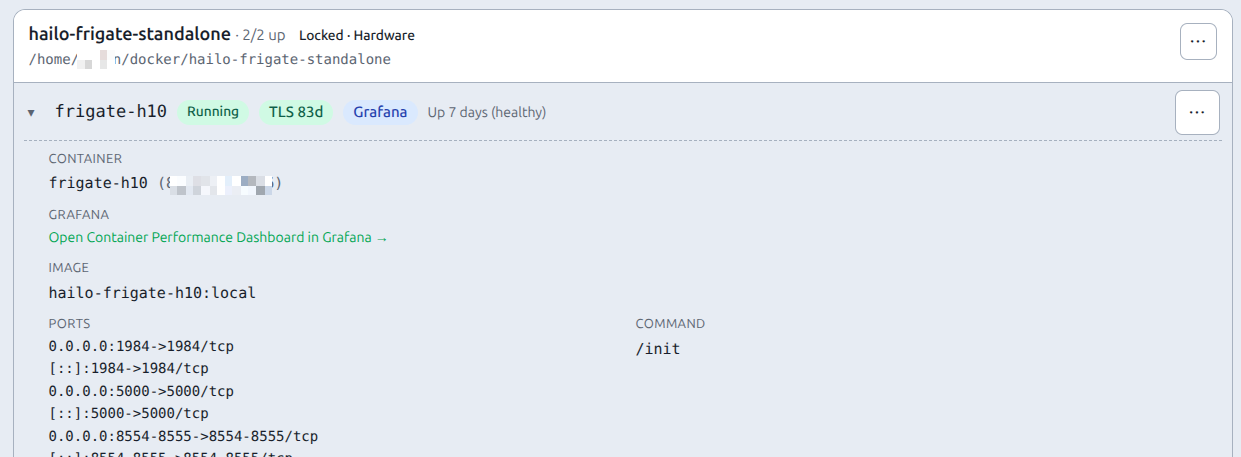
Maps stay customer-facing by default. For one focused service (or host project), open the Stack panel and/or map expand to see containers, categories, tags, Kuma binds, and runtime links.
| Surface | What you get |
|---|---|
| Stack panel | Modal/drawer: containers (category, tags, running, Kuma, published ports as host→container chips), view group pills, detail expand, suggested/confirmed edges, accept/dismiss/manual link (including cross-host project/container), Refresh inventory, deep links to Server / Service / Docker / maps |
| Map expand | On Path map or Hosts map focus: sideways fan to the right of the path — not a fleet-wide container mesh. With All view groups and 2+ groups populated, one fan per group. |
Device icons: Hosts map cards and rack titles show a canned glyph from discovery/device kind (Pi, NAS, printer, camera, …). Fleet hosts default to a server glyph; override the kind on the discovery device to change the icon.
Ports: inventory publish strings are parsed into structured chips (e.g. 8080→80/tcp). Chips also show a role hint when known (DNS, Web, Database, Cache, …) — e.g. Pi-hole 53 · DNS and 443 · Web. Internal-only containers show a short “internal” summary rather than a fake host mapping. Sources: Docker published · nmap open · sticky operator roles (PortAnnotation).
Ports on the Hosts map (progressive expand)
Depth is on the canvas, not a drawer-first flow. Lock a fleet host or discovered device (camera, printer, … — any nmap chip with open ports).
  Lock host / cam
       │
       ▼
  ┌ compact callout ┐     summary + a few chips
  │  N ports · name  │     whole box is the hit target (mobile-friendly)
  │  Tap for ports ▸ │
  └────────┬────────┘
           │ tap box
           ▼
  ┌ ports-only list ┐     full port rows on the map (role · owner hint)
  │  Back            │     hairline footer chrome
  │  [Edit] [Services]│    Services only when compose stacks own ports
  └────────┬────────┘
           │ Services
           ▼
  ┌ by-service fan  ┐     previous service-card fan (project → ports)
  │  Ports (back)    │
  └──────────────────┘
| Step | What you see | Touch / click |
|---|---|---|
| 1 · Compact | Small callout to the right of the host: count, name, up to ~4 chips, Tap for ports | Tap anywhere on the callout (not a tiny button). Empty → opens edit table. |
| 2 · Ports | Ports-only panel: larger rows, port number + role, optional owner line | Back → compact. Edit → sticky-role table. Services → step 3 (when stacks exist). Discovered-only devices get Edit only. |
| 3 · Services | Service/stack fan (compose project cards with ports inside) | Ports → back to ports-only list. Click a service card → edit table focused on that project. |
Discovered devices: same progressive flow using nmap open ports (no Docker owners → Observed / Edit). Chips can show a short Np · click port hint when scan data exists.
App path / containers:
| You want… | Click | What appears on the map |
|---|---|---|
| Containers & deps | An app path satellite (or Path map node) | Stack fan (edge/app/db columns) + dependency edges; containers list published ports when inventory has them. |
| One container’s ports | A stack container that publishes ports | Scoped compact → ports callout for that container / project. Containers without published ports still open Stack detail. |
Nothing is fleet-wide spaghetti by default — depth expands for the focused host, device, or path.
Edit ports table (panel): sticky roles, hide/noise toggle (e.g. SSH), Docker∪nmap union. Open via callout Edit, toolbar Edit ports, or double-click/tap a port row. Fleet: ?server_id=; discovered: ?nmap_device_id=.
Manual edges: when accepting or adding a link, the picker can target containers on another fleet host (cross-host topology), not only the focused compose project.
Compose project identity is exact (case-insensitive) for annotation storage. Soft substring match (e.g. conflating unrelated project names) is not used.
Summary chips: depends_on means inventory parsed compose depends_on (feeds suggested links). If suggestions exist, the chip jumps to Suggested links in the panel — it is not a separate page.
Labels (category + tags)
| Label | Rules |
|---|---|
| Category | One per container; drives map columns. Fixed list (edge, app, queue, cache, data, tooling, …). Default = heuristic from name/image; override in panel detail → Save labels. |
| Tags | Multi chips from a fixed list (web, db, worker, proxy, test, …). Not free text. Add new entries via POST /dns/vocab (operator). |
Visual service stacks and view groups
Under one compose project, create view groups (e.g. Main vs a custom group) and move containers between them. Deploy / stop / start still act on the whole compose project (or a compose set on the Docker page) — view groups are presentation only.
Panel pills: All · Main (unassigned) · (your groups). Compact segmented control styling. Map expand respects the same filter; All draws multiple fans when more than one group has members.
Main = containers with no view-group assignment. Assigning every container to a named group leaves Main empty (expected).
vs Docker compose sets: compose sets = files on disk under one folder. View groups = labels for how you look at containers on Network maps.
Map expand layout
focused path ──► edge → app → queue → cache → data → tooling (enabled categories that have containers)
- Column order follows category vocabulary sort order (empty columns hidden).
- Role colors + type chips on boxes; confirmed dependency curves; soft structure lines between adjacent columns only.
- Published ports appear on container boxes when known (up to a few chips + “+N”).
- No Server / Service / Docker chips on the map — use the Stack panel for navigation.
- Click a container with ports → on-map ports callout for that unit; otherwise Stack panel focused on that container.
Reorder containers (operators)
- Open Stack for the service/project (optionally filter to a view group first).
- Desktop: drag the ⋮⋮ handle. Mobile: long-press a row, then drag.
- Order is saved in the DB (
containerannotation.sort_index) and dual-written tostack_container_order_jsonfor compatibility.
View groups keep independent order: reordering while Main or a named group is selected only updates that list — it does not wipe the other group. Reordering under All replaces the full project order. Separate compose projects (piherder vs piherder-e2e) never share order keys.
Effect on the map: with a custom order, column left→right can follow that order (by earliest container in each category). Example: put celery last in the panel → queue column moves right.
Light / dark theme
Infrastructure nodes (Internet cloud, Router, LAN, NPM hub) use theme-aware fills (no default black SVG fill). Zoom chrome stays readable in light mode.
Setup
- Base domain (optional) on Catalog → Network (e.g.
example.com) for name suggestions. - Network map — set LAN CIDR, gateway, public IP (or Lookup); optionally bind Router / WAN Kuma monitors (poll Kuma first so the dropdown is populated).
- Host DNS — each server Edit → General: FQDN + IP; tick Manage A on all Pi-holes (creates/updates A; duplicates treated as success).
- Import existing names — Catalog → Network → Import all from Pi-hole (or Adopt per row after candidates load). Existing CNAMEs are mapped; Pi-hole is not recreated when the record already exists.
- Host identity — when the app name equals the host A name (Kuma host-level service, no Docker), use Map host identity (A only).
- Template deployments — Service DNS card attaches an inferred plan (one FQDN field when needed).
- External DNS — checklist on the hub for Cloudflare/etc. (not automated in 0.5.0).
Direct TLS (no NPM)
When a container terminates TLS itself (e.g. Frigate on host-a.example.com) and the CNAME target is the host (not the NPM edge):
- Pi-hole CNAME (or host A) must point at the backend host FQDN. Leftover NPM proxy hosts in inventory are not treated as the path edge.
- Bind the Kuma HTTP monitor to that host and the compose project / container (not “host service”). Prefer the monitor URL to be the published HTTPS name.
- Open Stack on the path. If it says no Docker project linked, click the compose project (e.g.
frigate) — that persists the association so Hosts / Path maps show the container satellite. Preview-only chips do not write the path.
Without a linked project the Hosts map shows the host only; stack expand has nothing to fan.
NPM on the same host
A proxied app can live on the same Pi as NPM (e.g. n8n after the proxy moved). Public DNS is still CNAME → NPM hostname (n8n.example.com → edge.example.com); NPM forwards to localhost/LAN on that box. Path map keeps name → NPM → host → app. It does not collapse to direct because target and backend server ids match. Direct TLS (above) is only when the fabric row is not via_proxy.
Pi-hole behaviour
| Action | Behaviour |
|---|---|
| Host A / service CNAME create | Fans out to all enabled Pi-holes |
| Record already present | Treated as success (adopt / re-sync safe) |
| Remove service CNAME mapping | Deletes CNAME on Pi-holes when managed |
| Remove host identity mapping | Does not delete host A (owned by server Host DNS) |
Audit actions include dns_host_*, dns_service_cname_sync, dns_service_a_sync, dns_service_delete.
Uptime Kuma coverage (v0.6+)
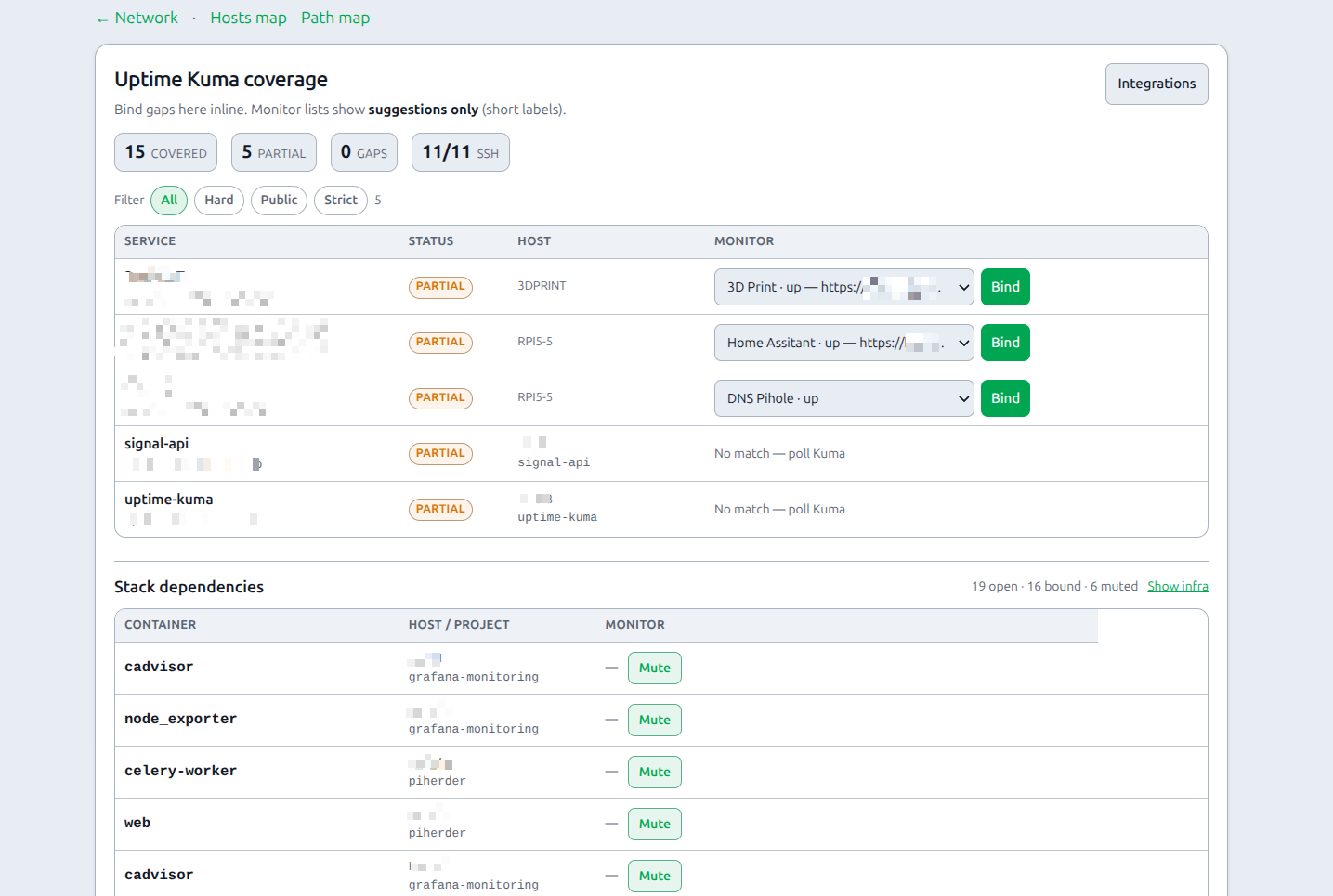
Catalog → Network → Kuma coverage (/dns/coverage) is a dedicated page (not the whole hub — keeps maps + paths scannable).
The hub shows a teaser card with path/dep gap counts. Full audit, binds, filters, and stack dependencies live on the coverage page.
| Status | Meaning |
|---|---|
| Covered | Service-role binding matches FQDN / Docker project (or a clear host-scoped service monitor) |
| Partial | Host has SSH reachability only, or a weak/label-only match |
| Gap (none) | No useful Kuma binding on the backend host for this name |
Path cards show a small Kuma / Kuma· / no Kuma chip.
Binding from the gaps table
Coverage is a dense table (not a wall of large cards). For each gap (operators only):
- Poll Kuma on the integration if the monitor list is empty.
- Choose a Suggested monitor from the constrained select (short labels; ranked by FQDN / name / URL).
- Click green Bind — the button is inside the form (posts correctly); creates a service binding on the backend host with the path’s Docker project when known, then reloads coverage (
next=honoured when set). - Advanced… opens the full Kuma “Add service binding” form with server / project pre-filled.
This does not create monitors inside Kuma — only links an existing monitor to a fleet host/project. Create the HTTP check in Kuma first (Uptime Kuma).
Path/dep gap tables stack as cards on narrow screens.
Stack dependencies (Docker inventory)
Below path coverage, Stack dependencies lists compose containers from host Docker inventory (not only published FQDNs):
| Status | Meaning |
|---|---|
| Bound | Kuma service bind matches project (and container when set) |
| Suggest bind | No bind — pick TCP/HTTP monitor; host ports shown when published |
| Muted / infra | Postgres, Redis, MySQL, Mongo, … (name/image heuristics) or operator Mute |
Show infra toggles whether DB/cache roles appear as suggestions (default hidden — they are not public path monitors; a TCP/Postgres check needs a port reachable from Kuma).
Path gap filters: All · Hard gaps · Public/apps · Strict (drops host-identity partial noise).
Monitoring Postgres (example)
- Ensure Kuma can reach the DB (publish port carefully, or put Kuma on the same Docker network).
- Create a TCP or Postgres monitor in Kuma (connection string stays in Kuma).
- Network → coverage → Show infra if needed → Bind to
project/dbcontainer. - Or keep DB muted and rely on app HTTPS + host SSH.
Availability
Coverage audit + dependency suggest: v0.6.0+. Requires enabled Uptime Kuma + Docker inventory on hosts.
Data model (summary)
| Setting / field | Storage | Notes |
|---|---|---|
network_lan_subnet | App settings | CIDR |
network_gateway_ip | App settings | Router internal IP |
network_public_ip (+ checked_at) | App settings | WAN IP |
network_gateway_kuma_external_id | App settings | Kuma monitor id/name |
network_public_kuma_external_id | App settings | Optional WAN monitor |
network_kuma_integration_id | App settings | Empty = first enabled Kuma |
| Server | dns_name, dns_manage_a, dns_ip_override | Host A |
| ServiceDnsRecord | FQDN, record_type (cname | a), servers, project, NPM, sync | Service path |
| RuntimeEdge | Confirmed/manual/suggested stack dependency edges | Panel + map expand; herder backup |
| TopologyCategory / TopologyTag | Fixed vocab for category + tags | Seeded; operator can add |
| VisualServiceStack | Visual group under one compose project | Presentation only |
| ContainerAnnotation (+ tags) | Category override, visual stack, order, tag set | Herder backup |
stack_container_order_json | App settings | Dual-write fallback for order |
stack_inventory_down_alerts | App settings | Optional alert when Kuma-bound container is down in inventory (same flag as Alert policy → Inventory) |
Alerts (v1.3): Kuma SSH binds raise host_down with a Hosts-map focus (?focus=n:host-{id}#map). Service monitors stay integration_monitor_down. Gateway/WAN chips raise map_infra_down. Discovered-device focus is n:host-d-{id}. Tune or mute under Settings → Alerts — herder does not ping hosts itself.
Resolution also uses Pi-hole inventory, NPM poll cache + proxy_host binds, Kuma service binds, Docker inventory (compose graph v2), and stack deployments.
Related
- LAN Discovery (nmap) — whole-LAN devices, map identity (name / type / gateway), Hosts map overlay
- Pi-hole
- NPM
- Uptime Kuma
- Certificates
- Move a service — direct CNAME → dest
dns_name+ both Pi-holesrestartdns; NPM-fronted keeps the public CNAME on NPM and PUTsforward_host(proxy-host binding is enough). Optional Adopt into fabric adds avia_proxyrow without rewriting Pi-hole. Path map keeps an NPM hop when the app shares the NPM host.