Managed certificates
What this is
PiHerder stores TLS fullchain + private key encrypted (Fernet / PIHERDER_MASTER_KEY) and deploys them to fleet hosts over SSH via deploy targets (path, layout, permissions, optional restart command, post-deploy verify).
Why it exists
One Let’s Encrypt cert often feeds NPM, UniFi, reverse proxies, and app containers. Copying PEMs by hand is error-prone and expires on different schedules. The vault is a single encrypted store; deploy targets describe each consumer; renew/redeploy keeps them aligned.
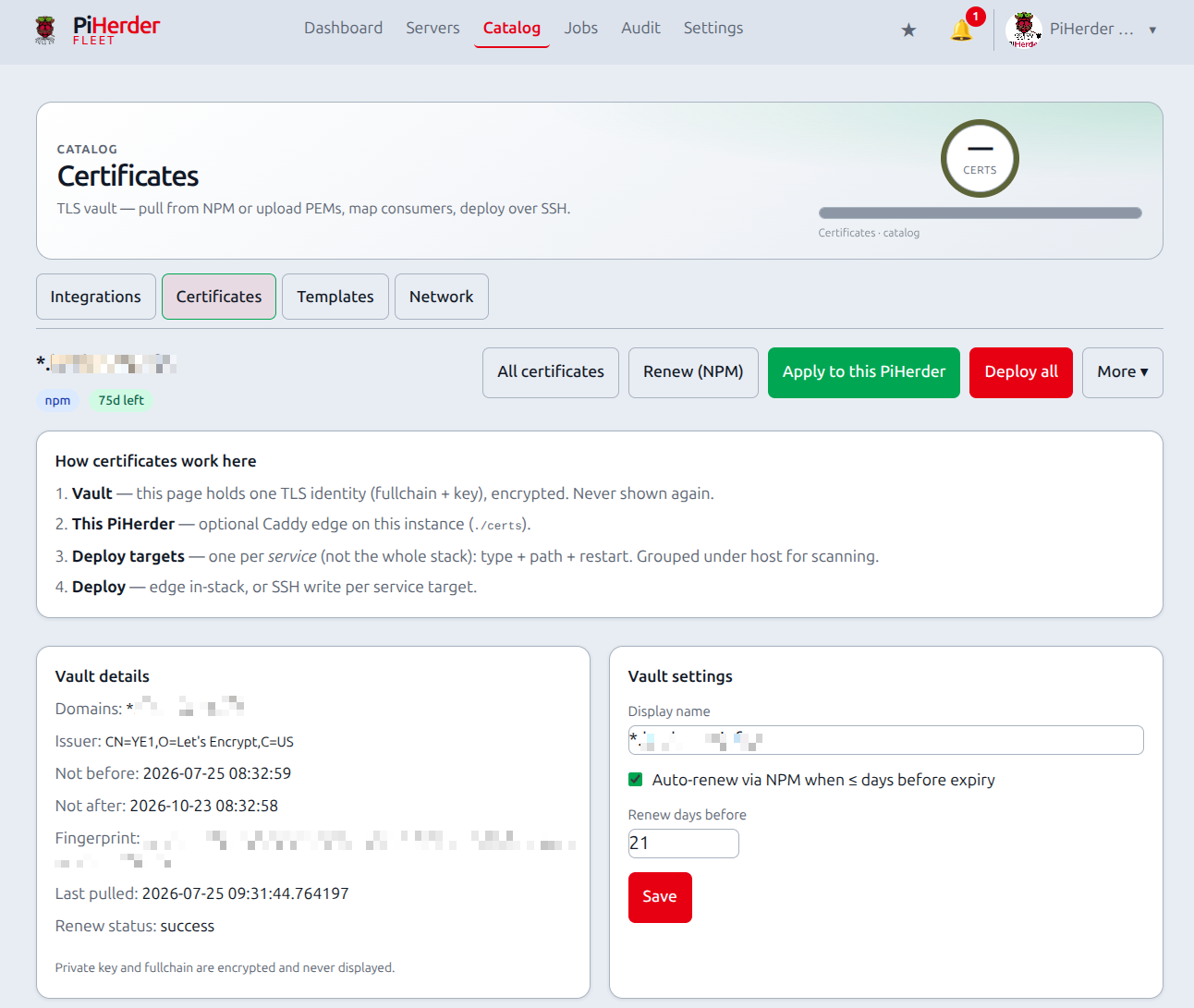
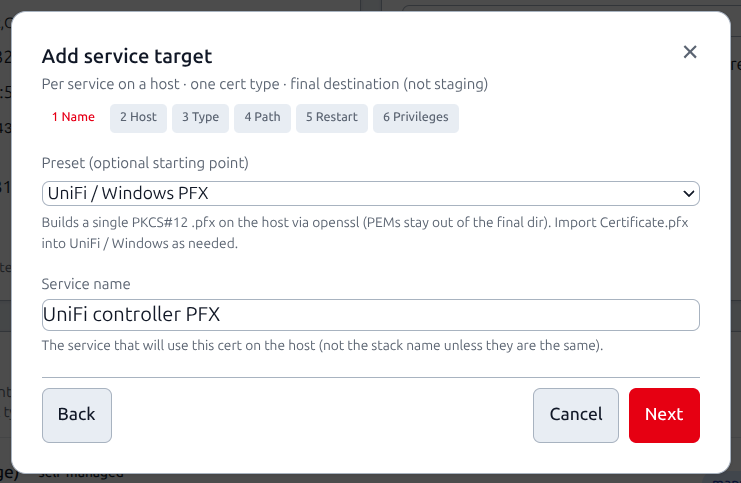
End-to-end: vault → host files
Guided path: Catalog → Certificates → First-cert setup (/certificates/setup).
- Get material in — NPM pull, Upload PEM, or obtain via ACME/Certbot then upload.
- Optional — this PiHerder (edge): Apply to this PiHerder writes Caddy’s
./certs(no SSH) and reloads Caddy. While mapping is on, NPM renew re-applies here with fleet deploys. Remove mapping stops renew re-apply (files undercerts/stay). - Fleet: open the cert → Add deploy target — guided wizard (name · server · optional service · cert type · destination · filenames · perms · restart · sudoers · Simulate · save).
- Deploy that target (or Deploy all) from the top bar or target modal.
- Verify — post-deploy host fingerprint (and optional TLS port probe) marks the target verified or failed.
- Confirm the app reloaded; enable auto-renew for NPM-sourced certs if desired.
Targets show in sync when the last deploy fingerprint matches the vault (redeploy is a no-op unless you force), or stale after vault material changes. Failed deploy/verify can open Notifications (auto-resolve on success).
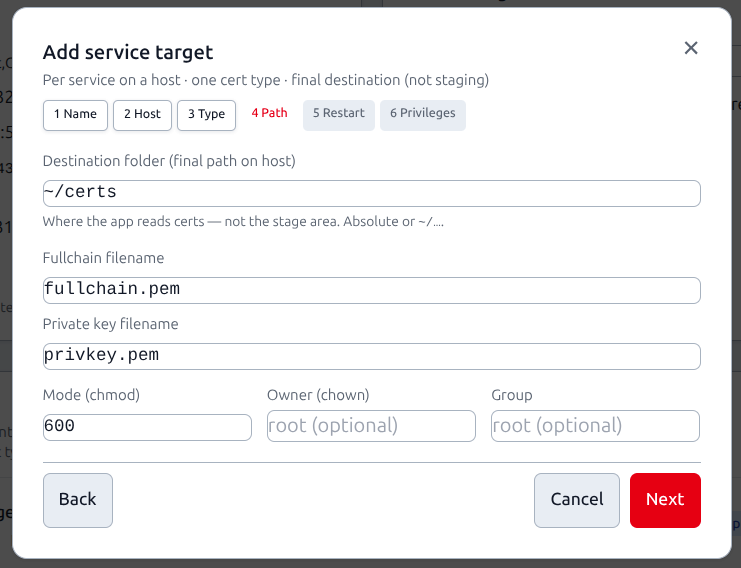
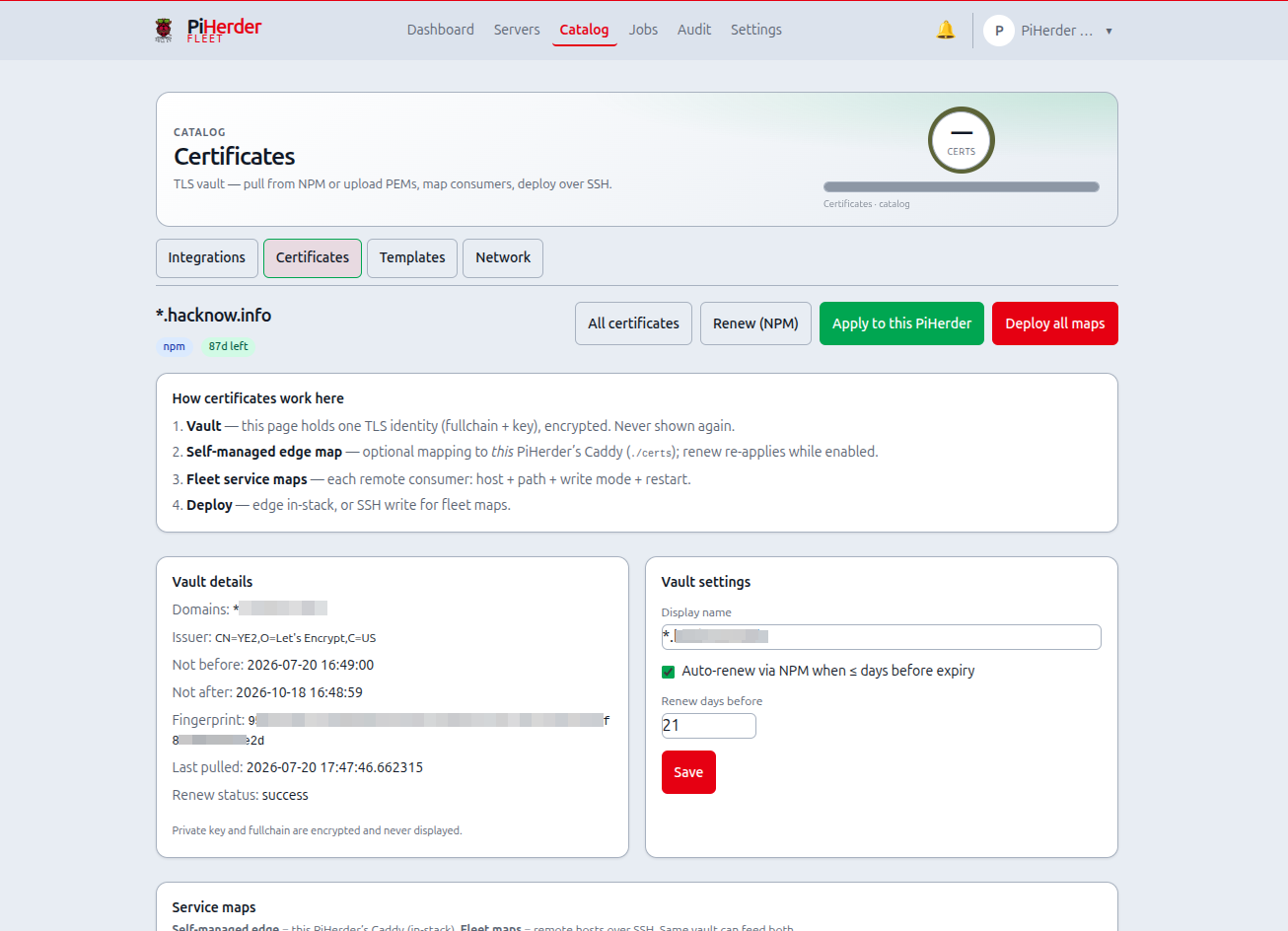
Write modes (fleet targets)
| Mode | When | How |
|---|---|---|
| Direct SFTP | SSH user owns the target directory (e.g. under ~/) | Write PEMs in place; optional chown |
| Stage + sudo install | Root-owned paths (/etc/ssl, Docker volume data dirs) | SFTP into ~/.piherder/cert-stage/<id>/, then sudo install for mkdir/mode/owner |
The wizard shows a suggested sudoers drop-in for stage_sudo (install only) and can Simulate remote sudo -n / write probes. Post-deploy restarts may need systemctl lines or membership in group docker — not free-form root shell.
Known edges (cert distribute)
Documented on First-cert setup and here so operators are not surprised. Sudoers are still operator-installed (copy drop-in); the wizard helps generate and simulate them.
| Edge | Detail |
|---|---|
| Home path | Snippet uses the selected server’s SSH user and default home (/home/<user> or absolute paths). Custom homes need correct absolute paths before visudo -cf. |
| Exact sudo match | After installing the drop-in, sudo -n install … must not prompt. Deploy errors are humanized (sudoers mismatch, permission, path). |
| Post-deploy | systemctl / docker compose need their own allow lines or group membership — the snippet only best-effort hints. |
| Write mode | Prefer Stage + sudo install for root-owned destinations; direct only when the SSH user owns the target directory. |
~/ expansion | Snippet expands ~/… remote dirs to absolute paths for sudoers matching. |
| One layout per new target | New targets choose pair, combined, or pfx only. Legacy compound layouts still deploy until edited. |
NPM Certificates tab lists certs as dense stacked cards (mobile-friendly), with Pull into PiHerder as plain button text (brand mark is not used inside solid primary buttons).
Mental model
| Piece | What it is |
|---|---|
| Vault | One certificate identity in PiHerder (domains, expiry, encrypted PEMs) |
| This PiHerder (edge) | Optional self-managed consumer on the herder host (Caddy ./certs) |
| Deploy target | One fleet consumer: host + directory + layout/filenames + mode/owner + restart + optional verify |
| Deploy | SSH write files → chmod/chown → run restart → optional fingerprint / TLS probe |
| Verify | Host openssl/marker fingerprint vs vault; optional TLS port probe |
Typical flow:
- Get material in — NPM → Certificates → Pull, or Upload PEM
- Add deploy targets — wizard per consumer (NPM volume, UniFi PFX path, Docker bind-mount, …)
- Deploy — per target or Deploy all; renew/auto-renew re-deploys after a successful NPM renew
PiHerder does not reconfigure the app’s TLS settings. Point the service at the files you wrote (or the volume that mounts them).
Two different TLS stories
- PiHerder’s own HTTPS (Caddy /
certs/on the herder host) → Trusted HTTPS & TLS - Fleet vault (this page) — distribute LE/NPM/upload PEMs to any SSH host (Docker not required)
Where to find it
Catalog → Certificates (/certificates) — same Catalog tabs as Integrations / Templates / Network.
List shows expiry chips, source (npm / upload), target count, host names, and deploy status. Certs with no targets get an Add deploy target shortcut; unmapped first certs can use First-cert setup.
Sources
- NPM pull — Catalog → Integrations → NPM → Certificates → Pull
- PEM upload — Catalog → Certificates → Upload PEM (cleartext paste; encrypted immediately; never shown again)
- Obtain PEMs yourself (ACME) — novice cookbook + optional Certbot helper: Obtain a certificate (ACME)
PiHerder vaults and deploys material; it does not yet issue ACME certs in-app. Use NPM or Certbot (script or CLI), then upload or pull.
Deploy targets
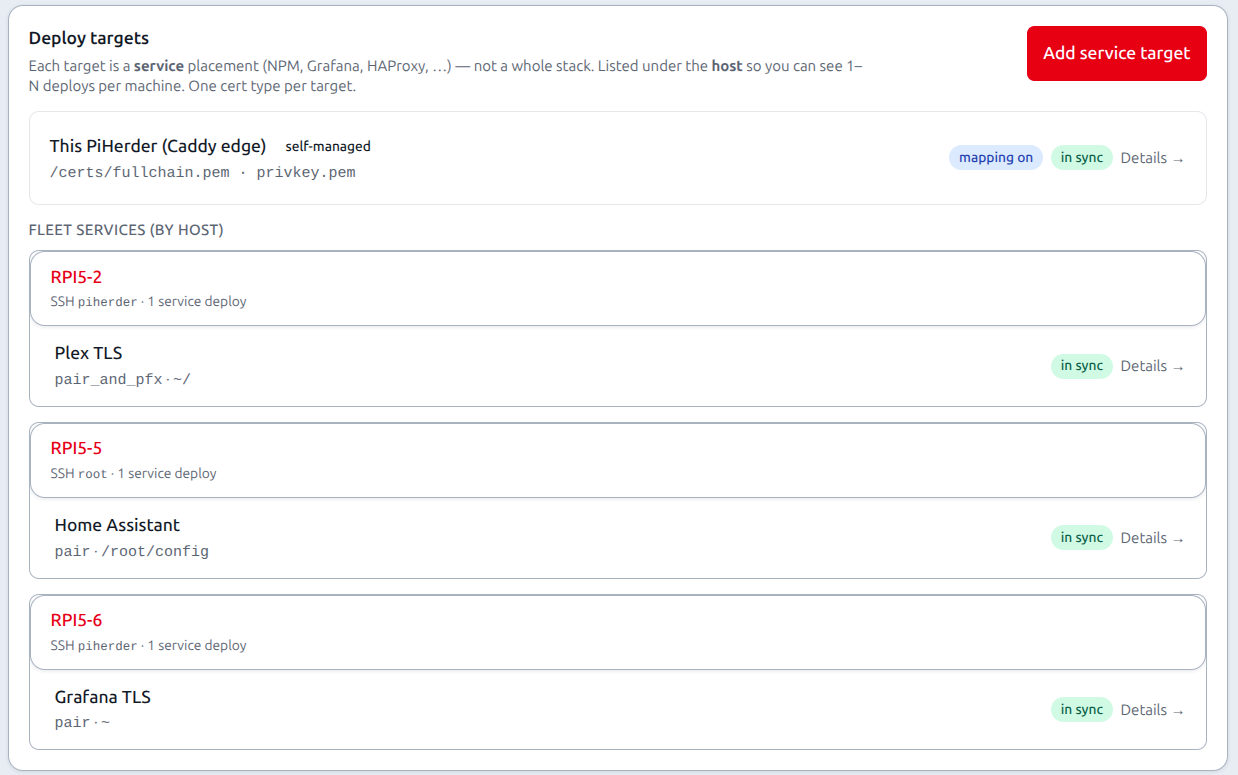
Each target answers: for this service, where and how should the cert land?
Targets are per service (not whole stack). The cert detail page groups targets under each host (1–N deploys per machine). List rows are compact — click opens a detail modal (Deploy · Edit · Remove · sudoers copy). Move a service clones matching targets onto dest (source row stays until leftover remove, which disables it).
| Field | Purpose |
|---|---|
| Label | Human name (“NPM custom SSL”, “UniFi”) |
| Host | PiHerder server (SSH) |
| Service (optional) | Linked fleet service when known |
| Directory | Final remote folder (~/certs or absolute) — staging is an implementation detail of stage+sudo |
| Layout / cert type | Which files to write (see below) |
| Filenames | Exact names the app expects |
| Mode / owner | chmod + optional chown |
| Post-deploy | Restart recipe → real shell command (compose / systemctl / custom) |
| Verify | Optional TLS host/port probe after deploy; host fingerprint always attempted when possible |
Layouts (new targets)
| Layout | Files written | When |
|---|---|---|
| pair | fullchain.pem + privkey.pem (defaults; rename as needed) | Nginx, Caddy, most Docker TLS mounts |
| combined | One PEM: private key then fullchain | HAProxy / some “snakeoil” apps |
| pfx | PKCS#12 via host openssl pkcs12 | Windows / UniFi-style |
Legacy compound layouts (pair_and_combined, pair_and_pfx, …) still deploy until edited; the wizard no longer offers them for new targets. Need both pair and PFX? → two deploy targets.
Wizard (modal)
On cert detail: Add deploy target opens a multi-step modal (name → server → type → destination → perms → restart → privileges / sudoers → Simulate → save). Replace PEM is under the page ⋮ menu (not a permanent page slab).
How deploy writes files
- SSH as the host’s configured user (
ssh_username, e.g.piherderoruser). - SFTP write into Directory (expand
~to that user’s home). chmod/ optionalchown(chown may usesudo).- Optional post-deploy shell command (also as that user; use
sudowhen needed).
Implication: writing straight into /etc/ssl/… usually fails for a least-priv user. Prefer a staging directory under the service user’s home, then sudo install / sudo cp in post-deploy into the system path.
Docker is not required. Hosts with only OS features (or none) still work as long as SSH + post-deploy sudo rules allow the install/restart.
Example: NPM custom cert on a Docker host
- Label:
NPM custom SSL - Directory:
/opt/stacks/npm/certs(bind-mounted into the container if needed) - Layout: pair →
fullchain.pem,privkey.pem - Mode:
600, ownerroot:root - Post-deploy:
docker compose -f /opt/stacks/npm/docker-compose.yml restart
Then configure NPM (or the proxy) to use those files.
Cookbook: OctoPi / HAProxy host (no Docker, least-priv piherder)
Use when a host runs OctoPrint / OctoPi (or similar) with HAProxy TLS and stock /etc/ssl/snakeoil.pem, and the PiHerder SSH user is the dedicated piherder account (not full-sudo user).
Combined layout builds one PEM (private key, then fullchain) — same idea as OctoPi’s snakeoil file.
1. One-time host prep (as root or a full-sudo admin)
Stock least-priv sudoers does not allow writing under /etc/ssl or restarting HAProxy. Add a tight drop-in:
# Paths assume service user piherder and staging dir below
cat <<'EOF' | sudo tee /etc/sudoers.d/piherder-certs
# PiHerder cert deploy — OctoPi HAProxy (review before install)
piherder ALL=(root) NOPASSWD: /usr/bin/install -o root -g root -m 644 /home/piherder/certs/snakeoil.pem /etc/ssl/snakeoil.pem
piherder ALL=(root) NOPASSWD: /bin/systemctl restart haproxy, /usr/bin/systemctl restart haproxy
EOF
sudo chmod 440 /etc/sudoers.d/piherder-certs
sudo visudo -cf /etc/sudoers.d/piherder-certs

sudo -u piherder mkdir -p /home/piherder/certs
Verify non-interactive sudo (must not prompt for a password):
sudo -u piherder -H bash -lc 'sudo -n true && echo sudo-ok'
# After a file exists at staging path, also:
# sudo -u piherder -H bash -lc 'sudo -n install -o root -g root -m 644 /home/piherder/certs/snakeoil.pem /etc/ssl/snakeoil.pem'
# sudo -u piherder -H bash -lc 'sudo -n systemctl restart haproxy'
Optional: backup the current system cert before first deploy:
2. PiHerder server row
| Setting | Value |
|---|---|
| SSH user | piherder |
| Key auth | Test connection succeeds |
| Docker feature | Off is fine |
3. Deploy target (Catalog → Certificates → cert detail → Add deploy target)
| Field | Value |
|---|---|
| Label | OctoPi HAProxy |
| Host | your OctoPi server (e.g. 3dprint) |
| Directory | /home/piherder/certs |
| Layout | combined |
| Combined filename | snakeoil.pem |
| Mode | 600 |
| Owner / group | leave empty |
| Post-deploy | (command below) |
Post-deploy command (paste as one line):
sudo install -o root -g root -m 644 /home/piherder/certs/snakeoil.pem /etc/ssl/snakeoil.pem && sudo systemctl restart haproxy
4. Deploy and check
- Save the target → Deploy (or Deploy all). Optionally Verify.
- On the host:
- Browser:
https://3dprint.example.com(or the FQDN that matches the cert SANs).
Using a full-sudo user (user) instead
Same target, but Directory can still be staging under that user’s home (/home/user/certs) and post-deploy uses the same sudo install … && sudo systemctl restart haproxy pattern. Full sudo means you may not need a separate piherder-certs drop-in — still prefer not relying on interactive password prompts (sudo -n must work for automation).
Wizard presets
The deploy target wizard can prefill common patterns (compose restart, systemctl, stage+sudo). Paths and post-deploy commands are starting points — edit for your host and sudoers. Prefer Simulate before the first real deploy.
Cookbook: Grafana TLS into a Docker named volume
Use when Grafana expects PEMs inside its data volume, e.g. in-container:
(host path often /var/lib/docker/volumes/grafana_grafana_data/_data/…).
Why Grafana crashed after a “successful” deploy
Official grafana/grafana runs as UID 472. Installing PEMs as root:root mode 600 makes them unreadable:
→ crash loop (Restarting (1)). Deploy “success” only means SSH + commands exited 0, not that Grafana can read the files.
Fix on a broken host (SSH user in docker group):
docker run --rm -v grafana_grafana_data:/data alpine:3.20 \
  sh -c 'chown 472:0 /data/fullchain.pem /data/privkey.pem && \
         chmod 644 /data/fullchain.pem && chmod 600 /data/privkey.pem'
cd /home/user/docker/grafana && docker compose restart grafana   # adjust path
Deploy target (recommended — no sudo)
| Field | Value |
|---|---|
| Label | Grafana TLS |
| Host | Grafana host |
| Directory | ~ (home of SSH user, e.g. /home/piherder) |
| Layout | pair |
| Write mode | Direct SFTP |
| Filenames | fullchain.pem / privkey.pem |
| Mode | 600 on staging only |
| Owner | leave empty |
| Post-deploy | (command below) |
docker run --rm \
  -v grafana_grafana_data:/data \
  -v /home/piherder:/src:ro \
  alpine:3.20 \
  sh -c 'cp /src/fullchain.pem /src/privkey.pem /data/ && \
         chown 472:0 /data/fullchain.pem /data/privkey.pem && \
         chmod 644 /data/fullchain.pem && chmod 600 /data/privkey.pem' && \
cd /home/user/docker/grafana && docker compose restart grafana
Adjust:
/home/piherderif the SSH user differsgrafana_grafana_data(docker volume ls \| grep -i grafana)- compose project path (
/home/user/docker/grafanaon this lab host)
SSH user needs the docker group (not root for volume path).
Avoid
# BAD for Grafana — process cannot read the certs
sudo install -o root -g root -m 600 … /var/lib/docker/volumes/…/_data/
If you insist on sudo install into the volume, use -o 472 -g 0 (not root) and matching sudoers; the docker-copy method above is simpler when Docker feature is on.
One-time host notes
- Volume name —
docker volume ls | grep -i grafana - Grafana config —
cert_file/cert_keyunder/var/lib/grafana/…if that is the volume mount. PiHerder does not editgrafana.ini. - Fingerprint sidecar — may appear under home (
~/.piherder-cert-fp); harmless.
Deploy and check
- Save map → Deploy.
- On the host:
sudo ls -l /var/lib/docker/volumes/grafana_grafana_data/_data/*.pem
cd ~/docker/grafana && docker compose ps
- Hit Grafana over HTTPS with a cert SAN that matches the hostname.
Troubleshooting: deploy / post-deploy
Post-deploy sudo denied
Symptom in PiHerder: deploy_failed — post deploy failed: sudo: I'm sorry piherder. I'm afraid I can't do that (any SSH user name in the message).
Meaning: SSH and the SFTP write usually succeeded (staging PEMs under the user’s home). The post-deploy shell ran sudo … and sudoers denied it. This is a host permission issue, not a PiHerder vault bug. Stock least-priv only grants backup/rsync (and optional apt/docker) — not /etc/ssl or /var/lib/docker/volumes/….
Fix:
- Confirm staging files exist after deploy (example user
piherder):
ls -l /home/piherder/fullchain.pem /home/piherder/privkey.pem
# or OctoPi:
# ls -l /home/piherder/certs/snakeoil.pem
-
Install a NOPASSWD drop-in whose command line exactly matches post-deploy (sudo is strict about args). Examples above: OctoPi, Grafana volume.
-
Validate and dry-run non-interactively (
-nmust not ask for a password):
sudo visudo -cf /etc/sudoers.d/piherder-grafana-certs   # or piherder-certs
sudo -u piherder -H bash -lc '
  sudo -n install -o root -g root -m 600 \
    /home/piherder/fullchain.pem /home/piherder/privkey.pem \
    /var/lib/docker/volumes/grafana_grafana_data/_data/ && echo install-ok
'
- Still “can’t do that” / password prompt → path, flags, or volume name still mismatch sudoers.
install-okbutdocker composefails → add user todockergroup (or a sudo rule for compose), then new SSH session.-
Both OK → re-Deploy the map in PiHerder (use force / deploy all if fingerprint skip leaves an old status).
-
Prefer absolute paths in both the map’s post-deploy and sudoers (
/home/piherder/…), not only~/….
Other common failures
| Symptom | Likely cause |
|---|---|
mkdir failed / write error under /etc/ssl or /var/lib/docker | Directory is not writable by SSH user — stage under home, install in post-deploy |
Post-deploy fails only on docker compose | Not in docker group; passwordless sudo only fixed the install half |
skip — already deployed same fingerprint | Success earlier; change cert or force redeploy |
| Renew OK but maps stale | Upload-sourced certs do not auto-renew; NPM-sourced need auto-renew + maps enabled |
Auto-renew
Every 6 hours: NPM-sourced certs with auto-renew and expiry within the window → renew orchestration → deploy all enabled maps. Failures raise notifications (cert_expiring, cert_renew_failed).
Herder self-backup
Certificate rows and maps are included. Restore requires the same master key.
Security notes
- Prefer
600mode and a dedicated remote directory - Post-deploy commands are operator-supplied and audited — treat like any remote shell privilege
- Least-priv
piherderneeds explicit sudoers for system paths / Docker volumes; full-sudo users still needsudo -n(no TTY password) - PFX export uses host
openssl pkcs12(empty or stored export password) - Removing a map does not delete files already on the host