Move a service
Availability
Move a service shipped in v1.4.0 (pipeline + lock). v1.5.0 runs the job on the Celery worker (same as backups) — recycle web mid-Move is safe; recycle celery-worker fails it. PIHERDER_SERVICE_MIGRATE defaults on (set false to turn Move off). Host lock / unlock has no flag. Source remove + named-volume delete is optional and off unless you pick it. A finished Move has no Undo. Public demo never copies. User notes: RELEASE_v1.5.0. Technical: PLAN_v1.5.0.
What this is
Move one Docker Compose project (same boundary as Stop all / Start all) from fleet host A to host B as one audited Job: lock hardware-bound stacks, preflight dest, stop source, copy dataset via the herder, start dest, retarget DNS or the NPM proxy backend, validate TLS/Kuma when those rows exist, rebind maps / templates / Kuma / Grafana container chips, then leftover policy.
PiHerder stays SSH-first. The herder is the staging hop (/backups/_migrate/{job_id}) — not a new host-to-host trust mesh.
Why it exists
Operators already stop a stack, rsync trees, retarget a CNAME, restart Pi-hole, and start on another Pi. Those steps were never one Job with a preview of paths, bytes, and dest free space.
Turn Move off
Move is on when PIHERDER_SERVICE_MIGRATE is unset. To hide it:
- Set
PIHERDER_SERVICE_MIGRATE=falsein.env. - Recreate web (
docker compose up -d web).
Operator+ only. Viewer 403. Demo never opens the wizard. The same flag gates the Home Assistant card, POST /api/v1/servers/{id}/moves, and hosted /mcp start_move (confirm: true, leftover stopped). Health field service_migrate. POST /jobs with service_migrate is refused. trigger_job does not start a Move. There is no MCP undo. The card does not offer Undo or source remove. Adapter 0.4.4 lists start_move. Adapter 0.3.1 does not.
Lock / unlock does not need this flag.
Lock to this host (always on)
Operator+ only.
- Open Docker on the source host.
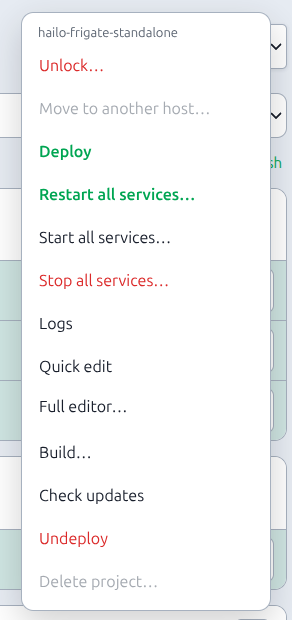
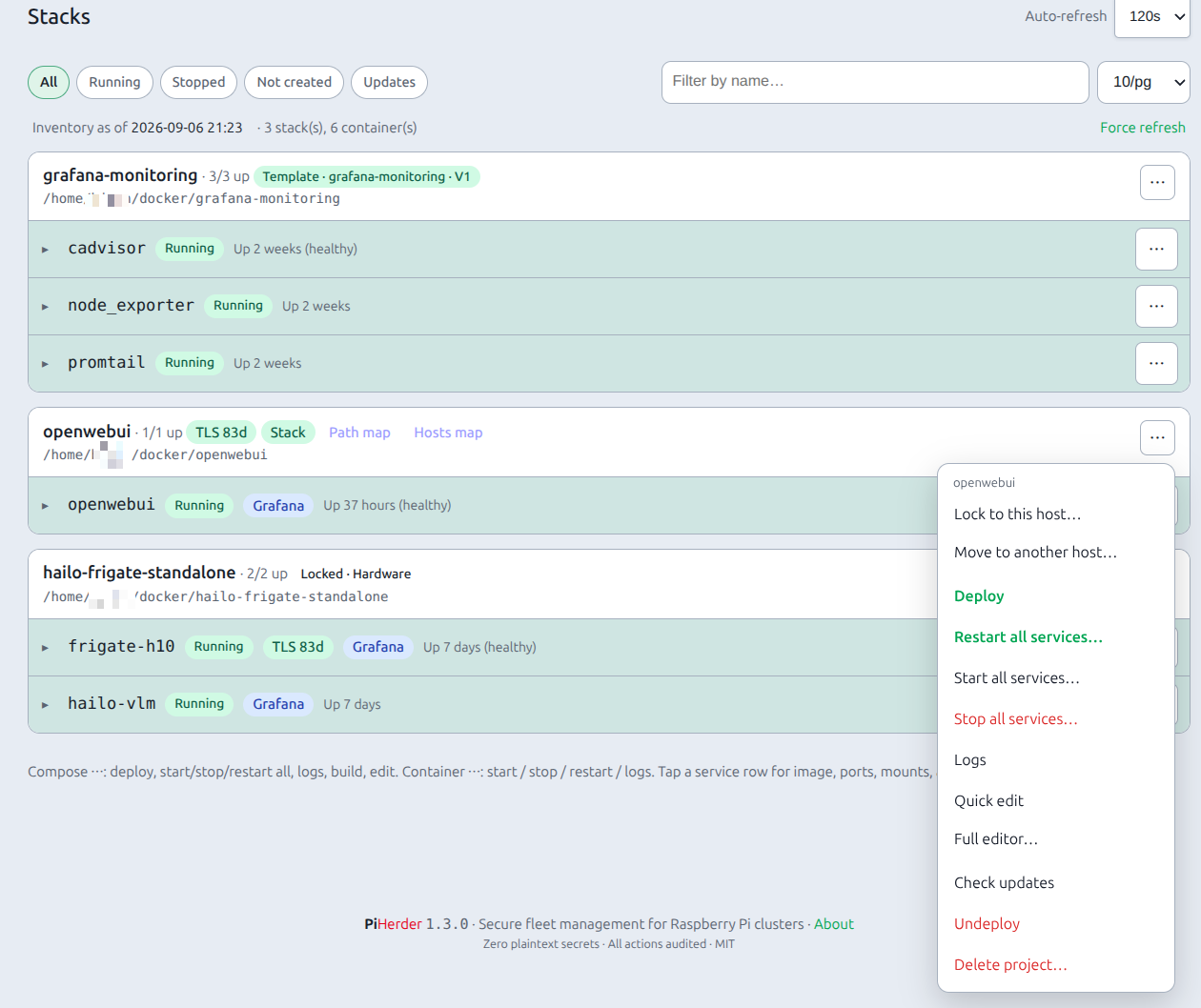
- Project ⋯ → Lock to this host…
- Pick a reason: Hardware (TPU / USB / Coral), Operator, or Infrastructure. Optional note (e.g.
Coral TPU on USB). - A Locked badge appears on the project and on the runtime stack panel. Move is disabled with the reason.
- Unlock… is a confirm.
HAOS hosts are always locked — they never appear as a migrate source or destination. You cannot lock/unlock individual HAOS “projects”; the host os_type is enough.
Audit: service_host_lock / service_host_unlock (project, reason, note — not secret bodies).
Use lock for Frigate + Coral, USB gadgets, or anything you must not relocate by accident.
Move wizard
- Unlock the project if it is locked.
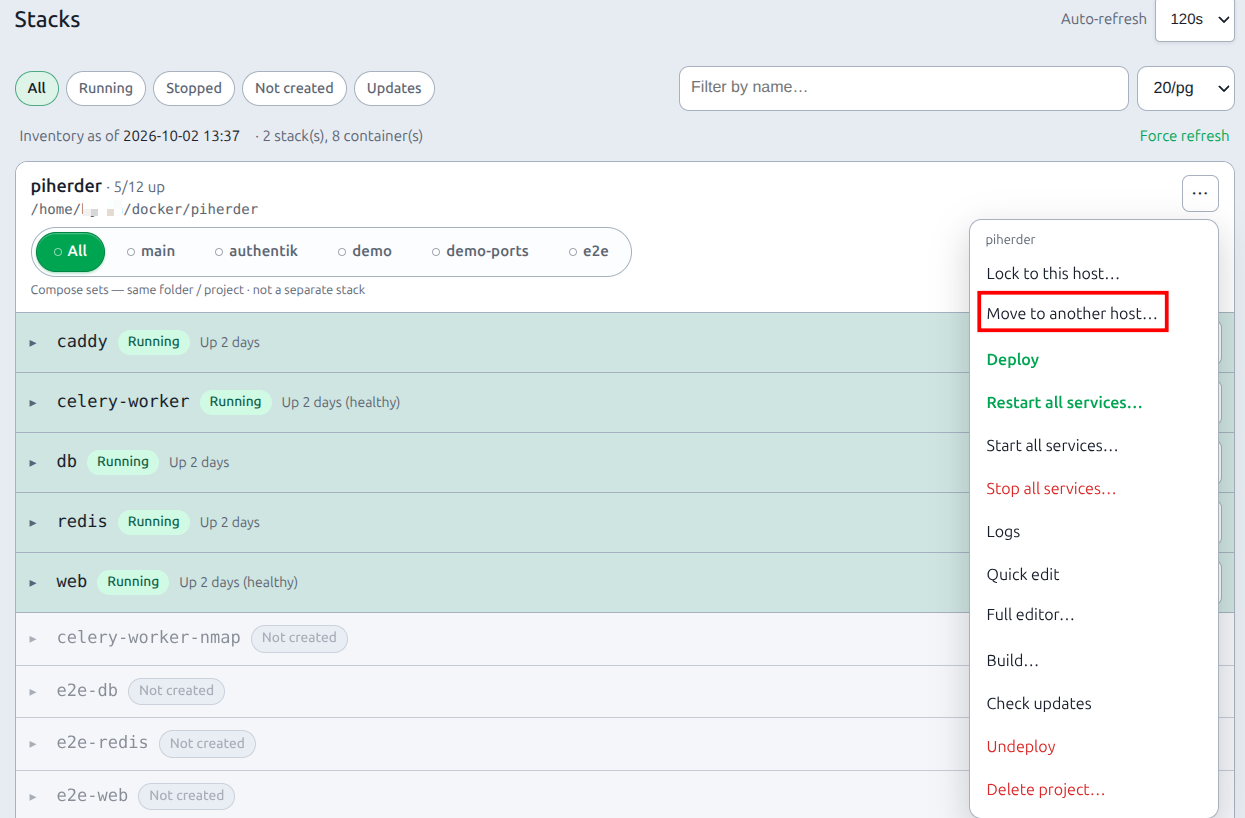
- ⋯ → Move to another host…
- Pick a destination (other hosts with Docker / containers on; HAOS and the source are excluded). A wait modal runs for dest pick, port change, and Recheck (SSH probe).
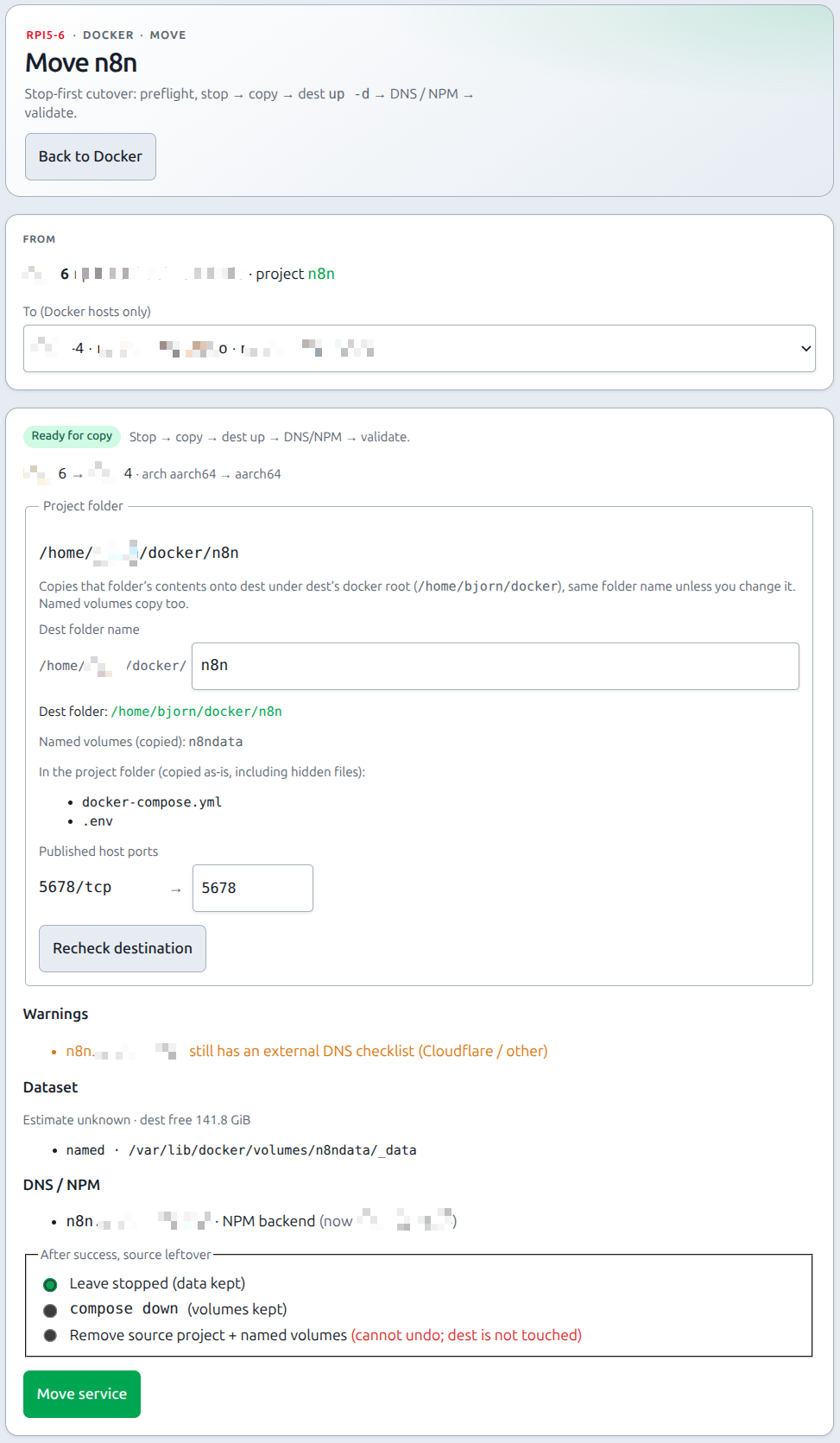
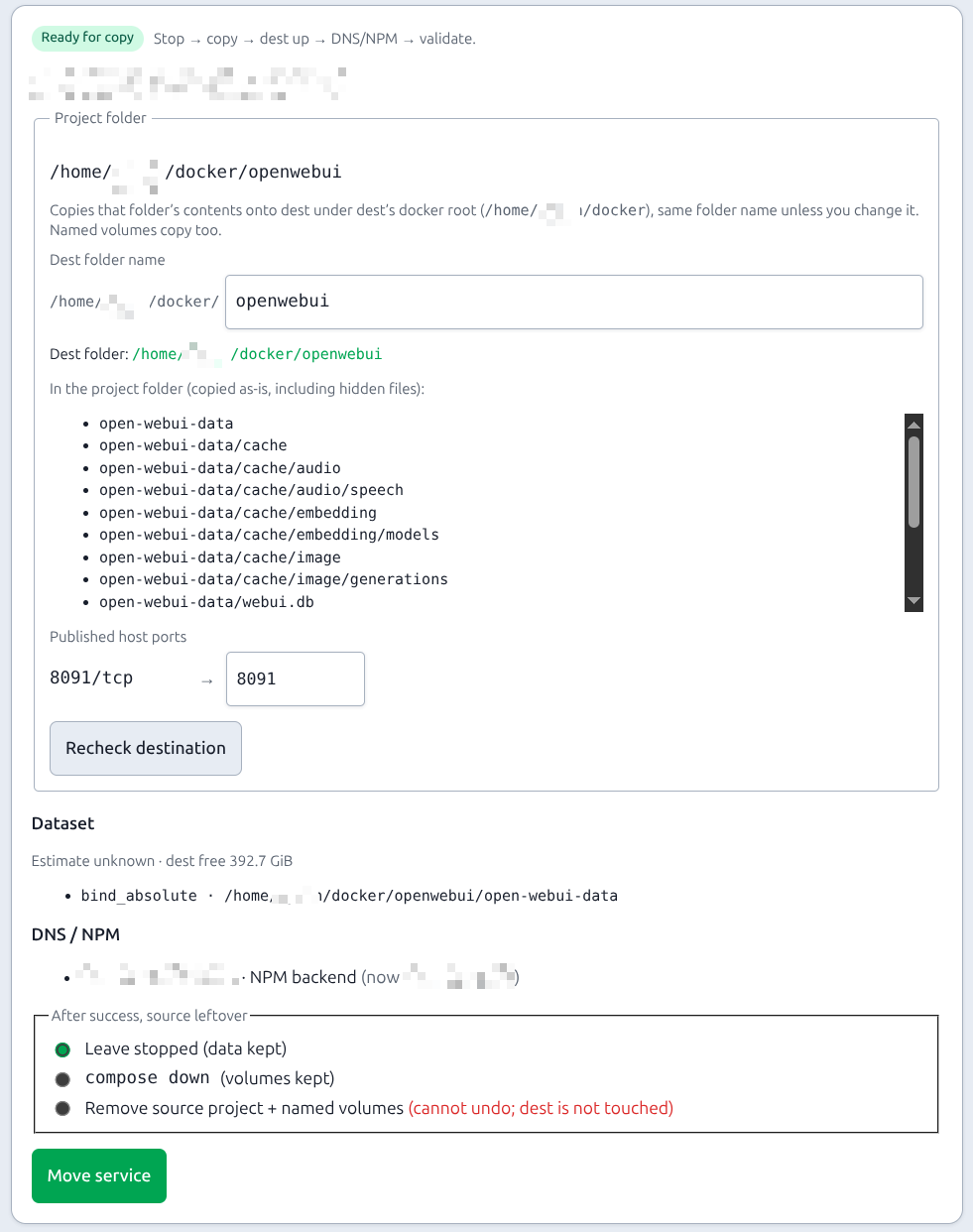
- Preflight lists blocks (hard stop) and warnings. Dataset lists paths, kinds, byte estimate, dest free space.
- Project folder is dest docker root + the same folder name (
/home/user/docker/test→/home/user/docker/test). Change Dest folder name only if you wanttest2. Named volumes copy with the project. Extra host binds (paths outside the project folder) are a separate list — not the project itself. - If the stack looks hardware-bound (
/dev/…), tick the acknowledge checkbox (or lock it instead). - If preflight lists NPM names with no fabric DNS row, optional Adopt into fabric (default off) — see below.
- Choose leftover (see below). Default is leave source stopped.
- Move service — danger confirm (downtime). Remove source also requires the extra checkbox and a stronger confirm.
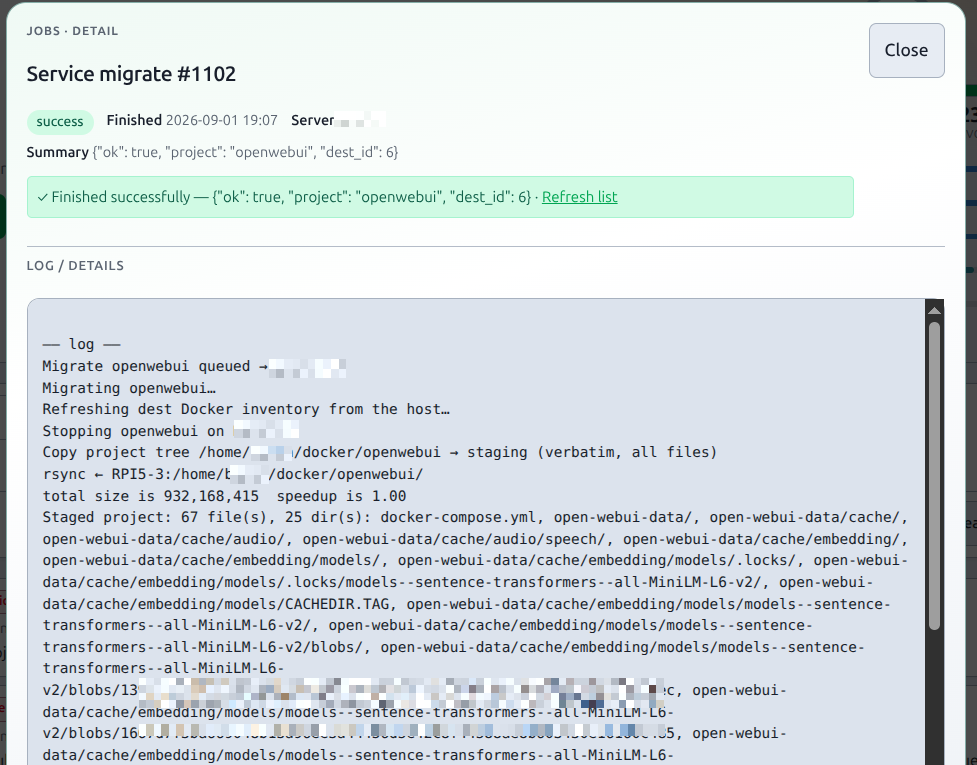
- JobHold live log stays open with Succeeded or Failed until you Close (does not vanish). Job type
service_migrate.Job.server_idis the source; dest is in job details. Copy / dest-up fail offers Start source stack. A failure at cutover, rebind, or validate offers Undo move (preview, then confirm): dest iscompose stopfirst (notdown -v), then DNS/NPM and control-plane rows go back to the source, then source iscompose start. A stop failure leaves names on dest. If names have not moved and a later step fails, dest is started again. A retry skips steps that already committed. The dest directory and volumes stay. A successful Move has no Undo — run a new Move the other way. After Undo itself succeeds, Undo move is hidden on that failed job. A failed Undo can be retried. The job runs on the Celery worker (same as backups). Recreating web mid-Move is safe. Recreating celery-worker (orcompose restart celery-worker) fails a running Move — staging stays under/backups/_migrate/{job_id}. Start source stack is offered when the death was during stop or copy. A death during dest up offers Inspect destination, then stop dest and start source, and does not change DNS or NPM.
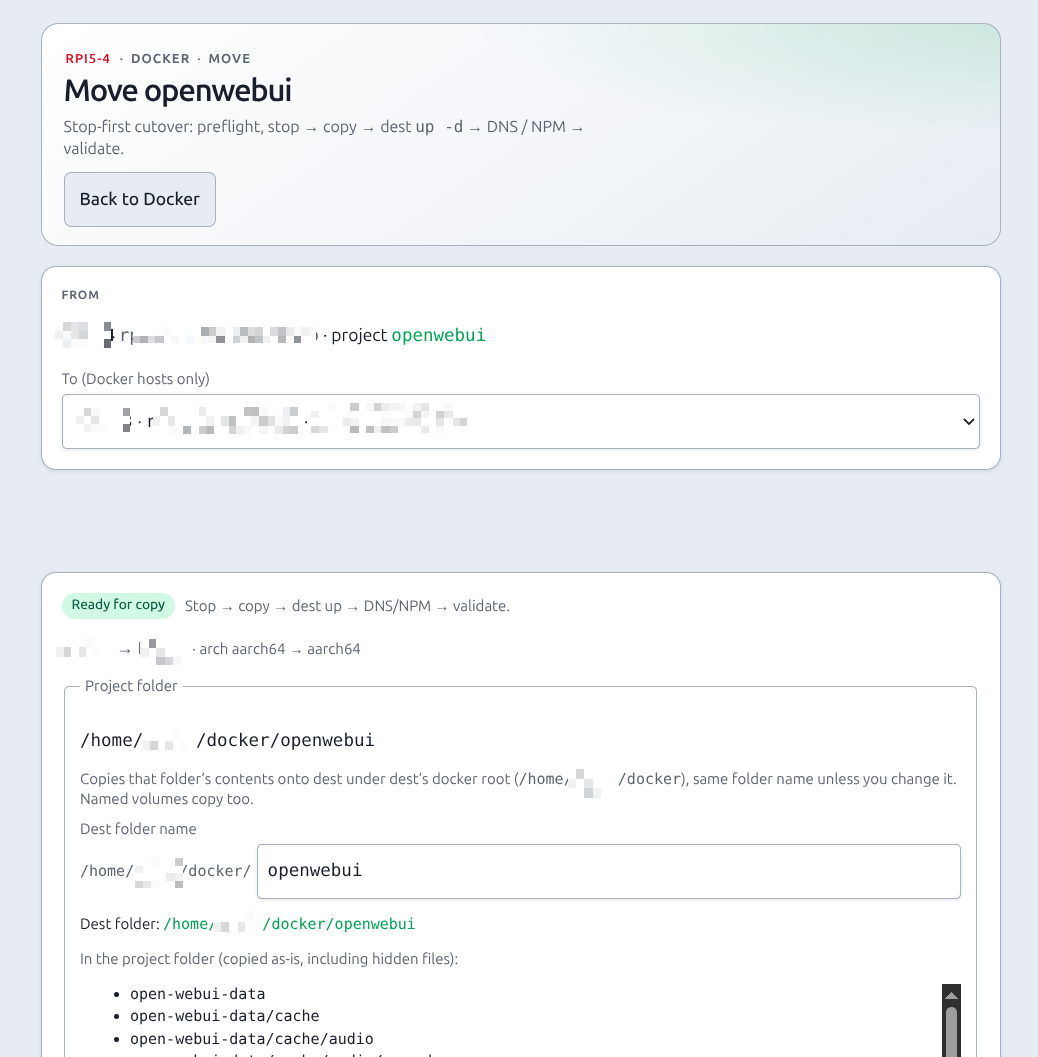
Audit on open: service_migrate_preview.
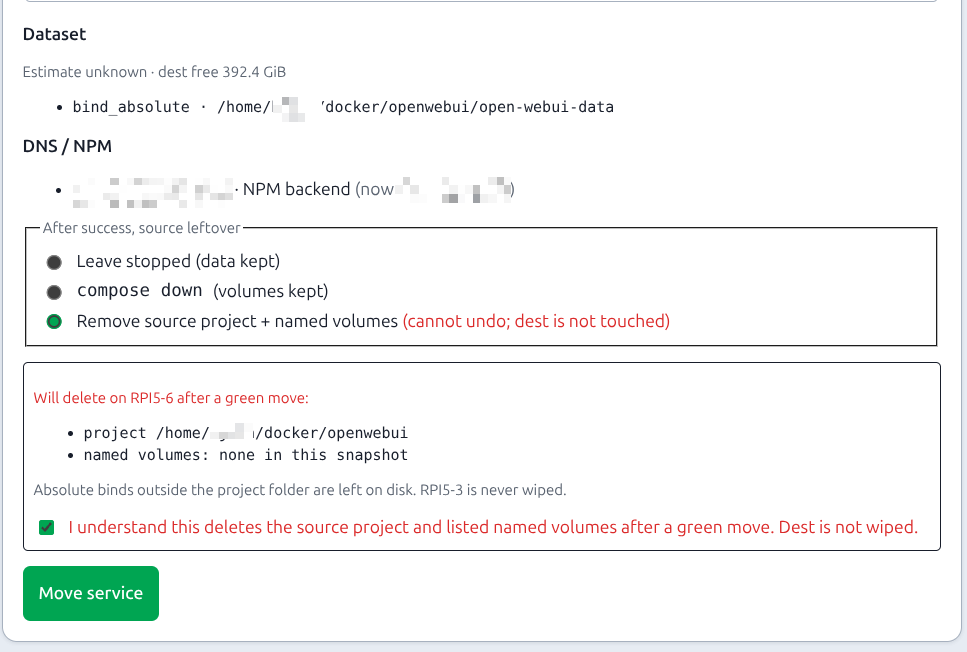
The green JobHold figure above stays the success shot.
Pipeline (default)
preflight
  → compose stop (source)
  → rsync project + binds + named volumes → herder staging → dest
  → compose up -d (dest)
  → DNS CNAME → dest  or  NPM PUT forward_host → dest
  → rebind maps / Kuma / Grafana container chips / templates / clone cert targets
  → TLS (SNI = service FQDN) + Kuma last_state when rows exist
  → leftover
  → wipe staging (success) / keep staging (failure)
Default order is dest up, then name/proxy flip (clients keep hitting the stopped source until dest answers). The project folder is a verbatim rsync of every file and directory (including .env) onto dest docker root + folder name, then chown to whoever owns dest docker root (/home/user/docker → user, not fleet SSH piherder and not root:root). A ~/… bind (inspect /home/piherder/open-webui-data) is folded into that dest project as ./open-webui-data and compose is rewritten. Host ports only if remapped (does not apply with network_mode: host). Named volumes = Mountpoint rsync. Host sockets (/var/run/docker.sock) stay as dest-host binds. They are not rsync’d.
Direct TLS rows (via_proxy off): CNAME → dest DNS name, then both Pi-holes Restart DNS. NPM-fronted rows: public CNAME stays on NPM; the job PUTs forward_host (and forward_port only if you remapped that published host port). An NPM proxy-host binding for the compose project is enough. A fabric DNS row is not required (e.g. app.example.com → Open WebUI). Optional Adopt into fabric (default off) adds those NPM names as via_proxy rows so they show on the DNS list; it does not create certs or rewrite Pi-hole CNAMEs. Preflight still uses the NPM poll cache; unmatched hosts are a block. Poll NPM before moving.
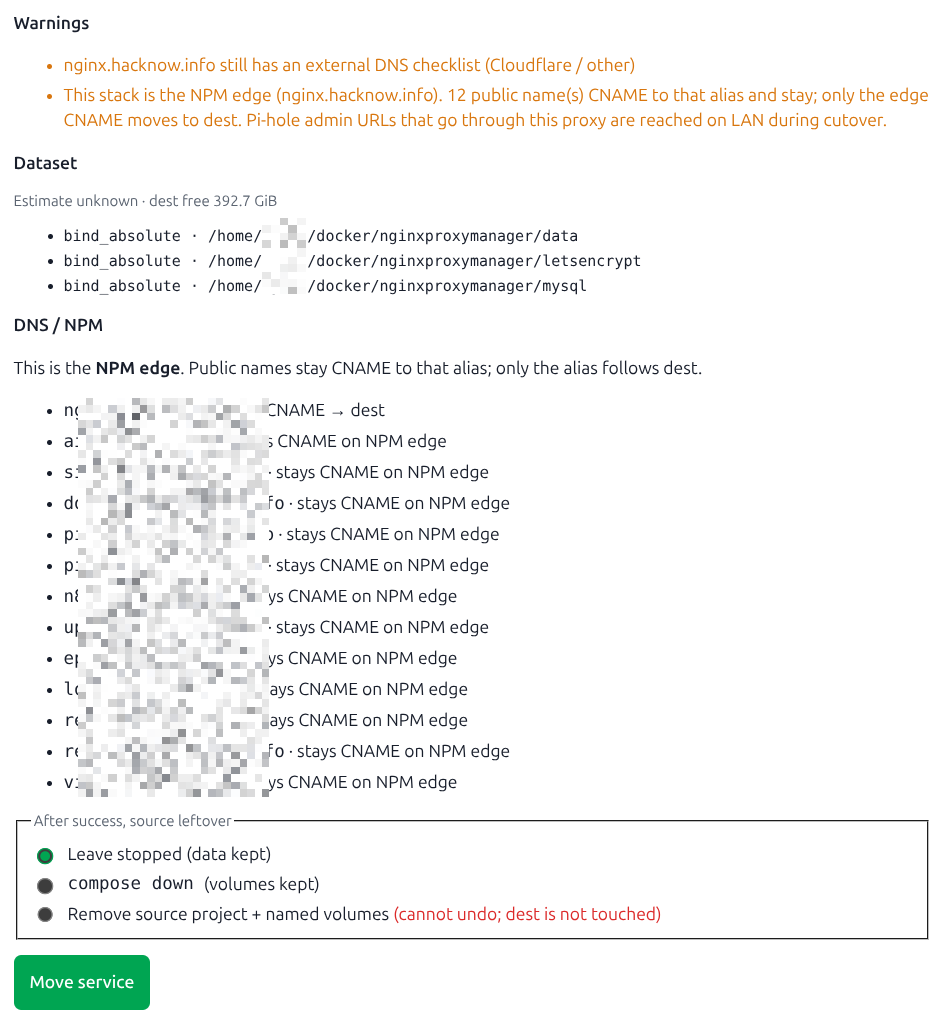
Moving the NPM edge itself (the compose project whose public name is the NPM base URL, e.g. edge.example.com): every proxied service stays CNAME → that alias. Only the alias is rewritten to dest (edge.example.com → dest host DNS name). The job does not rewrite app.example.com onto dest. Pi-hole admin URLs that go through this proxy are reached on the LAN backend from the last NPM poll (forward_host:forward_port) so cutover is not stuck on a dead edge FQDN. A retry after a failed DNS sync still retargets the alias (fabric may already show dest).
Dual-host exclusive
A migrate and a backup or stack-mutating job cannot run at the same time on the source or dest. Second start → 409. Same lane as Stop all / Deploy / template deploy, plus backup.
Blocks (cannot move yet)
| Check | Typical cause |
|---|---|
| Source / dest is HAOS | Appliance, not a compose suitcase |
| Project locked | Unlock, or keep it on this host |
| Dest Docker off | Enable Docker / containers on dest |
| Same host | Pick a different Pi |
| Dest already has that project name | Recheck SSHs dest. Block only if dest has running containers for that name. A leftover dest folder / created containers from a failed Move is a warning — Move overwrites the folder and removes those ghosts |
| Could not SSH dest | Recheck could not see dest live. Cached dest inventory is not used. Fix SSH, Recheck |
| Arch mismatch | uname -m differs (e.g. aarch64 vs x86_64) — rebuild images yourself |
| Dest docker base not writable | Fleet SSH user cannot write docker_base_dir |
| Dest / herder disk | Free space below payload + margin (512 MiB or 15%) |
| Absolute bind outside docker base | Default dest path is inside the dest project folder (./basename). Override only if you want another path, or skip copy. Host sockets/devices (docker.sock, /dev/…) are not copied — dest binds dest’s own path |
Inventory mount path truncated (…) | docker ps ellipsis, not a real directory — Move inspects containers for full Source. Refresh Docker on source if it still blocks |
| Published port clash | Dest is currently listening on that host port (ss + docker). Remap dest host port. Ghost leftover dest-project ports are ignored. Host network stacks cannot remap — dest must have the same port free |
| Busy job | Backup or stack mutate running on source or dest |
| Direct DNS, dest has no DNS name | Set dest DNS name for CNAME retarget |
via_proxy and no NPM | Enable an NPM integration |
| NPM proxy host unmatched | FQDN not in last NPM poll — poll NPM, or the proxy host is missing |
Warnings (informational)
| Check | Meaning |
|---|---|
| Leftover dest compose containers | Failed previous Move left created/exited containers. Move removes them before dest up |
| Dest folder not empty | No running dest stack — Move overwrites that folder (rsync --delete) |
/dev/… mounts | Hardware-looking binds (TPU / USB) — lock the project if it must stay |
| Host network / privileged | Dest binds the same host ports; wizard remap does not apply. Tick the acknowledge checkbox (or lock instead) |
Host socket (docker.sock) | Not a folder — dest uses dest’s /var/run/docker.sock (Uptime Kuma Docker monitor) |
| External DNS checklist | Cloudflare / other still on the fabric row |
| Kuma looks IP-based | Monitor hostname will not be rewritten (no Kuma write API) |
| Arch / disk / writable unknown | SSH probe failed — refresh connectivity and retry |
| NPM edge | This project is the reverse proxy. Public names CNAME to its alias and stay; only the alias follows dest |
| NPM proxy-host binding (no fabric row) | Move will still PUT forward_host. Optional Adopt into fabric adds a via_proxy DNS row (no cert, no Pi-hole rewrite) |
Source leftover
After a green move only:
| Choice | What happens on the source host | Dest |
|---|---|---|
| Leave stopped (default) | Stack stays stopped; project dir and volumes stay on disk | Untouched |
compose down | Containers/networks removed; volumes kept | Untouched |
| Remove source | compose down, then docker volume rm for copied named volumes, then delete the jailed project directory | Never wiped |
Remove is a second danger confirm plus checkbox. Preflight lists the project path and named volume names. Absolute binds outside the project folder are left on disk. Source cert deploy targets for that stack are disabled (dest clone stays). This cannot be undone from PiHerder — restore from backup if you still need the old copy.
After a green move (check)
- Dest Docker inventory shows the project running.
- Direct: CNAME target is dest
dns_name; both Pi-holes restarted. - NPM-fronted: public name still on NPM; proxy-host
forward_hostis dest. A fabric DNS row is not required if an NPM proxy-host binding exists for the project. - If you ticked Adopt into fabric: those NPM names appear on the DNS list as
via_proxy(backend = dest). Pi-hole CNAMEs are unchanged. - NPM edge move:
nginx…(or whatever the NPM hostname is) CNAME → dest host;ai…/ other proxied names still CNAME to that alias. - Maps / stack panel / template deployment / Kuma service bind / Grafana container dashboard chips follow dest. Host metrics/logs Grafana chips stay.
- TLS probe used SNI = service FQDN when a cert is linked.
- Source leftover matches what you picked.
- Staging dir under
/backups/_migrate/{job_id}is gone on success.
Failure
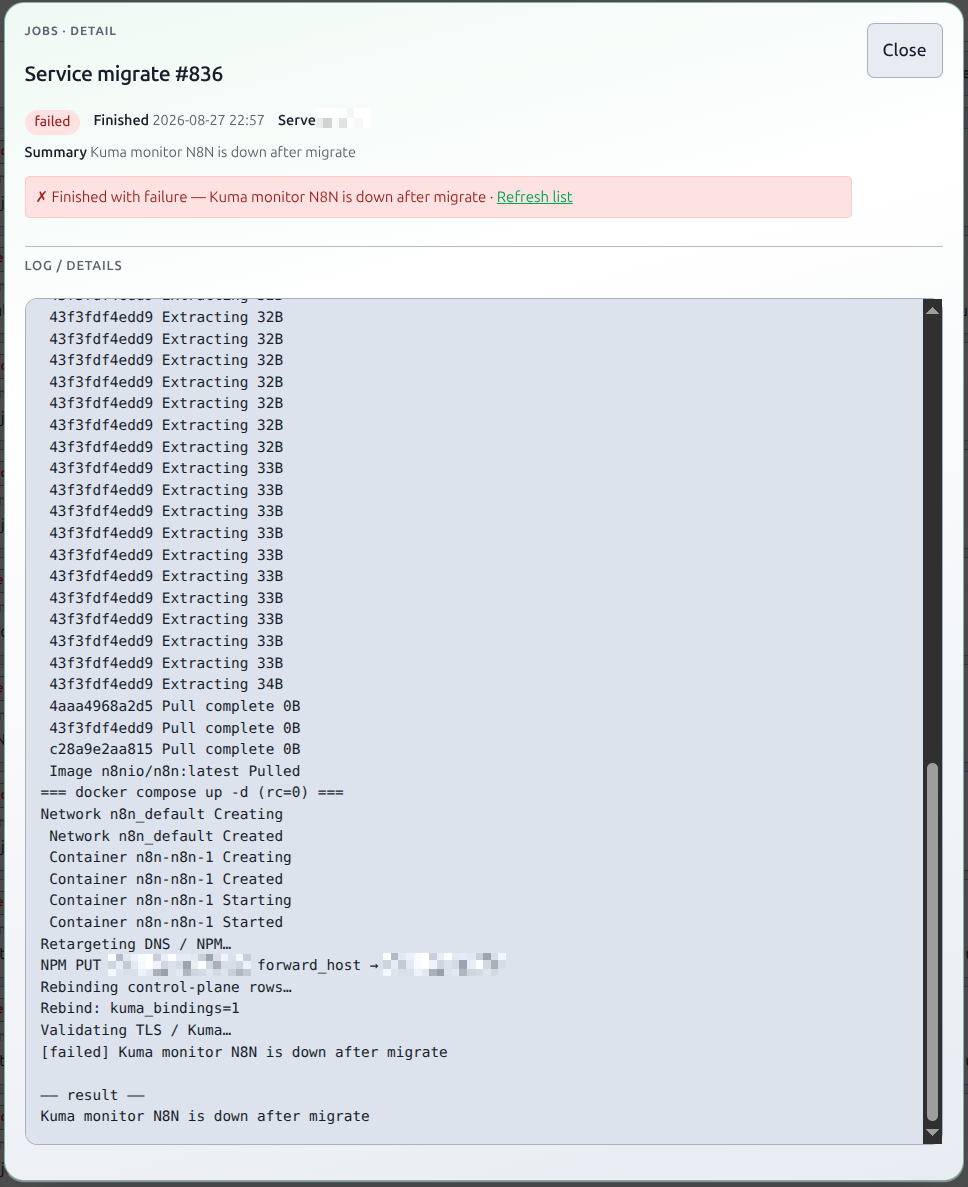
Validate red (TLS mismatch, Kuma down) does not auto-roll back. Dest may already be up with DNS/NPM flipped. Fix dest yourself, or use Undo move when the failure is cutover, rebind, or validate. Staging is kept on failure — PiHerder does not auto-wipe /backups/_migrate/{job_id}. After you have copied what you need (or Start source stack), delete that directory yourself so failed Moves do not fill the backup volume.
| Fail | State | JobHold |
|---|---|---|
| Stop / copy | Source stopped (or stop failed), dest untouched | Start source stack |
| Dest up | Source stopped, dest partial, DNS/NPM unchanged | Start source stack |
| Dest up, worker recycled mid-up | Dest may already be running; names unchanged | Inspect destination, then Stop dest and start source. DNS and NPM stay. No down -v |
| NPM PUT / DNS | Dest up, proxy or names maybe stale | Fix dest / poll NPM; no auto-revert |
| Validate | Dest up, names already flipped | No Start source (would dual-run) |
Start source stack queues the existing Docker Start all job on the source project. It is pre-flip only — not a full migrate rollback. Leftover Remove source cannot be undone from PiHerder; restore from backup.
What it does not do
- Auto-rollback (or reversing a green Move), live (zero-downtime) copy, cross-arch image rebuild
- Moving PiHerder itself, or the Pi-hole you are using to migrate
- Deleting dest volumes, or wiping extra binds outside the project folder
- Remapping published ports on host-network stacks (the process still binds the source host port on dest)
- Copying host sockets/devices (
/var/run/docker.sock,/dev/…) — dest binds dest’s own path - Rewriting IP-based Kuma monitors (checklist only)
- Moving Grafana host metrics / logs chips (only container/project dashboard binds follow dest)
- Auto-creating fabric DNS rows (optional Adopt into fabric checkbox, default off)
- Flipping names before dest is up (
dns_then_start— not built) - Full NPM proxy create/delete/SSL (backend
forward_hostonly) - ACME-in-herder
Related
- Docker overview
- HAOS hosts
- Network maps / DNS fabric
- NPM
- Uptime Kuma
- Grafana — container chips follow dest
- Certificates
- Jobs, audit & notifications
- Backups — same rsync privilege as named-volume Mountpoints
- Env reference —
PIHERDER_SERVICE_MIGRATE - Operator scenarios