Docker on hosts
What this is
When Docker / containers is enabled for a server, PiHerder can list compose projects, stream logs, edit multi-file compose, build, check/update images, and redeploy — all over SSH as the server’s configured user.
Why it exists
Homelab hosts often run many stacks. SSHing into each machine for docker compose ps does not scale, and ad-hoc edits leave no version history. The Docker UI is the day-to-day surface for free-form stacks; templates cover desired-state managed stacks.
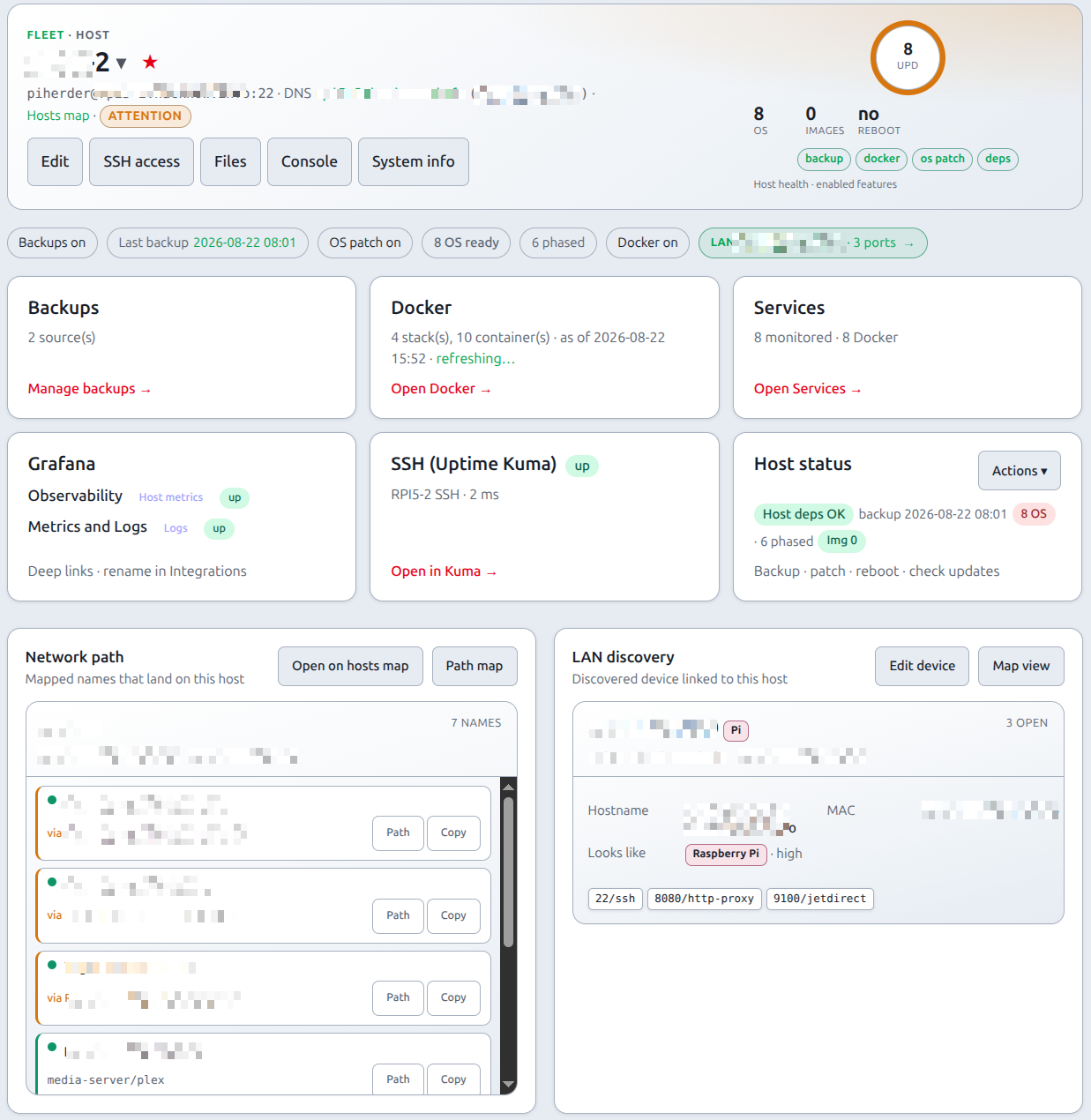
End-to-end: open a stack and redeploy
- Enable Docker / containers; set Docker base dir correctly.
- Confirm the dependency check for docker is green (SSH access). On Ubuntu, Debian, or Raspbian, Bootstrap missing tools can install official Docker CE when this feature is already on (Add a server).
- Open Docker — inventory snapshot appears immediately (Inventory).
- Expand a project; open logs if needed.
- Check updates vs Deploy when you want pull-only vs pull+up (Updates).
- For compose edits, use Compose edit (quick modal or full editor with history).
- For a sidecar / log sitting next to the stack, or to copy a file out of a container, use Host Files (jailed SFTP; flag
PIHERDER_HOST_FILES). - Hardware-bound stacks: ⋯ → Lock to this host. Optional Move to another host… — Move a service.
Prerequisites
- Feature flag Docker / containers on. Off leaves the Docker page on off and does not SSH.
- Remote
dockerusable by the SSH user (group/socket). - Docker base dir set correctly (absolute path if using least-priv).
- Dependency check green for docker. If
docker-ce, the Compose plugin, or docker group membership is missing, use Bootstrap missing tools (Add a server). Other failures: SSH troubleshooting. The same v1.13 train also covers restore ownership (Backups), a possible NIC change (LAN Discovery), and the stuck-queue warning (Alerts). That ships in 1.13.0.
What you can do
| Action | Notes |
|---|---|
| Browse projects / containers | From inventory snapshot (Inventory); search + status chips + pager are server-side (see below); containers as dense rows |
| Runtime stack / Path map | Project Stack / Path map pills → Network stack panel + map expand (Network maps) |
| Logs | Per container / service (modal or full page). Multi-service projects: pick a service or All services (project-level docker compose logs). Live SSE requires a signed-in session |
| Stop / Start / Restart all | Project ⋯ menu → confirm → Job with live log (docker_stack_stop / _start / _restart) — operator+ |
| Lock to this host | Project ⋯ — Move a service. Hardware / operator / infra. HAOS always locked. Operator+. |
| Move to another host… | Flag PIHERDER_SERVICE_MIGRATE (default on; set false to hide). Preflight then Celery Job: stop → copy → dest up → DNS/NPM. Recycle web is safe; recycle celery-worker fails a running Move. NPM proxy-host binding is enough (no fabric row required). Optional leftover: leave stopped, compose down, or remove source + named volumes. A finished Move has no Undo. Move a service. |
| Container start / stop / restart | Row ⋯ on a single service (immediate; not a full-stack job) — operator+; actions allowlisted (start/stop/restart) |
| Quick edit / Full editor | ⋯ menu — quick modal is compose (± Dockerfile) only; .env and sidecars are full editor — Compose edit |
| Multi-file compose edit | primary compose + override + .env + Dockerfile + compose sets |
| Compose sets | Extra docker-compose.<name>.yml in the same project folder — see below |
| Version history | Snapshots; rollback |
| Build / redeploy | POST-only SSE stream of docker compose build for a named project (operator+). Paths are quoted; there is no GET /path fallback. Redeploy as Jobs. If a stopped container from the same project still holds the name, that container is removed and the deploy retries once. A container from another project, or one that is running, is left in place |
| Check updates vs Deploy | Pull-only vs pull+up as Jobs — Updates |
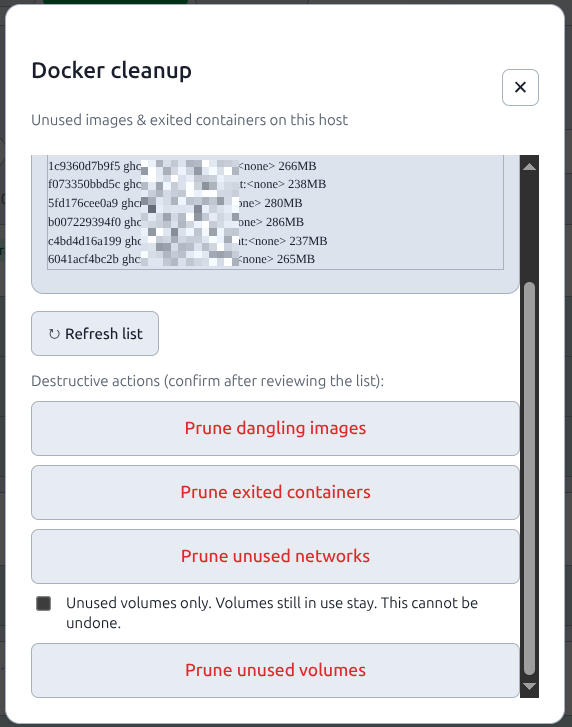
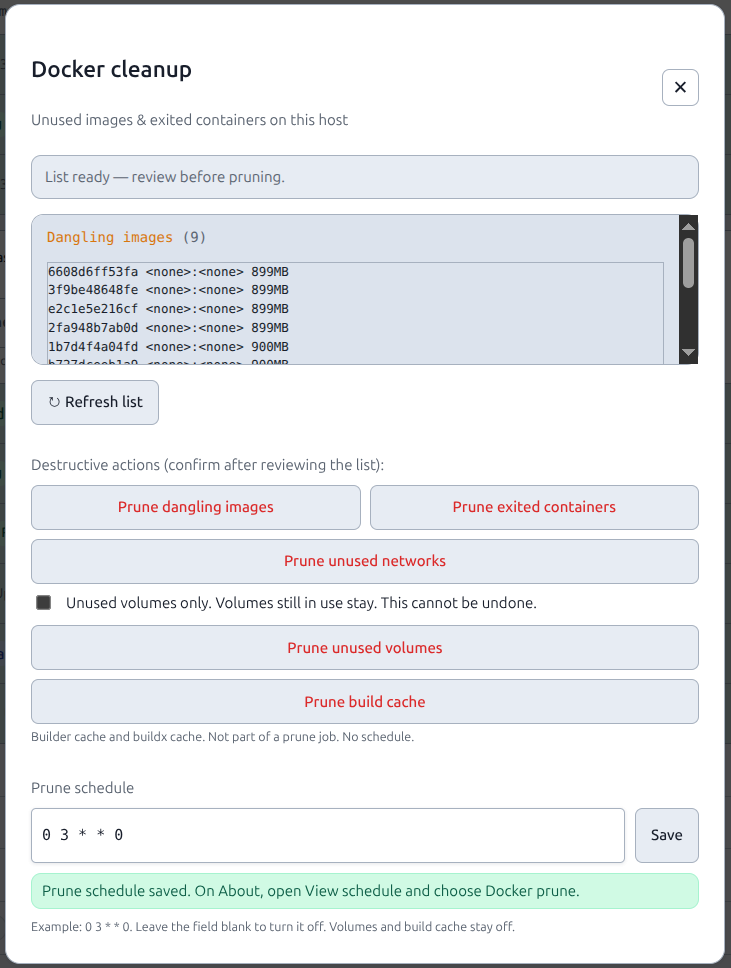
| Cleanup unused | List dangling images and exited containers. Prune images, exited containers, or unused networks as a job. Unused volumes stay until the confirm on this page is ticked. The token API and hosted /mcp can start the same job with the edit scope, and they cannot prune volumes. A saved docker_prune_schedule inside the Cleanup… modal (#cleanup-modal, empty means off) starts that same job (both: dangling images and exited containers) when container patch is on. Volumes stay off that schedule. About View schedule lists it, and a missed slot opens docker_prune_missed. Build cache and buildx cache are a separate button (docker builder prune -f, then docker buildx prune -f), POST /api/v1/servers/{id}/docker/build-cache, and hosted prune_build_cache (edit, one audit row docker_build_cache_prune, no schedule). A successful container update or redeploy then runs docker image prune -f (dangling images only). A prune failure does not fail that job. These follow-ups ship in 1.13.0 |
| New project wizard | Create a stack on the host |
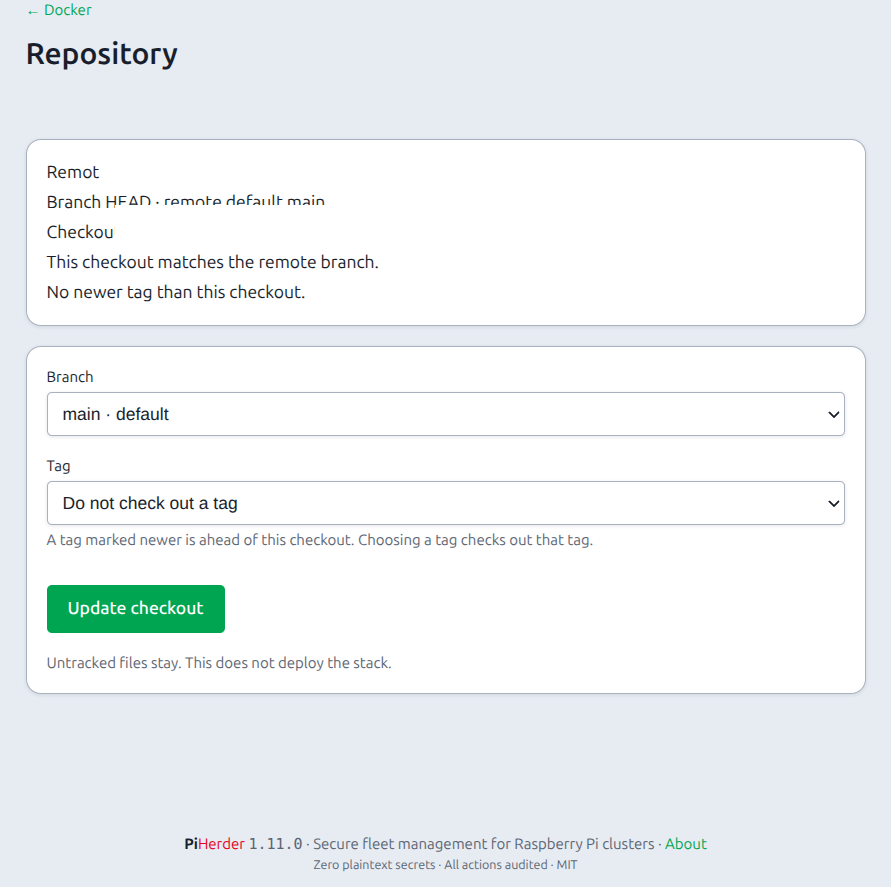
| Repository… | Project ⋯ menu. Attach a git remote to a project that is already on the host, pick a branch or a tag, and update the checkout. A tag ahead of the checkout is marked newer. A tracked local edit stops the update until you keep those files or take the remote copies. Untracked files stay. This does not deploy. A folder or checkout the SSH user does not own is refused. An https URL with a user or token in it is refused. Use a deploy key or a credential helper |
| Template-managed stacks | Badge + gated full editor — Templates |
A Docker inventory left at refreshing for 30 minutes, measured from docker_inventory_at, resets to stale when a snapshot exists and to never when it does not. A missing timestamp is not treated as expired. GET /api/v1/inventory and GET /api/v1/servers/{id}/inventory set update_available on each container, each image, and each compose project. Callers do not read container_update_check job logs for that flag. Both ship in 1.13.0.
Browser Back on Docker
Leaving Docker for another tool (template deployment, full editor) and pressing Back must not leave a stuck “Collecting information from host via SSH” overlay. The page clears the wait chrome when the stack is already loaded (bfcache-safe).
Compose sets (same folder, one project card)
One directory under the Docker base dir is still one project in the Docker list. You may keep more than one compose file there:
| File | Role |
|---|---|
docker-compose.yml / compose.yml | Primary (main set) |
docker-compose.override.yml | Compose auto-merge — multi-file editor, not a separate set |
docker-compose.<name>.yml | Compose set (e.g. docker-compose.e2e.yml → set e2e) |
UI: under the project header, pills All · main · e2e · … filter which services are listed inside a visible project. This is not a second stack card and stays client-side.
Filter and page stacks
Status chips (All / Running / Stopped / Not created / Updates) and the name box are GET query params (q, status, page, per_page). A project stays if its name or any service/image matches the search (same aliases as Servers — ha → Home Assistant). Page size is the shared 10 / 20 / 50 / 100 cookie. Hero totals stay the unfiltered inventory.
HTMX refresh keeps the query so filters do not reset. ?project=foo after Deploy still jumps to that stack. Compose-set pills are unchanged.
Deploy: project ⋯ → Deploy runs the whole project (default Compose resolution). Deploy \<set> set runs docker compose -f <that-file> up -d still under the same project name / directory.
vs fabric view groups: compose sets are files on disk / deploy slices. Network view groups (Main / custom) are presentation only on the stack panel and map — Network maps.
Project lifecycle (stop, start, restart all)
From a compose project ⋯ menu:
- Choose Stop all services…, Start all services…, or Restart all services…
- Confirm — host + project name; Stop uses danger styling.
- A Job runs
docker compose stop|start|restartover SSH with a live log (same JobHold pattern as Deploy). - Success refreshes inventory; Jobs / Audit record
docker_stack_stop/_start/_restart.
Only one stack mutation runs at a time per host (shared lane with Deploy and template deploy/redeploy). Operator+ only. Single-container start/stop/restart stay on the service row ⋯ menu. Home Assistant plugin 0.5.4 can start, stop, restart, or update that same one service, and can Stop project (docker compose stop, not down or remove) after a confirm. It can also start a stop-first Move. Files on that card stay in the fleet jail.
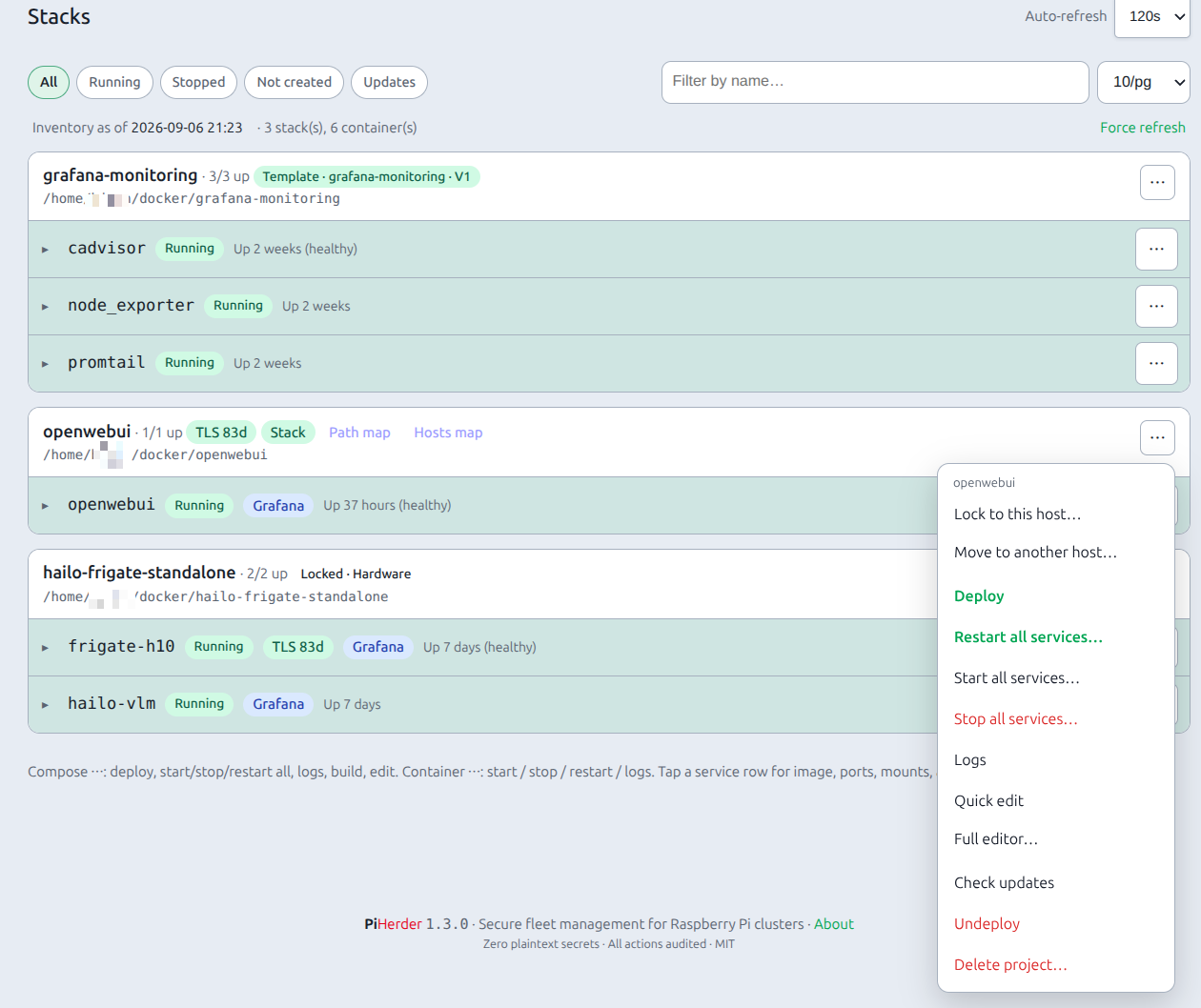
Template vs free-form stacks
| Kind | Edit path | Why |
|---|---|---|
| Template-managed | Desired state / redeploy / Accept host as desired on deployment page; host file editor gated | Template desired state is source of truth |
| Free-form | Full compose multi-file editor (compose, .env, sidecars, sets) | Bring-your-own stacks |
Related
- Inventory cache
- Compose edit & deploy
- Move a service — lock, preflight, copy, dest up, DNS/NPM, rebind, leftover
- Service templates
- Reports — deploy / patch job history (running-now is last inventory only)