Web SSH console
What this is
Optional in-browser SSH terminal to a managed host. The private key stays on PiHerder; the browser only shows a terminal (xterm.js) over an authenticated WebSocket.
Default: off. Enable with PIHERDER_SSH_CONSOLE=true and restart web.
Train: v1.2 Stream W · security bar is intentionally high.
PTY vs host mux (Mux-1). Default is still a direct SSH PTY. Soft resume parks on the herder — recreate web ends those parked shells unless the host has Console mux on. See Host mux below.
Why it exists
Operators on a tablet or locked-down PC need a shell without exporting the herder private key.
Who can use it
| Role | Fleet console | Privileged Connect as… |
|---|---|---|
| viewer | No (except public demo — see below) | No |
| operator | Yes (flag on + 2FA enrolled) | Only if Settings → Console allows operator and admin |
| admin | Yes | Yes (default). Extra confirm. 2FA again only if the short proof expired |
Connect as… (v1.3)
Each host has a fleet identity (jobs + default shell) and may add a privileged identity (break-glass console and Files).
Host: lab-core
  ├─ fleet        user=piherder         ← jobs + default console
  └─ privileged   user=piherder-admin   ← Connect as… only
- Picker is on the same bar as Passkey/TOTP (and + Shell after unlock).
- Pick Privileged · user, complete 2FA if the bar still shows it, then + Shell. Optional reason appears next to the picker until that shell opens (then it hides; it is stored on the audit row).
- After 2FA the Passkey/TOTP controls hide. They only return if the short privileged proof expired (~90s).
- The shell tab is labeled
username · priv. - Jobs, Docker, backups, and host-deps always stay on fleet. Privileged is never the default console identity. Files defaults to fleet and can Connect as… privileged (same 2FA grant cookie).
- Demo: simulated fleet shell only — privileged mint is refused.
- Leave privileged unset if you do not need break-glass. XSS on the herder origin is already shell-equivalent; a privileged key makes it root-equivalent. Keep
PIHERDER_SSH_CONSOLEoff when unused.
Add / rotate / test privileged under SSH access on the server page. That panel shows Fleet public key and Privileged public key as separate boxes — copy the privileged line into piherder-admin’s authorized_keys (or use Setup script). Download the setup script and run it on the host (PiHerder will not auto-provision a root-capable user). HAOS: skip.
Who may elevate: Settings → Console → Who may open a privileged console (admin default, or operator). Env lock: PIHERDER_SSH_CONSOLE_PRIVILEGED_ROLE.
Command audit (v1.3)
Optional. Default off. Settings → Console:
| Mode | What is stored |
|---|---|
| Off | Session open/close only (same as 1.2) |
| Commands only | Reconstructed command lines (best-effort) |
| Commands + truncated output | Commands plus up to 2 KiB of following output each |
Require on every session records commands on all live shells even if Off is selected (treated as commands). A shell that cannot start recording is refused. Demo still never stores transcripts.
When recording, the console chrome shows command audit on. If audit is off and you pick privileged Connect as…, a warning notes that the break-glass session will not record commands (it still opens).
After the shell ends: Audit → the close event → timeline, or Open full at /audit/console/{id} and download .txt. operator+ only. Viewers see that a transcript existed, not the body. Search does not index the shell text.
Redaction strips common Password: prompts and some token/PEM patterns. It is heuristic and imperfect — never treat a transcript as secret-free. read -s, editors, sudo, and secrets pasted as arguments can still land in the log. Not video, not script(1), not dual-control. Interactive programs (vim, htop, tmux) will not look like a clean command list. Leave audit off unless you accept that residual.
Retention (default 14 days) drops the encrypted body and keeps counts. Full herder DR (Postgres + master key) holds bodies; JSON config-only backups skip them.
Env locks: PIHERDER_SSH_CONSOLE_AUDIT_MODE, PIHERDER_SSH_CONSOLE_AUDIT_REQUIRED, PIHERDER_SSH_CONSOLE_AUDIT_RETENTION_DAYS. Compose does not inject defaults.
Public demo (PIHERDER_DEMO_MODE)
The public demo enables Console for the shared viewer account as a simulated shell only: same xterm UI, no live SSH, no network, no real keys, no 2FA step-up. Banner text says demo / simulated. Your self-hosted install is unchanged (flag off by default; operator+ + 2FA when enabled).
How it opens
| From | Opens |
|---|---|
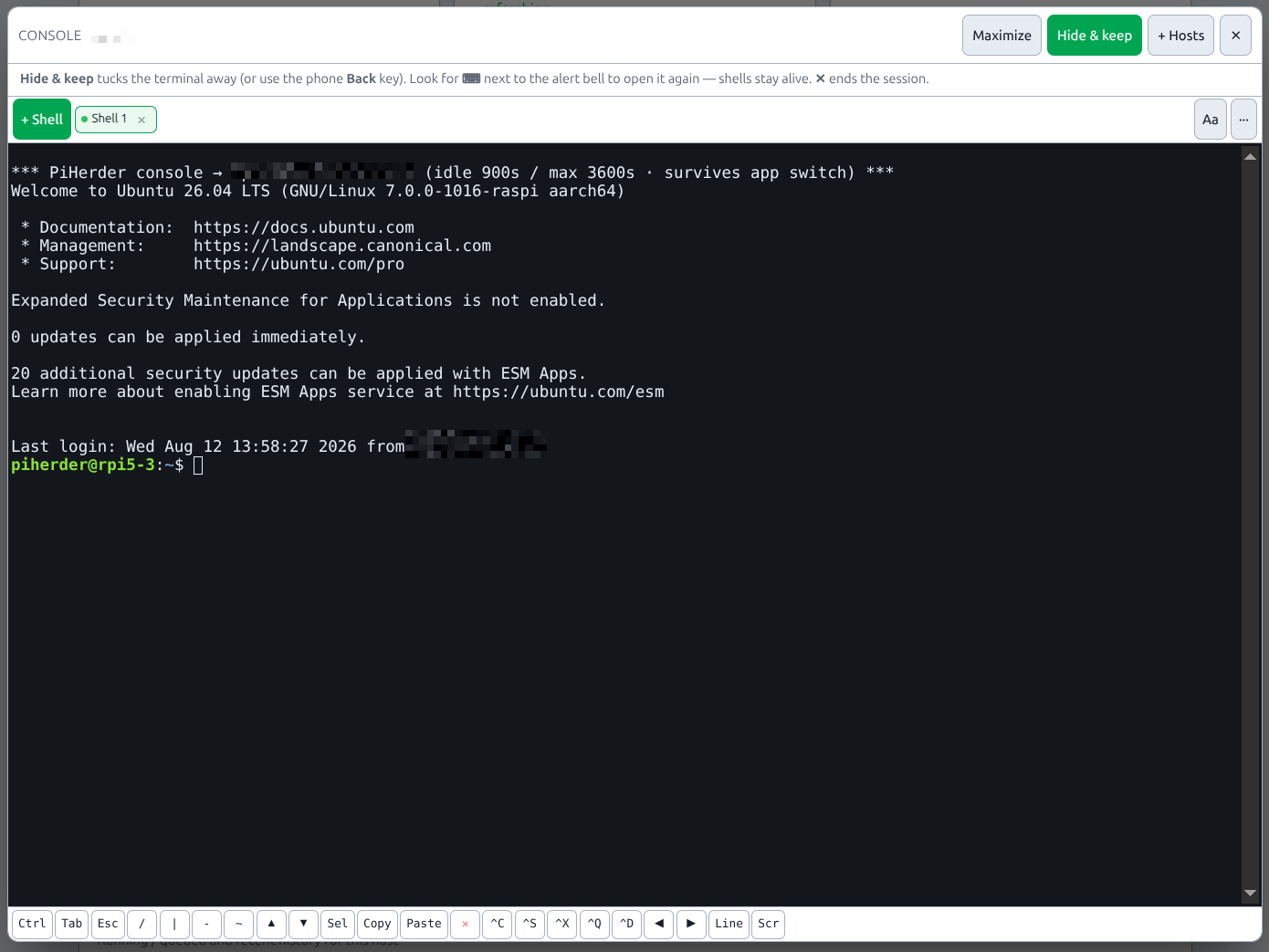
| Server detail → Console | Floating popup over the page (terminal itself, not a help article) |
| Servers list → host ⋯ → Console | Multi-host workspace at /console?host=<id> |
| Servers list → select hosts → Console | Multi-host workspace at /console?hosts=1,2,3 (SSH-ready hosts only) |
| Popup → + Hosts | Same multi-host workspace |
| Control | Does |
|---|---|
| Maximize | Full screen + slim outer bar; on mobile expands from a short bottom sheet |
| Restore | Back from maximize |
| Hide & keep | Hides the console UI; shells stay available via ⌨ next to the alert bell. Parks the herder PTY. With Console mux on, the named tmux/screen session stays on the Pi. Phone Back does the same |
| ✕ / host tab × / Exit | Ends shells and frees concurrent shell slots. With Console mux on, this kills the named host session (tmux kill-session / screen -X quit) |
| + Hosts | Multi-host workspace at /console — stays visible when maximized |
| Passkey / TOTP | Step-up first; + Shell / Lock / Aa appear only after unlock |
| + Shell | New PTY (after step-up) |
| Tab (soft key) | Sends a real Tab to the shell (completion). Desktop physical + soft Tab match. Mobile: flushes the IME token, then Tab — see Known issues |
| Shell tab × | Close that shell only (multiple shells per host) |
| Aa | Font size 8–28 (hidden until tapped) |
| Gate ··· | Show/hide status + slot count (saves vertical space) |
| Soft-key row | One scrolling row: Ctrl Tab Esc / | - ~ ↑ ↓ · Sel/Copy/Paste/✕ · ^C ^S ^X ^Q ^D ← → Line Scr. Swipe left/right for the rest. |
| Ctrl | Sticky Ctrl — next keyboard letter is Ctrl+letter |
| Sel / Copy / Paste | Mobile select (drag either direction) + clipboard |
| Shell ✕ | Close the active shell |
| App switch | Shells park on the server until idle/max; return auto-resumes |
Chrome is a single compact row after unlock: + Shell, shell tabs, Aa, optional Lock. Status is hidden by default (gate ··· to show). Soft-key strip stays one row and scrolls sideways on mobile.
Typing exit, idle timeout, or session max ends that shell (no resume-retry spam). Explicit close (shell tab ×, shell ✕, or popup ✕) still ends the session (bye) and, if mux is on, kills the host session. Switching apps or backgrounding the tab does not end the PTY (and does not kill mux).
Host mux (Mux-1)
On v1.6.0-dev (migration 043_console_mux). Recreate web after migrate.
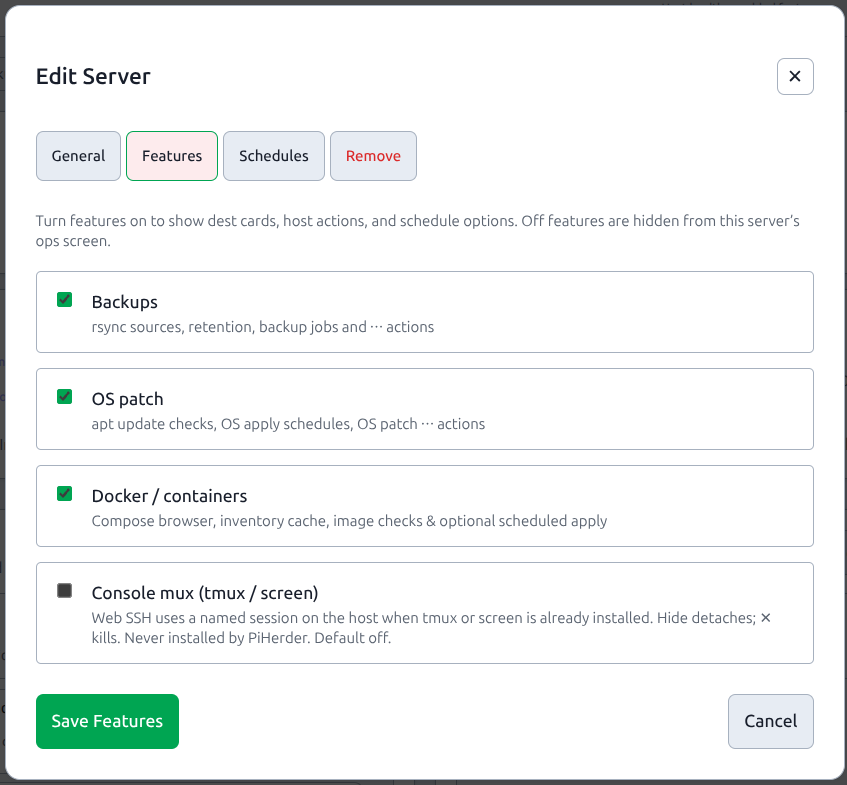
Default off. Turn it on per host: server Edit → Features → Console mux (tmux / screen) (also on the add-server wizard Features step). Not shown on HAOS. Public demo never muxes.
PiHerder does not install tmux or screen. Put the binary on the host yourself if you want mux:
# Debian / Pi OS — on the host, not on the herder
sudo apt-get install -y tmux    # preferred
# or: sudo apt-get install -y screen
| Mux off | Mux on + tmux (or screen) | Mux on, neither binary |
|---|---|---|
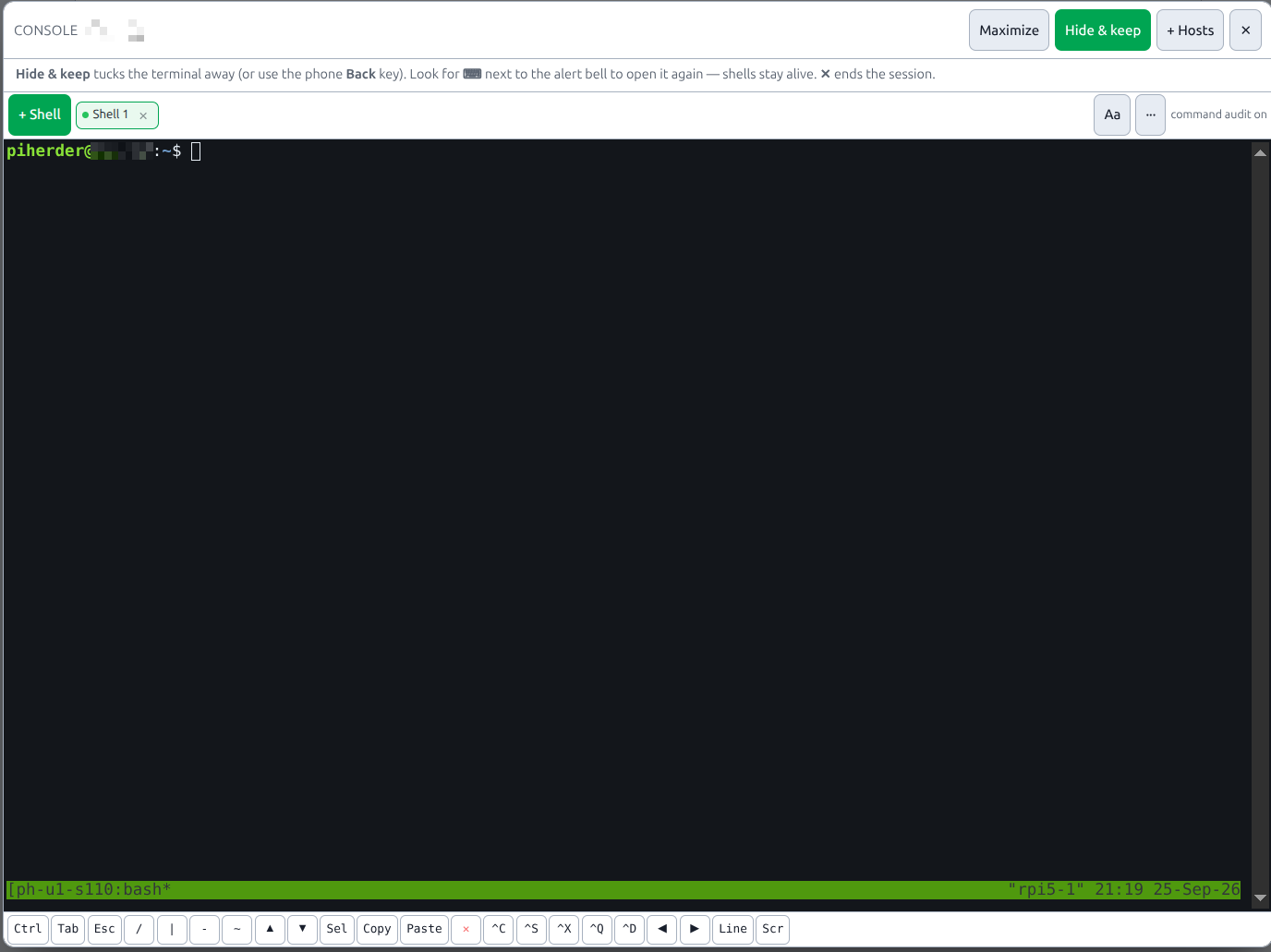
| Same PTY as 1.5 | Named session ph-u{user}-s{server}-n{tab}-f (privileged: -p) | Plain PTY + banner mux opted-in but tmux/screen not on host |
| Hide parks on web; recycle web kills it | Hide parks herder PTY; host session stays; recycle web leaves tmux ls on the Pi | Same as mux off for that shell |
| ✕ closes the PTY | ✕ kills that named session | ✕ closes the PTY |
Privileged Connect as… uses a different suffix (-p) so it never attaches to a fleet session.
Leftover sessions (Mux-2)
While the host is still in PiHerder, open SSH access and use Leftover console sessions → List sessions. The list is only ph-u* sessions for this host (ph-u{user}-s{server}-n{tab}-f or -p). Kill ends that one session, including another operator’s tab on this host. A name that belongs to a different server is refused. Listing does not open the shell again. Hide still leaves the session on the Pi. ✕ still kills the session you are in.
This block is hidden on HAOS and on the public demo. Console mux can be off and the list still works, because a session from an earlier opt-in stays on the host.
After removing a host, PiHerder does not kill-server for every Unix user. Kill leftovers on the Pi yourself:
Still out: turning mux on just because the binary is present. A shared lab piherder session. Mux on HAOS. Opening a leftover session from the list.
How to try it: enable PIHERDER_SSH_CONSOLE=true, migrate, recreate web, tick Console mux on a Debian host that has tmux, open Console → + Shell, confirm the banner mentions mux tmux, Hide then tmux ls on the host, ✕ then confirm the session is gone.
console-popup.png stays the plain PTY. The mux shots are above.
Multiple hosts (/console)
| Behaviour | Detail |
|---|---|
| Open | Servers ⋯ → Console, bulk Console, popup + Hosts, /console?host=<id>, or /console?hosts=1,2,3 |
| Host tabs | Switch anytime — inactive host tabs keep their shells (iframes stay alive; not visibility:hidden). If the browser drops the WebSocket, the PTY is parked until you select that host again |
| Close host / Exit / popup ✕ | In-app confirm modal (not browser confirm()); ends shells for that host |
| + Host | Opens only hosts you pick — does not auto-reopen every host from an earlier session |
| Shell slots | Account-wide (default 4 concurrent PTYs across all hosts) |
| 2FA grant | Fleet-wide: one passkey/TOTP covers all hosts until expiry (~10 min) or Lock / Aa → Lock step-up |
| Grant expired | Next + Shell re-shows Passkey/TOTP automatically (no need to hunt for Lock first) |
Known issues
KI-console-mobile-soft-tab (improved in 1.2 QA)
Status: Soft-key v13 — PTY completion is correct; v13 hides the leftover IME overlay (docker/doc on screen while Enter already uses docker/).
Surface: Soft Tab key on mobile browsers (Android Chrome / iOS Safari).
Works: Physical keyboard Tab; soft Tab on desktop; mobile soft Tab flushes the IME token, rewrites cd.do / cd .do, drops a matching PTY echo, and clears xterm’s composition overlay so the line matches what Enter will run.
| Symptom (residual) | Detail |
|---|---|
| Mid-word soft Tab | IME may still flash the short token for a moment. v13 should not leave docker/doc / piherder/pih stuck on screen. |
| If the overlay still sticks | Type Space → Backspace → soft Tab, or use a physical keyboard. |
Path completion still depends on the remote SSH user’s home (least-priv piherder may have no ~/docker).
Not a demo-shell bug: public demo uses a simulated PTY with toy paths; self-hosted live SSH uses real bash completion for that host’s login user.
End-to-end
- Set env (below) and recreate web.
- Enroll passkey (preferred) and/or TOTP on Account.
- Host must already have SSH credentials (key preferred).
- Open a console one of these ways:
- Server detail → Console (popup), or
- Servers → host ⋯ → Console, or
- Select hosts → Console (multi-host workspace).
- Step-up if asked → + Shell.
- Optional: add more hosts (+ Host / bulk select); switch host tabs freely — other hosts keep their shells.
- Maximize for more terminal; switch apps safely (soft resume).
- Close with in-app confirm: shell tab ×, host tab ×, popup ✕, or workspace Exit.
Security model
| Control | Behaviour |
|---|---|
| Kill switch | PIHERDER_SSH_CONSOLE=false by default (compose / env only — not a Settings checkbox) |
| In-app only | Same-origin mint (Origin/Referer); cross-site rejected; CSP frame-ancestors 'self' / frame-src 'self' for same-origin popup iframe only |
| No ticket in URL | Ticket in the first WebSocket message only |
| Single-use open ticket | Cannot mint a second WS with the same ticket |
| Soft resume | Unexpected WS drop parks the SSH PTY (bound resume token); exit / idle / max / bye send ended and the client closes that shell (no resume loop) |
| Multi-host keep-alive | Inactive host tabs use opacity (not visibility:hidden) so WebSockets stay up while you work on another host |
| Session binding | Login session_version — logout / password change / admin session revoke kills shells |
| IP binding | Default on; resume may allow IP change if device cookie still matches (mobile networks) |
| Device binding | HttpOnly console_device cookie |
| Continuous revalidation | Default every 10s while attached (Settings → Console, 5–60s) |
| Fleet 2FA grant | One step-up for all hosts; UI re-prompts when the cookie expires |
| 2FA methods | Passkey preferred; TOTP app OK; backup codes rejected by default |
| CSP | Compiled Tailwind (no unsafe-eval); xterm under /static/vendor/xterm/; connect-src is 'self' + public origin / its wss: only |
| Limits | Concurrent + idle + max session from Settings → Console; PEM never in browser |
Residual risk: XSS on the PiHerder origin can act as the logged-in user — and is shell-equivalent when this flag is on. Prefer HTTPS; leave the flag off when unused. Host SSH uses the pinned host key (same TOFU as Test connection).
Soft resume (app switch)
When the browser suspends the tab or drops the WebSocket:
- Server keeps the SSH session (slot still counted).
- Output while away is buffered (~256 KB).
- On return, the client sends
{"type":"resume","resume":"…"}and reattaches. - Resume is not attempted while a multi-host iframe is the inactive tab (avoids burning the resume token).
- Still ends on idle / max session / explicit close / logout.
Optional hard cap on park window: Settings → Console → Park hold (default 0 = until idle/max only). Env PIHERDER_SSH_CONSOLE_HOLD_SEC locks the same knob when set.
2FA recommendations
| Method | Console |
|---|---|
| Passkey (WebAuthn) | Preferred |
| TOTP app | Accepted |
| Backup codes | Not accepted unless Settings → Security allows them (or PIHERDER_SSH_CONSOLE_ALLOW_BACKUP_CODES=true locks that on) |
Tune in Settings → Security (prefer / require passkey, every-new-shell 2FA, backup codes). Set the matching PIHERDER_SSH_CONSOLE_* env only to lock a value.
Multi-shell (same host)
| Control | Effect |
|---|---|
| + Shell | Another PTY tab (counts toward concurrent cap) |
| Shell tabs | Switch between shells on this host |
| Close shell (✕) | End that PTY only (bye) |
| Lock / Aa → Lock step-up | Clear fleet grant; next shell needs 2FA again |
Default max 4 shells per user (Settings → Console, or PIHERDER_SSH_CONSOLE_MAX_PER_USER if set), shared across all hosts.
Settings vs environment
Settings → Console (admin) owns idle timeout, max session, concurrency, ticket TTL, park hold, bind IP/device, revalidate interval, and scrollback. Settings → Security owns the grant window and which 2FA factors count.
Env wins when a variable is set and non-empty (air-gap lock). The field shows as read-only (“Locked by environment”). Blank env does not lock.
Master enable stays env-only: PIHERDER_SSH_CONSOLE (default off). Public demo does not expose these knobs as a writable multi-tenant shell farm (Settings writes 403).
Lowering concurrency does not kick open or parked shells — the next new shell is denied.
| Variable | Default | Purpose |
|---|---|---|
PIHERDER_SSH_CONSOLE | false | Master enable (not a Settings checkbox) |
PIHERDER_SSH_CONSOLE_REQUIRE_2FA_EVERY_SHELL | false | 2FA every New shell (no fleet grant) — also Settings → Security |
PIHERDER_SSH_CONSOLE_ALLOW_BACKUP_CODES | false | Allow backup codes for step-up — also Settings |
PIHERDER_SSH_CONSOLE_PREFER_PASSKEY | true | UI promotes passkey — also Settings |
PIHERDER_SSH_CONSOLE_REQUIRE_PASSKEY | false | Passkey only if enrolled — also Settings |
PIHERDER_SSH_CONSOLE_BIND_IP | true | Bind ticket/shell to client IP — also Settings → Console |
PIHERDER_SSH_CONSOLE_BIND_DEVICE | true | Bind to console_device cookie — also Settings |
PIHERDER_SSH_CONSOLE_REVALIDATE_SEC | 10 | Continuous check interval (5–60) — also Settings |
PIHERDER_SSH_CONSOLE_TICKET_SEC | 60 | Open-ticket TTL (15–300) — also Settings |
PIHERDER_SSH_CONSOLE_IDLE_SEC | 900 | Idle disconnect (60–28800); also ends parked shells — also Settings |
PIHERDER_SSH_CONSOLE_MAX_SEC | 3600 | Max session length (120–43200, ≥ idle) — also Settings |
PIHERDER_SSH_CONSOLE_MAX_PER_USER | 4 | Concurrent shells / user (1–16) — also Settings |
PIHERDER_SSH_CONSOLE_MAX_GLOBAL | 20 | Instance-wide concurrent shells (1–64, ≥ per-user) — also Settings |
PIHERDER_SSH_CONSOLE_SCROLLBACK | 2000 | Default xterm scrollback lines — also Settings |
PIHERDER_SSH_CONSOLE_HOLD_SEC | 0 | Max park after WS drop (0 = idle/max only; else 30–3600) — also Settings |
PIHERDER_SSH_CONSOLE_GRANT_MIN | 10 | Fleet-wide multi-host grant after 2FA (minutes) — also Settings → Security |
Also: keep CSP on in production (PIHERDER_CSP=true). Tailwind is compiled CSS — no Play CDN / no unsafe-eval. Inline scripts carry a per-request nonce. Inline event handlers are not allowed (script-src-attr 'none').
Full catalog: Environment reference · sample: console-and-backup.env.example.
Related
- 2FA & force 2FA
- Roles
- Environment reference
- SECURITY.md
- Add a server (SSH key first)
- Reports — console sessions, privileged opens, duration (from Audit)