System Info (host snapshot)
What this is
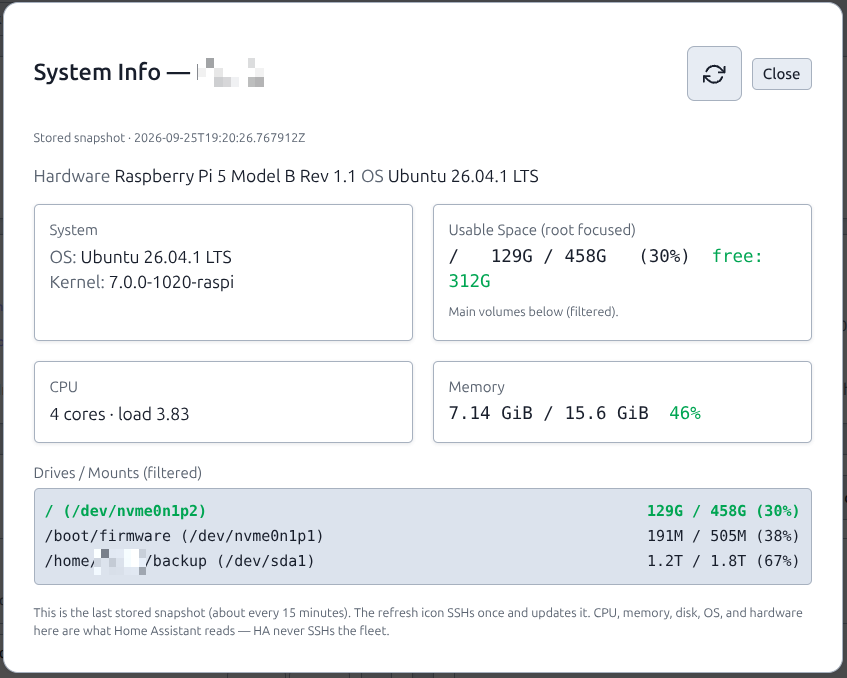
Each server stores a host-facts snapshot: pretty OS, hardware, CPU cores/load, memory, and disk. System Info on the host page shows that snapshot. Home Assistant and GET /api/v1 read the same columns — they never SSH the fleet.
Why (v1.6)
Path 2 (HACS on HA) may poll every 30 seconds. That poll is database only. Live SSH from HA, or SSH on every System Info open, would hammer hosts and still leave HA showing “debian” / empty CPU.
So this train:
- Persist what System Info used to fetch live (
os_pretty, hardware, arch — Alembic 044). - Persist CPU / memory / disk as columns so the Lovelace fleet card can sum the fleet (Alembic 045).
- Stop opening the modal from SSH-ing by default. A scheduler (~15 minutes) plus the modal refresh icon write the DB.
- Do not add a second host-page “Refresh facts” button. Refresh is the icon in System Info. An extra action 500’d and duplicated the modal.
One snapshot, three consumers: this modal, /api/v1/servers + /api/v1/summary, and the PiHerder fleet card.
What you see
| Field | Source |
|---|---|
| Hardware | Pi device-tree, DMI, or HAOS chassis/machine — not the os_type dropdown |
| OS | PRETTY_NAME (Ubuntu 24.04, Home Assistant OS, …) |
| Kernel / reboot pending | Snapshot |
| CPU | nproc + /proc/loadavg |
| Memory | /proc/meminfo (MemTotal / MemAvailable) |
| Usable space + drives | df (HAOS: ha host info when present) |
| HAOS Core / OS / Supervisor | ha CLI (path 1), still in the same snapshot |
Container count on the HA card comes from Docker inventory meta, not this snapshot.
Opening the modal does not SSH. The header refresh icon SSHs once (/servers/{id}/diagnostics?force=1) and writes the row. Footer text says so.
system-info-haos.png stays the path-1 shot.
After upgrade
Recreate web so Alembic 044 and 045 apply (SELECT version_num FROM alembic_version; should include 045_host_resources). Then click the refresh icon once per host (or wait ~15 minutes). Empty CPU/memory on the HA card means this snapshot has not been written yet.
Related
- Add a server · HAOS hosts
- Home Assistant → PiHerder (path 2 reads these columns)