Backups & restore
What this is
Server backups copy chosen directories from a fleet host into the PiHerder host’s backup volume using rsync over SSH. Runs are jobs on Celery (not inside a web request), so a long rsync does not freeze the UI.
Why it exists
Homelab hosts hold compose data, configs, and media that are painful to rebuild. PiHerder makes backup repeatable, scheduled, audited, and restorable without maintaining a separate cron library on every Pi. You choose paths and policy; the control plane handles queueing and history.
What it is not
| Server backups (this page) | PiHerder self-backup |
|---|---|
| Files from fleet hosts | Config of the herder itself (DB, users, keys…) |
| Server → Backups UI | Settings → PiHerder backup |
Volume /backups (or host map) | Volume /herder_backups |
See Self-backup & DR for the control plane.
Backups pulls the chosen paths onto this herder unless that host is set to send files straight out. Copy the backup drive then sends the mirror. Hosts that do not opt in still rsync onto /backups.
Send a host straight out
On the host’s Backups page, Configure can opt that host in. The tick stays unavailable until Google Drive, OneDrive, or a LAN share is saved under Settings → PiHerder backup.
When the tick is on, choose one or more of those saved destinations. None are selected until you pick. Save configuration asks for a destination when the tick is on and nothing is selected. Backup now and the schedule send to the destinations you ticked. That Backup now stays a Backup job. Open the finished job or the audit row to see where it went. Google Drive and OneDrive show the folder name. A LAN share shows the host, the share, and the path. Each source row adds the folder written on that destination. The sign-in is not in the job or the audit row. Copy now still sends only the destination that is open, and on this host it starts that push. Jobs labels that push Direct copy. A folder already on this herder stays Backup copy. When both are ticked, the folder hop runs, then the direct hop starts. A failed folder hop still starts that direct hop. A folder row left running does not hold that direct hop. A second folder copy still waits on the folder row. A second direct copy waits on the direct row.
Nothing of that host is stored under /backups first. rclone reads the original files in place and sends them straight on. It does not write a second copy of the tree on the Pi. The binary is copied for the run to /var/lib/piherder/rclone, owned by root, and removed when the run ends. The sign-in stays on this PiHerder. The temp config is deleted with the binary.
A host whose SSH user is not root needs that path in the script from SSH access. Copy the script again and apply it on a host that was set up before this option existed. Root and Home Assistant OS run the copy as that login. The host must be able to reach Google, Microsoft, or the NAS. The image carries rclone for amd64 and arm64, and the copy sends the one that matches the host. A host whose CPU is something else has the tick greyed out and should keep the /backups path. A host whose architecture is not known yet can still use the tick. If that binary cannot run, the job says so and the host should keep /backups.
The original files stay as they are. A file that grows during the copy, such as a live log, is sent at the size it had when the copy started. The copy keeps that file’s modification time. A share or Drive does not store a Unix owner the way the herder disk does. Retention days do not age the remote files. Restore can pull that host's folder from a ticked Drive, OneDrive, or LAN share onto this PiHerder, then write it back to the host. A dry-run does not write the pull.
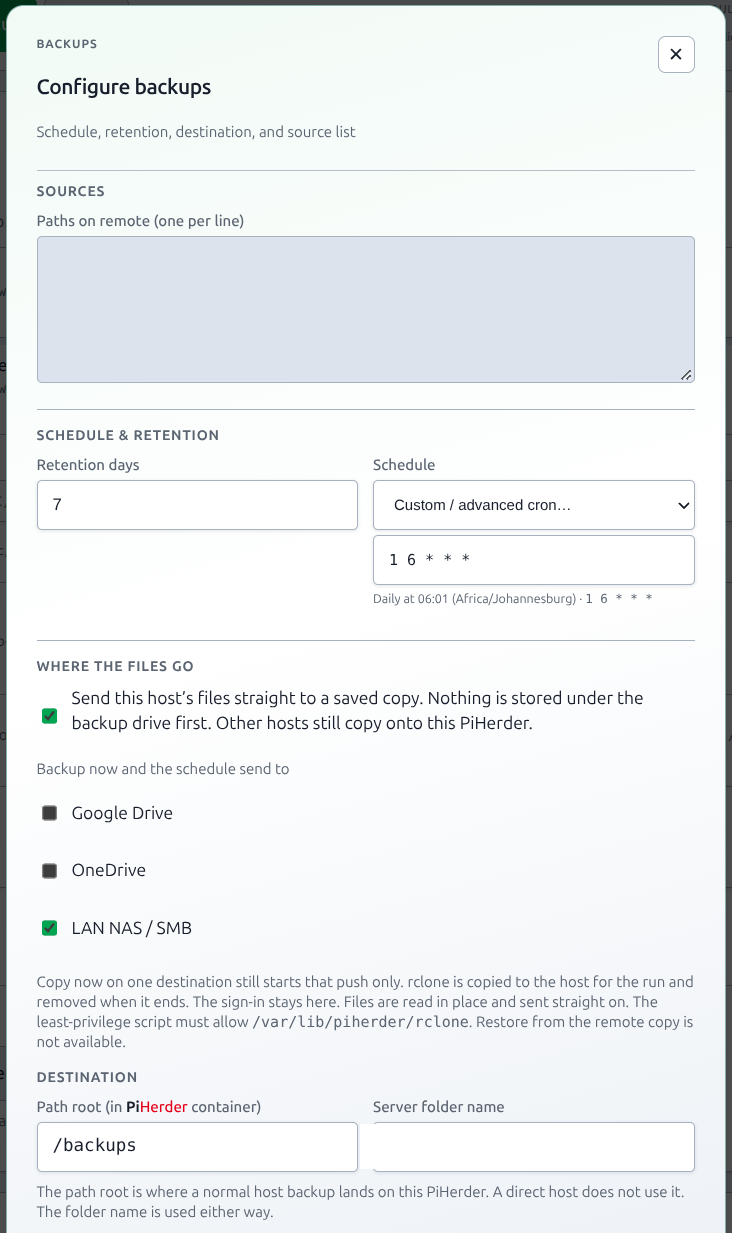
Copy to Google Drive (v1.8 train)
Settings → PiHerder backup has a card under the self-backup cards, titled Copy the backup drive. Google Drive ships in 1.8.0. The 1.7.0 image has no such card. A LAN share has its own row as of 1.9.0. OneDrive is a third row as of 1.10.0.
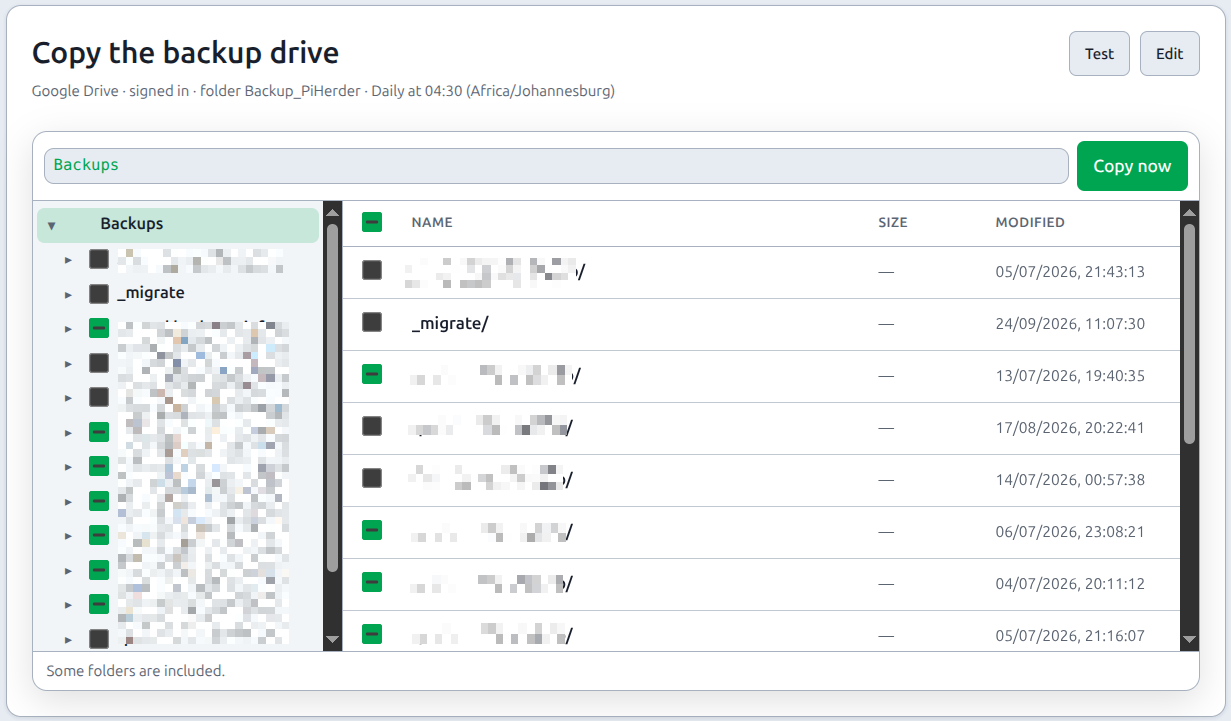
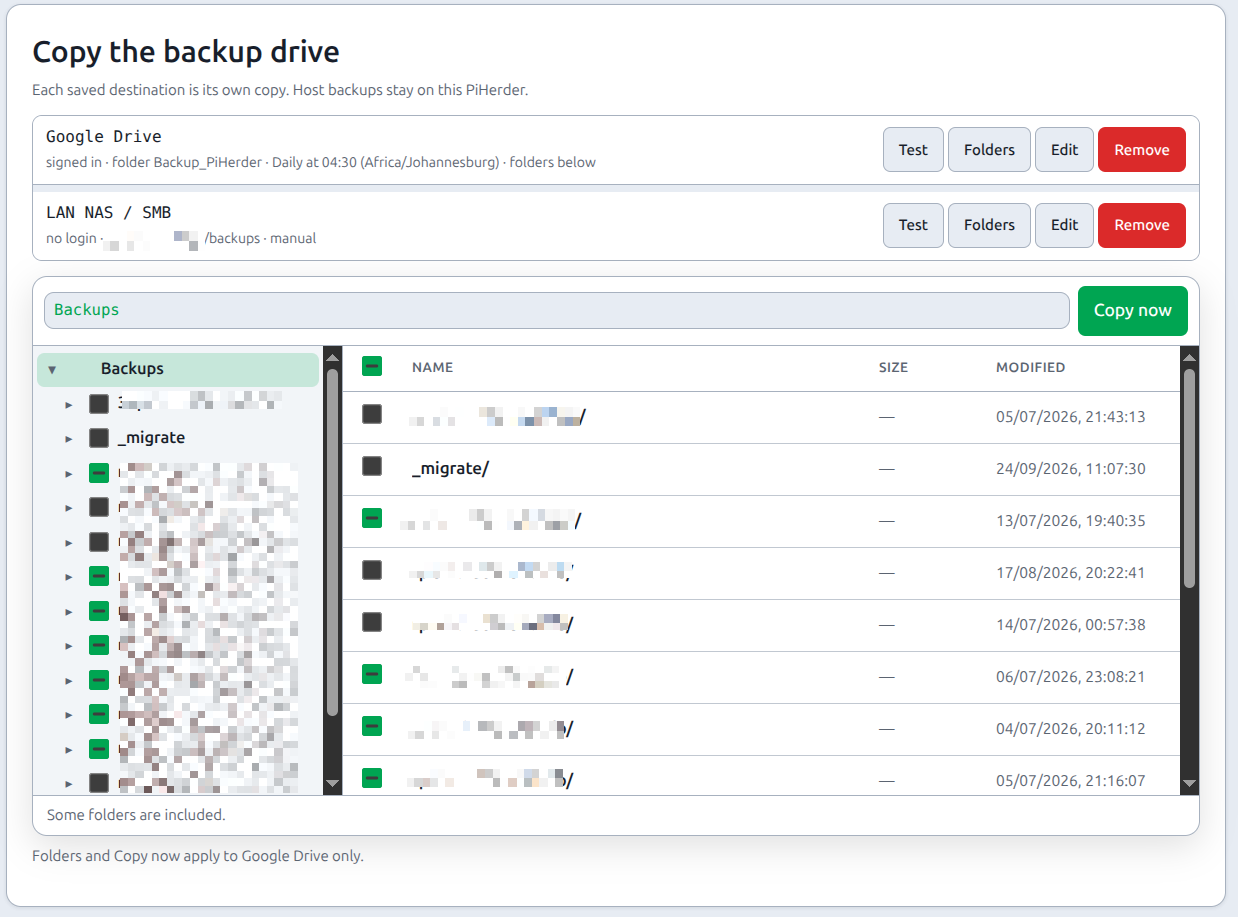
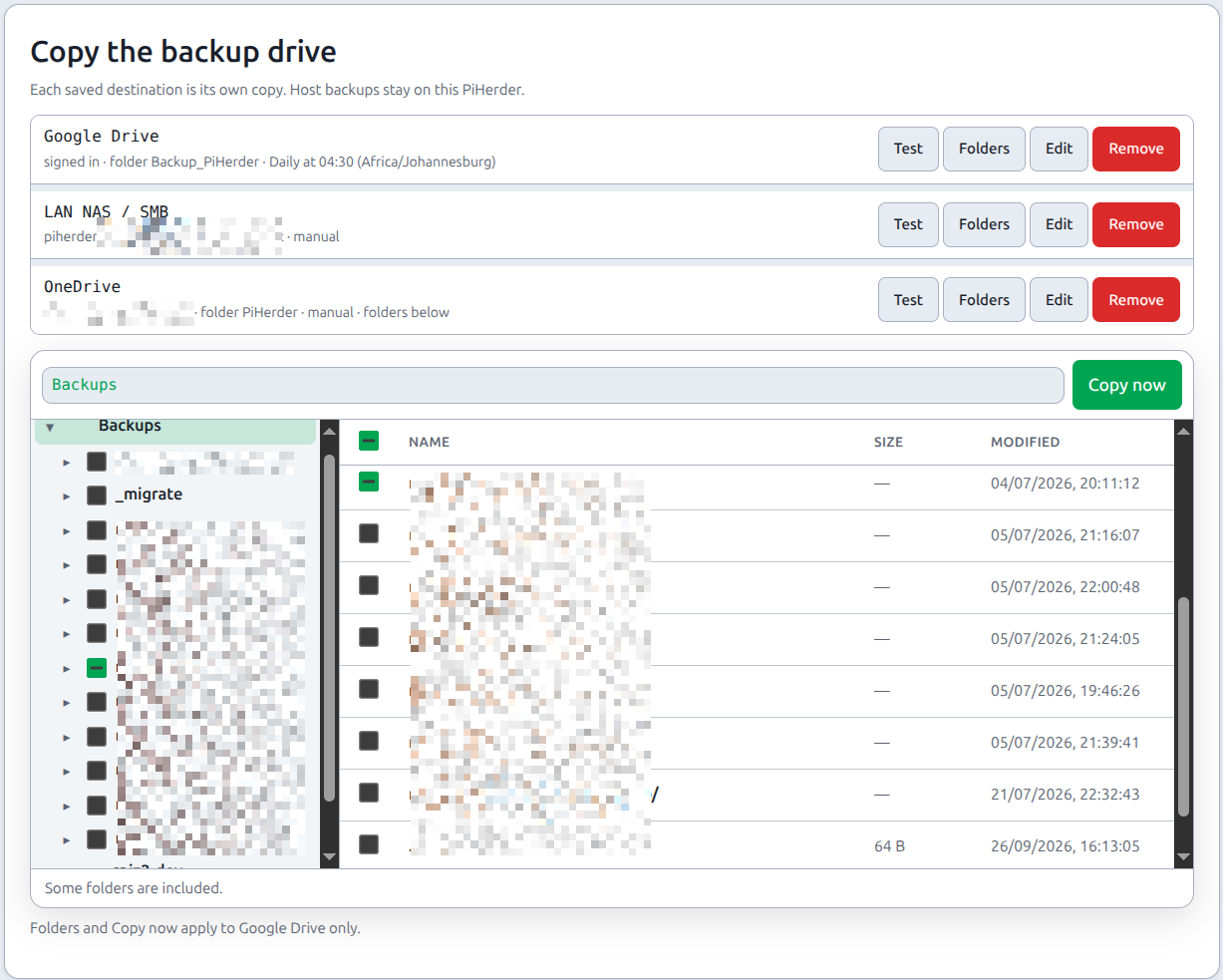
| What it copies | Checked folders on the herder backup drive (/backups), not one host’s source list |
| Service | Google Drive, OneDrive, and LAN NAS / SMB can each be saved and live at once. Remove wipes one provider's saved row. The others stay. Files already copied stay on Drive, OneDrive, or the share |
| Account | A Google sign-in from this PiHerder. New files are owned by that Google account. A service account cannot store them on a personal Drive |
| Schedule | The same presets as other schedules, Copy now, and an optional copy after a host backup succeeds |
| Browser | Folder tree on the left, the open folder on the right. A ticked folder stays ticked inside. Untick a child to leave it behind |
| Job | Backup copy (backup_replicate) on the existing Celery worker. It may run for up to 7 days. Host backups stay on the 2-hour worker limit. A task failure, including the 7-day limit, marks the row failed so Copy now can run again. A hard kill of the worker process can leave the row running. Copy now for another folder copy returns that row until it is marked failed. A direct hop does not wait on it. A self-backup copy on the same destination does not take it. Files already copied stay. A failure fails that job only. The host backup time stays |
| Restore | Still the local tree. The demo does not upload |
Pull bjorngluck/piherder:1.8.0 before a real copy. rclone is in that image. Design: FEATURE_PLAN_BACKUP_DESTINATIONS.md.
Set up Google Drive
Where in PiHerder: Settings → PiHerder backup → Copy the backup drive. Pick Google Drive. OneDrive and a LAN share are separate choices on the same card.
PiHerder opens Google, you approve access, and PiHerder stores that sign-in. Each new archive is created by your Google account inside a folder you own. rclone still uploads only files that are new or changed.
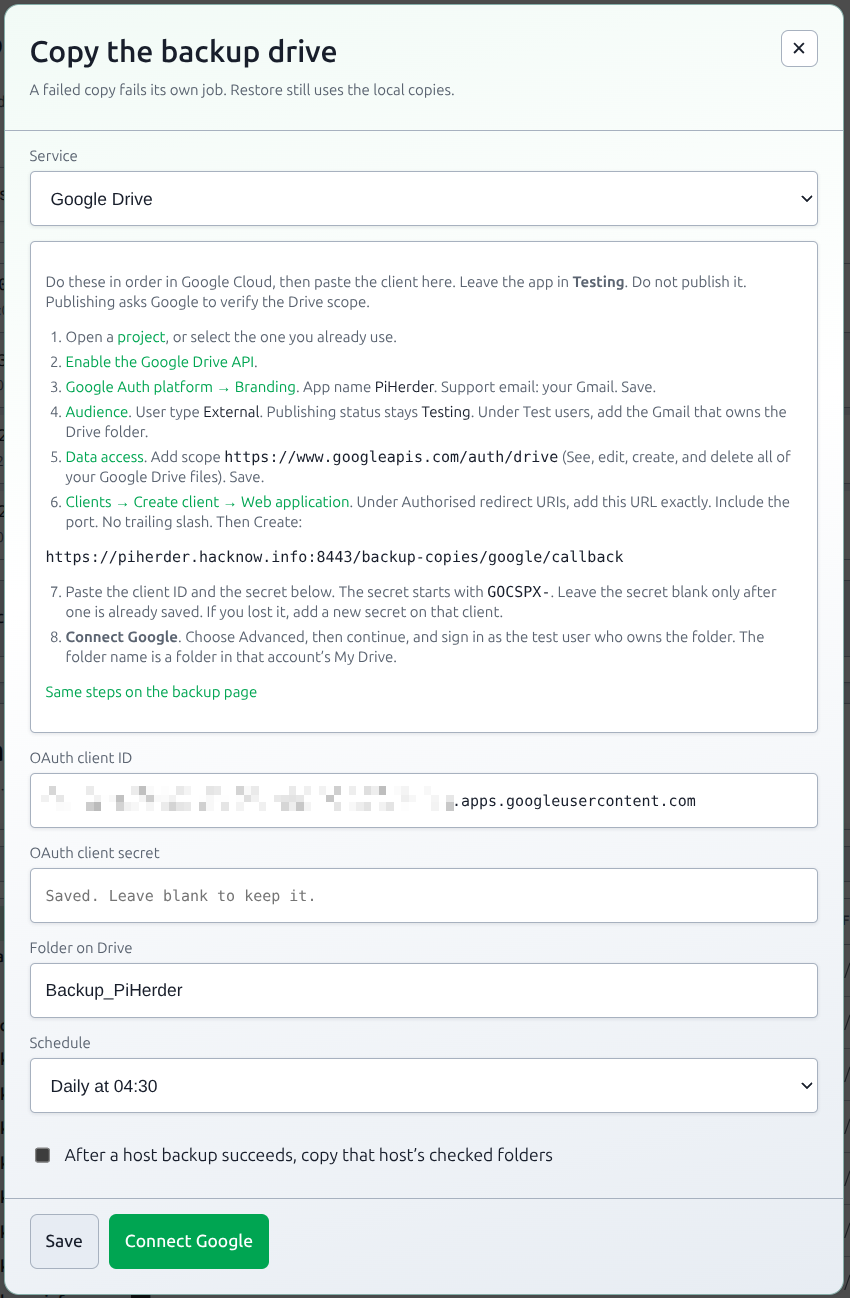
A self-hosted PiHerder cannot ship one Google client. Google only redirects to a URL registered on a client in your project. Publish the app to Production. An app left in Testing loses its refresh token after 7 days, and the next copy fails until you connect again. Publishing does not start a verification review. Google still says the app is unverified. Choose Advanced, then continue, and sign in as the Gmail that owns the folder.
The redirect URL is shown in the PiHerder dialog. It is the address you use in the browser plus /backup-copies/google/callback. If that address is wrong, set PIHERDER_PUBLIC_URL to the same origin and reload.
- Open Google Cloud Console and select a project, or create one.
- Enable the Google Drive API on that project.
- Open Google Auth platform → Branding. App name: PiHerder. User support email: your Gmail. Save. A logo is optional.
- Open Audience. User type: External. Publish the app to Production. A Testing app drops the sign-in after 7 days. You do not need test users after it is in production.
- Open Data access. Add or remove scopes. Add
https://www.googleapis.com/auth/drive, shown as See, edit, create, and delete all of your Google Drive files. Update, then Save. This is the scope PiHerder requests.https://www.googleapis.com/auth/drive.filecannot see a folder you created yourself, so the copy keeps the full Drive scope. - Open Clients. Create client. Application type: Web application. Name it PiHerder. Under Authorised redirect URIs, add the URL from the PiHerder dialog. It includes the port when you use one, for example
https://piherder.example:8443/backup-copies/google/callback. Do not add a trailing slash. JavaScript origins can stay empty. Create. - Copy the client ID and the client secret into the PiHerder dialog. The secret starts with
GOCSPX-. Google shows it once. If you lose it, add a new secret on that client. Leave the secret box blank only after a secret is already saved. Set Folder on Drive to a folder in that Gmail’s My Drive, for exampleBackup_PiHerder. The folder does not need to be shared with anyone else. - Connect Google. PiHerder shows Continue to Google, then Google’s account page. Google says the app is not verified. Choose Advanced, then Go to PiHerder (unsafe). Sign in as the test user and allow access. The summary line then shows that Gmail address. The secret and the sign-in are not shown again.
- Tick the backup folders. Test checks the sign-in and the folder and does not copy. Copy now uploads files that are not already there. A later copy uploads only new and changed names. The same folder path on the herder is created under the Drive folder.
A service account cannot store these files on a personal Gmail Drive. It has no storage quota. Do not use one for this copy.
Done when: the Drive copy job succeeds, and the ticked trees are in that Gmail account’s Drive folder.
Set up a LAN share (SMB)
Where in PiHerder: Settings → PiHerder backup → Copy the backup drive. Pick LAN NAS / SMB.
This is a second copy, independent of Google Drive and OneDrive. Hosts that have not opted to send files straight out still rsync into /backups on this PiHerder. rclone then sends the ticked folders to one SMB share. The share does not replace that local directory. A host that has opted in is listed even with no folder on /backups, and Copy now starts that host’s push to this share. A saved Drive or OneDrive copy keeps running if you also save SMB.
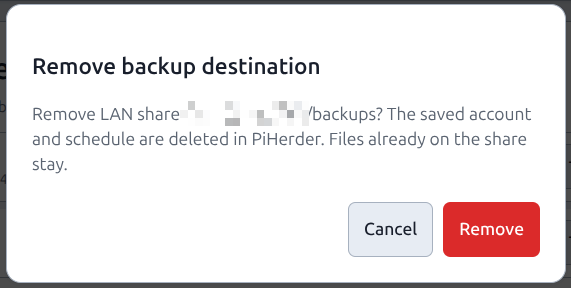
Remove (admin, confirm remove) deletes that one provider's saved destination and its secret. The other providers stay. Files already on Drive, OneDrive, or the share are not deleted. The public demo refuses. This is not a job and not an agent action.
- Enter the NAS hostname or IP, the share name, and an optional path under that share.
- Enter a username and password, or leave both empty for a share that needs no login. That row reads no login. A blank password on its own keeps a password that is already saved. A username without a password, or a password without a username, is refused. Kerberos is not used. An optional domain or workgroup can be set.
- Tick the backup folders. Test lists the share and does not copy. Copy now, the schedule, or the follow-up after a host backup runs the same Backup copy job as Drive. A host that sends files straight out is a Direct copy on that same destination.
- A failed copy fails that job only. The host backup time stays. The public demo does not upload. Restore still uses the local tree.
The password is stored with the instance master key and is not written to the job log.
Done when: Test lists the share, and a copy job puts the ticked trees on that share.
Set up OneDrive
Where in PiHerder: Settings → PiHerder backup → Copy the backup drive. Pick OneDrive.
This is another copy, independent of Google Drive and the LAN share. rclone sends the ticked folders to a folder in the default drive of the Microsoft account you sign in with. Hosts that have not opted to send files straight out still land on this PiHerder first. A host that has opted in sends straight to this drive when OneDrive is one of its ticked destinations. A Microsoft 365 personal plan already includes that OneDrive storage. The plan does not include a directory for the app registration below.
A personal Microsoft account that has never had Azure lands in a tenant named Microsoft Services. App registrations refuse that tenant. The message names identity provider live.com and application 74658136-14ec-4630-ad9b-26e160ff0fc6. Signing in again does not create a directory.
- In a private window, open https://azure.microsoft.com/free and choose Start free. Use the same Microsoft account that owns the OneDrive. Finish until Azure says the subscription is ready. That creates Default Directory and makes this account its administrator. Microsoft may ask for a card. Registering the app does not start a charge.
- Open https://portal.azure.com. The directory in the top bar must be Default Directory. While it still says Microsoft Services, the signup is not finished.
- In that directory, register an app named PiHerder. Accounts: any organizational directory and personal Microsoft accounts. PiHerder signs in through Microsoft’s common endpoint, so leave Personal Microsoft accounts only unselected. Redirect URI: Web, and the URL shown in the PiHerder dialog. It ends with
/backup-copies/onedrive/callback. - Add Microsoft Graph delegated permissions
User.Read,Files.ReadWrite, andoffline_access. That is the signed-in account’s own files, plus the address shown after sign-in. Do not addFiles.Read.All,Files.ReadWrite.All, orSites.Read.All. An account that already connected keeps its previous grant until you use Connect Microsoft again. - Create a client secret. On the Overview, copy Application (client) ID. On Certificates & secrets, copy the secret Value while it is on screen. The Secret ID is not the secret. Paste those two into PiHerder. Leave the secret blank only after one is already saved. Set the folder name, for example
PiHerder. If Connect Microsoft says the client is not enabled for consumers, the account type in step 3 is still single-directory. On Manifest, setrequestedAccessTokenVersionunderapifromnullto2and save. Then set the account type to any organizational directory and personal Microsoft accounts. The Authentication page refuses that change while the value is stillnull. - Connect Microsoft and sign in as the account that owns the drive. The directory only holds the app. The files go to that account’s OneDrive. Test lists the folder and does not copy. Copy now, the schedule, or the follow-up after a host backup runs the same Backup copy job. A host that sends files straight out is a Direct copy on that same destination.
A work or school account that already has a directory skips the free Azure signup. Register the app in that directory, with the same account type.
The secret and the sign-in are stored with the instance master key and are not written to the job log. The public demo does not upload.
Done when: the OneDrive copy job succeeds, and the ticked trees are in that account’s folder.
Also copy each new self-backup on a saved destination sends the herder archive (/herder_backups, one .tar.gz) into a herder/ folder on that destination. That is separate from the ticked host folders. The local archive stays if the copy fails. See Self-backup & DR.
End-to-end: first backup you trust
- On the server: Edit → Features → enable Backups.
- Open Backups → add at least one source path that exists on the remote (e.g. a compose data directory).
- Confirm path policy is not blocking that prefix.
- Run backup (manual) once.
- Watch Jobs until success; open Audit for size summary.
- On the herder host, confirm files under the backup volume (Volumes).
- Restore wizard → dry-run for that source (no write).
- Only then enable a cron schedule.
Done when: success updates last_backup_at; you know how to reverse with dry-run first.
Full journey: Operator scenarios — Journey B.
Busy sources (vanished files)
On Frigate/NVR-style trees, rsync may hit code 24 (vanished files). From v1.2, PiHerder retries and can mark the source soft-OK instead of failing the whole job. Details: Troubleshooting — vanished files.
Enable backups
- Server Edit → Features → enable Backups.
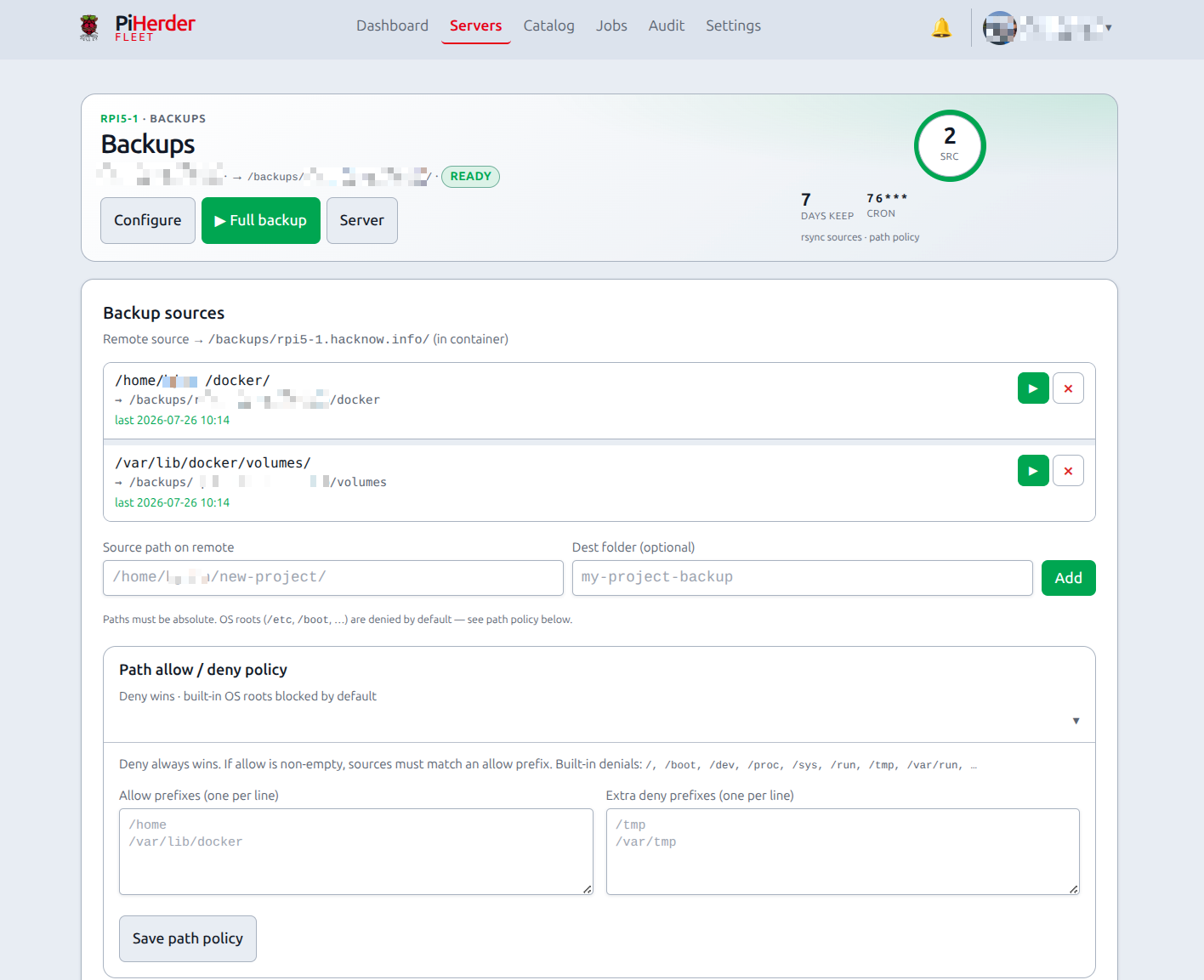
- Open the server’s Backups page (ops-hero + source cards — same width as other host pages).
- Use header Configure for schedule, destination paths, and sources (there is no second “Full configure” under sources).
- Add source paths on the remote host (configure form lists current sources; empty only when none are set).
- Optional: destination override, retention, cron schedule (UI shows plain English next to the expression, e.g. “Daily at 02:00”).
- Path allow/deny — default deny of OS roots; optional prefixes.
How success is decided
| Outcome | Meaning |
|---|---|
| Success | Each source finishes with rc == 0 and no error classification; last_backup_at updates |
| Failed | Status failed, audit error details, last_backup_at not updated |
| After success | Open backup_failed notifications resolve |
| Destination rejected the sign-in | One backup_destination_auth_failed alert, linked to Settings → PiHerder backup. It stays critical when the Backups category is set lower. Google Drive and OneDrive say reconnect. The line may include the provider error code, such as invalid_grant, and does not include the token, the rclone config, or the raw response. A later successful copy resolves it |
| No backup inside the stale window | One backup_stale warning per backup-enabled host. A later success resolves it |
| Scheduled run did not start | One backup_schedule_missed warning when a host backup does not start within 15 minutes of its slot. The next successful backup resolves it. Turning backups off resolves it too |
| Copy scheduled before the host backups | One backup_copy_early warning when a destination copy runs earlier the same day than a host backup whose folder on /backups is ticked. The warning names those hosts. It clears when the copy is no longer earlier. A host that sends files straight out is not part of this check. The same sentence shows on Settings → PiHerder backup |
rsync path
- Default:
--rsync-path "sudo -n rsync"(or local sudo) so a least-priv user can still read protected trees. - Root user / HAOS: plain
rsyncis auto-probed and used when sudo is not available. - A host set to send files straight out does not use this rsync pull. rclone reads the original files in place. See Send a host straight out.
Schedules
Enable + cron on the Backups page. The hour is the Settings timezone, the same clock as the label under the field. A destination copy schedule uses that clock too. Same server never runs two backups at once (Redis mutex); different hosts can run in parallel. A direct host is included in a destination schedule only when that destination is one of its ticked targets. A copy that is earlier the same day than a host backup whose /backups folder is ticked opens a warning. See the outcome table above.
Settings → Fleet has a base backup time, daily at 02:00 unless you change it. Apply to all servers, with Enable Backups ticked, turns backups on. It does not write a schedule. A host that already has a schedule is left alone. Saving a new base clock moves hosts that inherit it, even when Apply is not ticked. Adding a host, including the wizard, turns backups on and leaves the schedule empty, so the new host inherits this time.
A host with backups on and no saved schedule runs on the fleet time. The fleet clock is one time. Each host still gets its own minute, computed from the host id, so registering one host does not read the rest of the fleet. That time is not written onto the host. The Servers list and the Backups page mark it fleet default and show the next run when a job is registered. When backups are on and this page cannot see the scheduler, the label says schedule unknown. That is not a missed job. Not scheduled means backups are on, the scheduler is running, and no job is registered. The host's own schedule wins. Backups off means no job, and the schedule label is hidden. On a daily base, ids below 60 stay on that hour at minute (id + 30) % 60. Later ids fill the following hours, one minute each, then the hours before the base hour. The first 1,440 ids each get a distinct minute of the day, so a 02:00 base covers the whole day and an hour-23 base wraps host id 60 to 0 0 * * *. Past 1,440 hosts, a host shares a minute with the id 1,440 earlier. A list, a step, or a weekday base only changes the minute, so some hosts share a minute. Those jobs are queued. The worker runs them as slots are free. One host still does not run two backups at once.
The fleet-default choice on Configure saves the source list and the destination root, and the audit row records the old and new values. It does not set a schedule on other hosts. A weekday range or a day-of-month list stays as typed.
list_servers and get_server return the same three fields: effective_backup_schedule, next_backup_run, and backup_scheduled. The tool text names them. Adapter 0.4.4 carries that text. A cached 0.4.2 returns the fields and does not name them.
Why a mutex: overlapping rsync to the same destination corrupts snapshots and confuses retention.
From the Servers list you can multi-select hosts and run Backup in bulk (only hosts with backups enabled) — Bulk actions.
Restore wizard
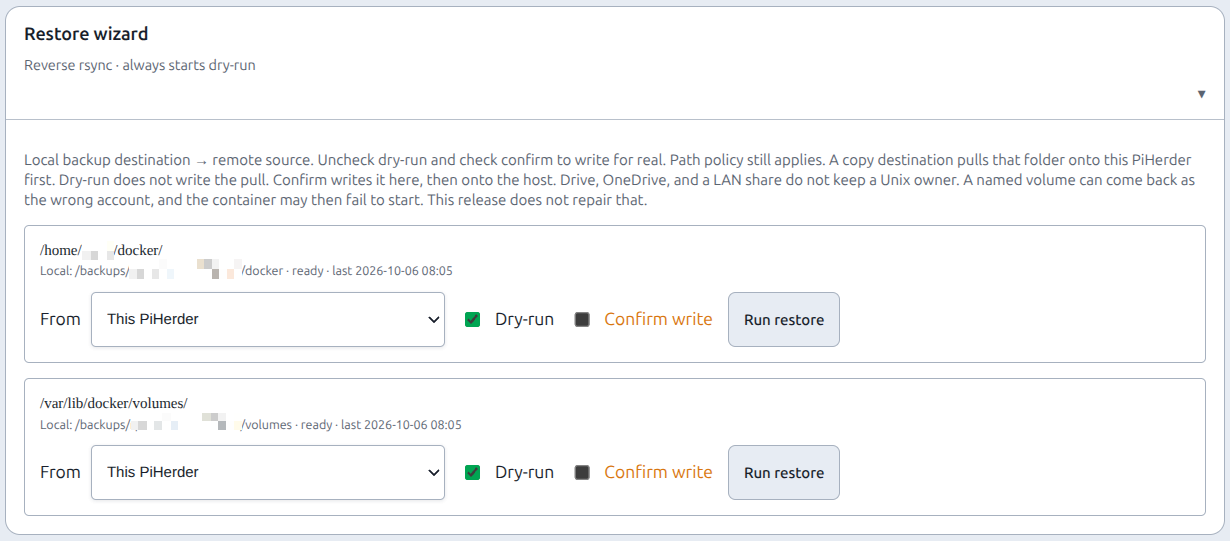
Why dry-run first: restore writes onto the remote host. A preview reverse rsync shows what would change without committing.
- Backups page → restore for a source.
- Leave From on This PiHerder, or pick Drive, OneDrive, or a LAN share. A direct host only lists destinations it sends to. The folder must be selected on that copy.
- Dry-run previews the host write. A destination dry-run checks the remote folder and does not write it here.
- Confirm to apply. That pulls the folder here, then reverse-rsyncs it onto the host.
- Path policy enforced; audit action
backup_restore. The row names the destination. It does not include the sign-in.
Restore is privileged
You are writing back onto the remote host. Prefer dry-run first. Prefer restoring to a test path when learning.
Drive, OneDrive, and a LAN share do not keep a Unix owner. The pull lands as the account that runs rclone on this PiHerder. A backup on this train also writes .piherder-ownership.json with the numeric uid, gid, and octal mode recorded at backup time. A straight-out copy uploads that file into the remote folder after the sync and excludes the name so the next sync does not delete it. Restore applies that owner, group, and mode on the host and strips setuid and setgid (mode & 0o1777). An archive from before that sidecar has no file and restores without an ownership error. The files then stay as the rclone account. A named volume that must belong to the app user needs a sidecar from a backup taken after this step. This ownership step ships in 1.13.0.
Retention
Retention cleanup is a separate job type (retention) driven by configured keep rules. Why separate: deleting old trees is independent of “did tonight’s rsync succeed?”
Troubleshooting
Success/fail over time and dest-size growth: Reports.
Named-volume copy during Move a service uses the same Mountpoint rsync privilege as backing up /var/lib/docker/volumes. That is a Job, not a backup restore.