Add a server
What this is
A server in PiHerder is one fleet host (Raspberry Pi, Debian/Ubuntu box, or specialised OS like HAOS) that the control plane reaches over SSH. Everything else — backups, apt, Docker, templates — hangs off this record.
Why it exists
Without a server record you have no place to store the encrypted SSH key, feature flags, schedules, or job history. Adding a server is the bridge from “I have a Pi on the LAN” to “PiHerder can act on it safely and repeatedly.”
When to use it
- First host after install
- Every new Pi / VM / metal box you want under the same dashboard
- Replacing a host: often add new then remove the old one after cutover
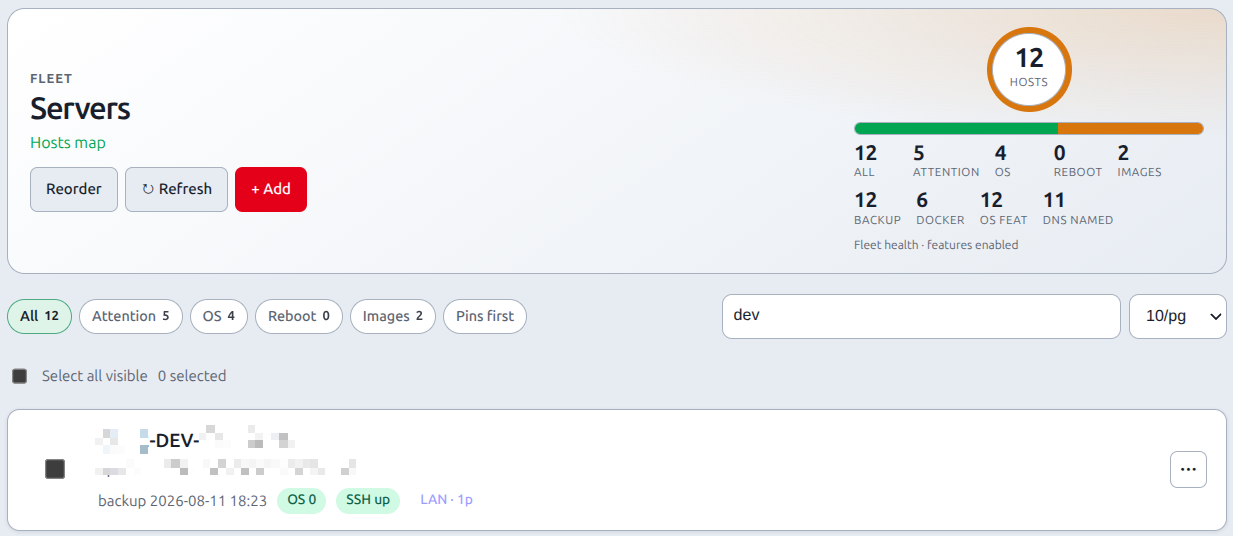
Finding hosts on a large fleet
The Servers list (/servers) is server-side. Pulse counts stay fleet-wide.
| Control | What it does |
|---|---|
| Chips (All / Attention / OS / Reboot / Images) | Same as 1.2. Combine with search. |
| Search box | Tokens match name, hostname, IP, DNS name, SSH user. ha also matches homeassistant; pi-hole matches pihole. |
| Per page | 10 / 20 / 50 / 100 — remembered in cookie ph_per_page (same cookie as Jobs, Audit, Docker, discovery). |
| Pins first | Sort pinned hosts to the top. Does not hide the rest. |
| Reorder | Full fleet only (All + empty search). If you have a filter, search, or pager, Reorder opens ?reorder=1 (unpaged). |
| Select all visible | This page only — not every host that matches the filter. |
Empty filter: “No hosts match” + Show all.
End-to-end: first Pi (wizard — primary path)
Servers → + Add opens the guided wizard (/servers/new). Prefer this for a new host.
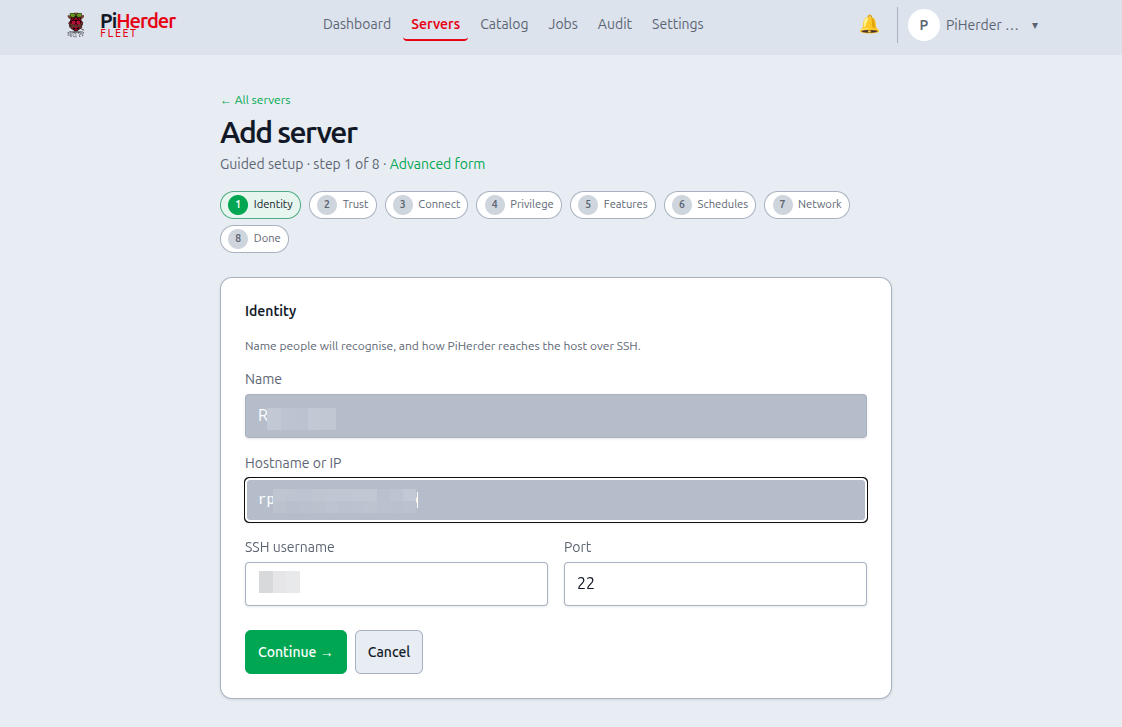
- Identity — display name, hostname/IP, SSH user and port (creates the fleet row). Default user is
pi(Raspberry Pi OS); typeubuntu,root, or your HAOS add-on user if different. Existing hosts are not changed. - Trust — generate a keypair (recommended), upload a key, or password-only (discouraged); optional one-time password only to bootstrap key deploy. Private material is encrypted at rest and never re-shown.
- Connect — ordered path: install public key (copy / install script / Deploy) → Test connection → Clear stored password when key-only works.
- Privilege — optional least-priv user on Pi OS / Ubuntu; skip automated least-priv on HAOS (wizard copy explains).
- Features — Backups starts on and does not save a schedule, so the host inherits the fleet time until you save one. OS updates and Docker stay off until you enable them. OS updates = apt/dnf on Linux, or HA Core/OS/Supervisor via
haCLI on HAOS; leave Docker off on pure HAOS. - Schedules — prefer check-only schedules first (counts without apply); deep edit stays on the server page.
- Network — optional FQDN / Pi-hole A later; safe to skip.
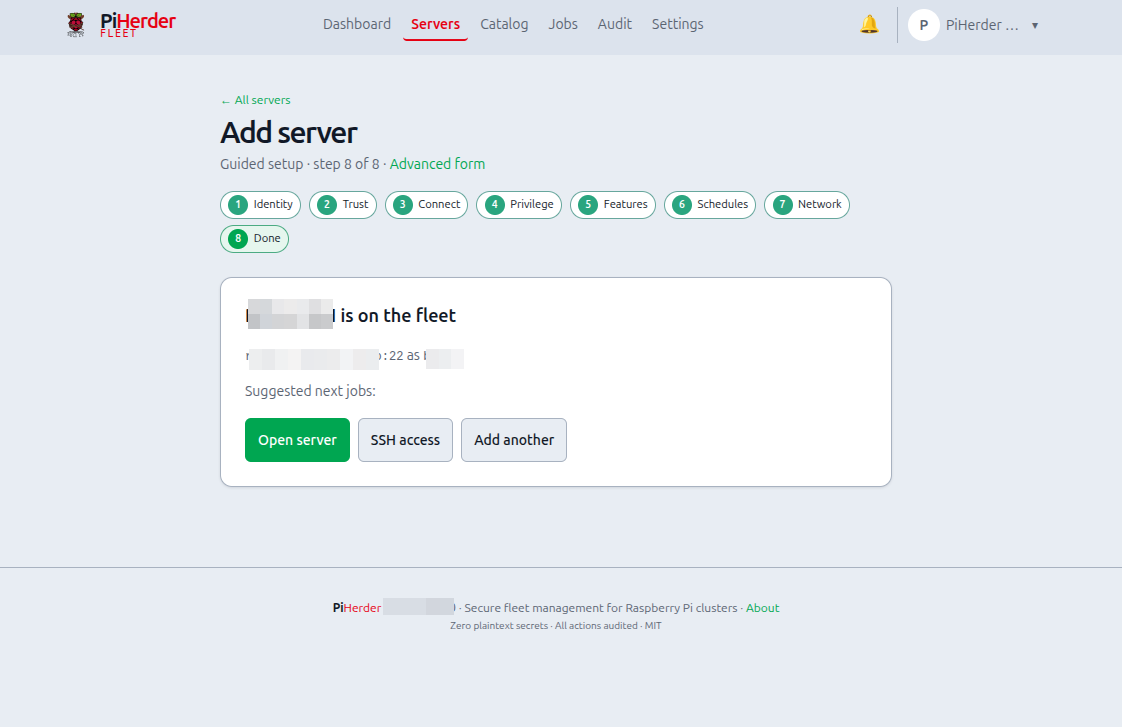
- Done — summary + next steps (HAOS-aware when the host was detected as HAOS).
Save & exit at any step after Identity leaves a partial host on the fleet; open the server or resume via
/servers/new?step=connect&server_id=… (or the next incomplete step).
Done when: Test connection succeeds; dependency chips match enabled features; password bootstrap is gone. The first successful connect pins the SSH host key (shown under SSH access). A later key change is refused until you reset the pin.
Advanced form
Prefer the wizard. For a one-shot form, use Advanced form on the wizard page (/servers/new/advanced) or legacy /servers/add — same create engine, no step chrome.
Wizard steps (reference)
| Step | What it means | What you set | Notes |
|---|---|---|---|
| Identity | Who is this host on the fleet? | Name, hostname/IP, SSH user/port | Creates the server row. Hostname must resolve from the PiHerder container. HAOS: match SSH add-on user/port. |
| Trust | How will PiHerder authenticate? | Generate keypair (recommended), upload key, or password-only | Secrets encrypted with PIHERDER_MASTER_KEY. Private key is never shown again after save. Optional one-time password only for key bootstrap. |
| Connect | Prove SSH works; prefer keys-only | 1) Install public key · 2) Test connection · 3) Clear stored password | Copy key / install script / Deploy key. Test refreshes dependency chips (Docker, rsync, HAOS). |
| Privilege | Optional least-privilege user | Open least-priv on server, or skip | Automated least-priv on Debian/Pi OS only; skip on HAOS (keep the add-on user). |
| Features | What should PiHerder manage here? | Backups · OS updates · Docker · optional Console mux | OS updates = apt/dnf or HA Core/OS/Supervisor via ha CLI. HAOS: enable HA updates + backups; leave Docker off — HAOS hosts. Console mux is Debian/Pi OS only (needs tmux or screen already on the host). |
| Schedules | When do checks/applies run? | Guidance only; deep edit on server | Prefer check-only first (counts without apply). Safe to skip. |
| Network | Optional DNS / Pi-hole A records | Open host DNS fields, or skip | Needs Pi-hole (or fabric) when you want A records. Does not block SSH/backups. |
| Done | Host is on the fleet | Summary + next CTAs | HAOS-aware tips when detected; open server, SSH access, add another. |
Save & exit after Trust keeps a partial host; reopen the wizard with server_id or continue from the server page.
SSH access panel (detail)
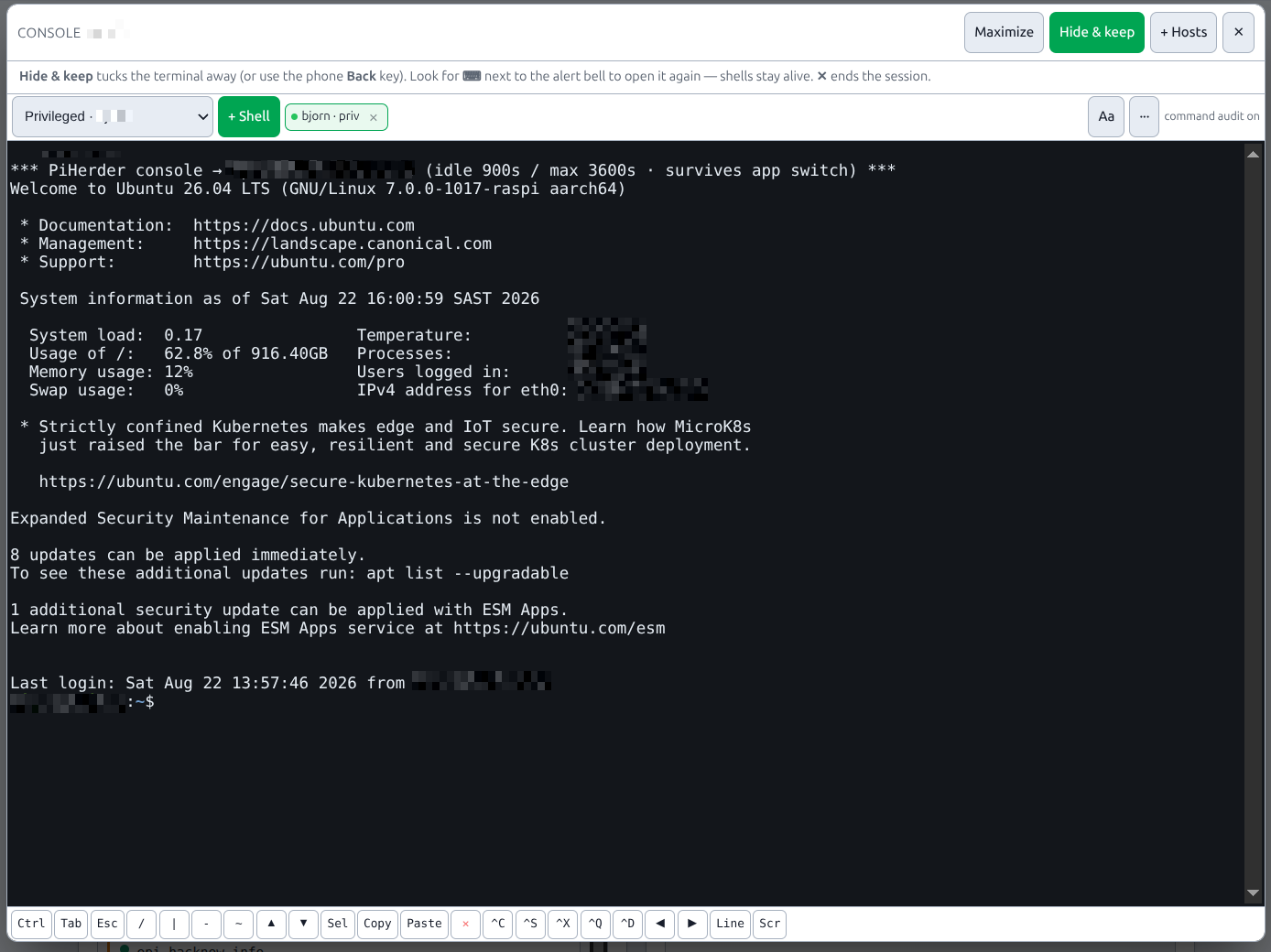
The wizard Connect step covers deploy / test / clear password (one fleet identity). The full SSH access panel on the server page also has rotate key, least-priv scripts, dependency re-check, and an optional privileged identity for Connect as… (console only — jobs stay on fleet).
Optional Web SSH console (browser terminal; flag off by default): Web SSH console.
| Action | What it does | Why |
|---|---|---|
| Test connection | Verifies key (or password) login, then refreshes host dependency probes when login succeeds. First success pins the SSH host key | Proves the path before you queue jobs |
| Reset host-key pin | Clears the stored fingerprint after a rebuild (or a replaced machine at the same address) | Mismatch is refused until you reset; do not reset on a surprise change |
| Check dependencies | Probes rsync / docker / apt for enabled features only. Also reads /etc/os-release and the CPU architecture | Failures become hints, not silent job fails later |
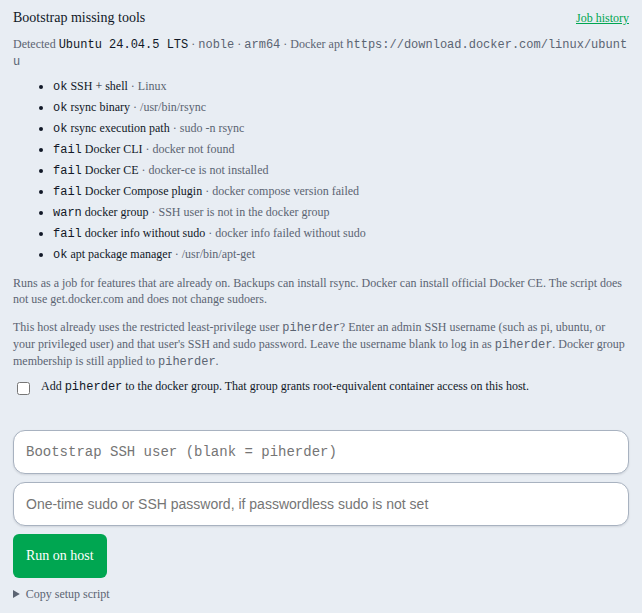
| Bootstrap missing tools | Operator action on SSH access and the add-server wizard. Queues a host_bootstrap job. Installs rsync when Backups are on, and official Docker CE when Docker is on. Asks before adding the fleet SSH user to the docker group. An optional bootstrap username logs in as an admin when the fleet user is already piherder. The one-time sudo password is Fernet-encrypted in the broker only until a worker picks it up, acked on receipt, expires after 120 seconds, is never retried or redelivered, and is never logged. A worker crash marks the job failed and the operator reruns with a fresh password. If no worker takes the message, the pending job fails with expired before a worker picked it up, rerun with a fresh password. A second bootstrap while one already holds the host fails at once with another job holds this host, rerun when it finishes, and the password is not queued. Progress and errors stay in the SSH access window | Avoids get.docker.com and does not widen the standing sudoers file |
| Deploy key | Installs public key into authorized_keys; verifies key-only login | Stops depending on passwords |
| Rotate key | New keypair, deploy, swap only after verify succeeds | Safe rotation if a key may have leaked |
| Least-priv user | Optional piherder user + limited sudoers (Pi OS / Ubuntu) | Limits blast radius of the fleet account |
| Privileged identity | Optional second key/user (e.g. piherder-admin). Generate or paste a key, download the setup script, run it on the host, then Test privileged | Break-glass Connect as… only. Not “Run on host”. HAOS: skip |
SSH access shows two labeled public keys when privileged exists: Fleet public key (jobs + default console) and Privileged public key. They are different keypairs. Copy the one that matches the user you are installing.
Bootstrap missing tools
After SSH works, Bootstrap missing tools uses the last host check. Backups on, and rsync missing, can install rsync. Docker on, and Docker CE, the Compose plugin, or docker group membership missing, can install official Docker CE from download.docker.com for Ubuntu, Debian, and Raspbian. The script installs ca-certificates, curl, and gnupg first, checks that Docker has published that distro codename, then removes only conflicting distro packages that are already installed (apt-get remove, not purge). It checks the Docker GPG fingerprint in a temporary GNUPGHOME and installs docker-ce and docker-compose-plugin. It does not call get.docker.com and it does not add apt-get to /etc/sudoers.d/piherder.
Tick the confirm box before Docker bootstrap. Adding the fleet SSH user to the docker group lets that user start containers as root. If distro Docker packages or running containers were seen, the same box covers replacing those packages. /var/lib/docker is left in place. When the fleet user is already the restricted piherder account, enter an admin SSH username (such as pi or ubuntu) and that user's password. Leave the username blank to use the fleet user. The optional password is used once for SSH and, only when sudo still asks, for sudo -S. The one-time sudo password is Fernet-encrypted in the broker only until a worker picks it up, acked on receipt, expires after 120 seconds, is never retried or redelivered, and is never logged. A worker crash marks the job failed and the operator reruns with a fresh password. If no worker takes the message, the pending job fails with expired before a worker picked it up, rerun with a fresh password. A second bootstrap while one already holds the host fails at once with another job holds this host, rerun when it finishes, and the password is not queued. It is not written to the job row or the audit row. The button queues job type host_bootstrap. The SSH access window stays open and shows the log. Job history lists the same row. The audit action is host_bootstrap. The button posts to POST /servers/{id}/host-deps/bootstrap in the browser. There is no token API and no hosted MCP tool for this install. A Pi with only Backups on is checked and installed for rsync only, even if a form field asks for Docker CE. This ships in 1.13.0.
Clear stored passwords
After key auth works, clear any stored SSH password (wizard Connect or server edit) so secrets stay keys-only.
Least-privilege user (Debian / Pi OS / Ubuntu)
Why: Running every job as your personal pi/ubuntu user mixes human logins with automation. A dedicated user with narrow sudoers is easier to reason about and revoke.
- Creates e.g.
piherderwith key-only login - Optional
dockergroup - Sudoers for rsync/test,
/var/lib/piherder/rclonefor a host that sends files straight out, and optional apt/reboot (visudo -cfbefore install). A host set up before that rclone path existed needs the script copied again from SSH access and applied again. Sudo resets the environment, so aDEBIAN_FRONTENDprefix is often gone when apt runs. The OS patch job keeps debconf, apt, and sudo error lines. A freshly generated script also allowsfind,chown, andchmodso a restore can put numeric ownership back. Apply that script again on a host created before it. That ownership step ships in 1.13.0 - Run on host re-points
ssh_usernameafter verify - HAOS / specialised: instructions only — not automated
Home Assistant OS (HAOS)
For a full HAOS appliance (SSH add-on + ha CLI + optional rsync):
- Add the host as a server (SSH user often
root). - Set Host profile → Home Assistant OS under Edit → General (or let an OS check auto-mark).
- Enable HA updates (OS patch flag) and Backups as needed; leave Docker fleet off.
Full checklist, System info, and update behaviour: HAOS hosts.
Docker base dir (Option B)
If stacks live under another user’s home (e.g. /home/ubuntu/docker while PiHerder logs in as piherder):
- Set Docker base dir to that absolute path (not
~/dockerafter switching to thepiherderuser). - Run the Option B ACL script from SSH access so the service user can traverse the tree.
~/docker expands to the SSH user’s home and breaks restart/build/logs after re-pointing to piherder.
Server detail layout
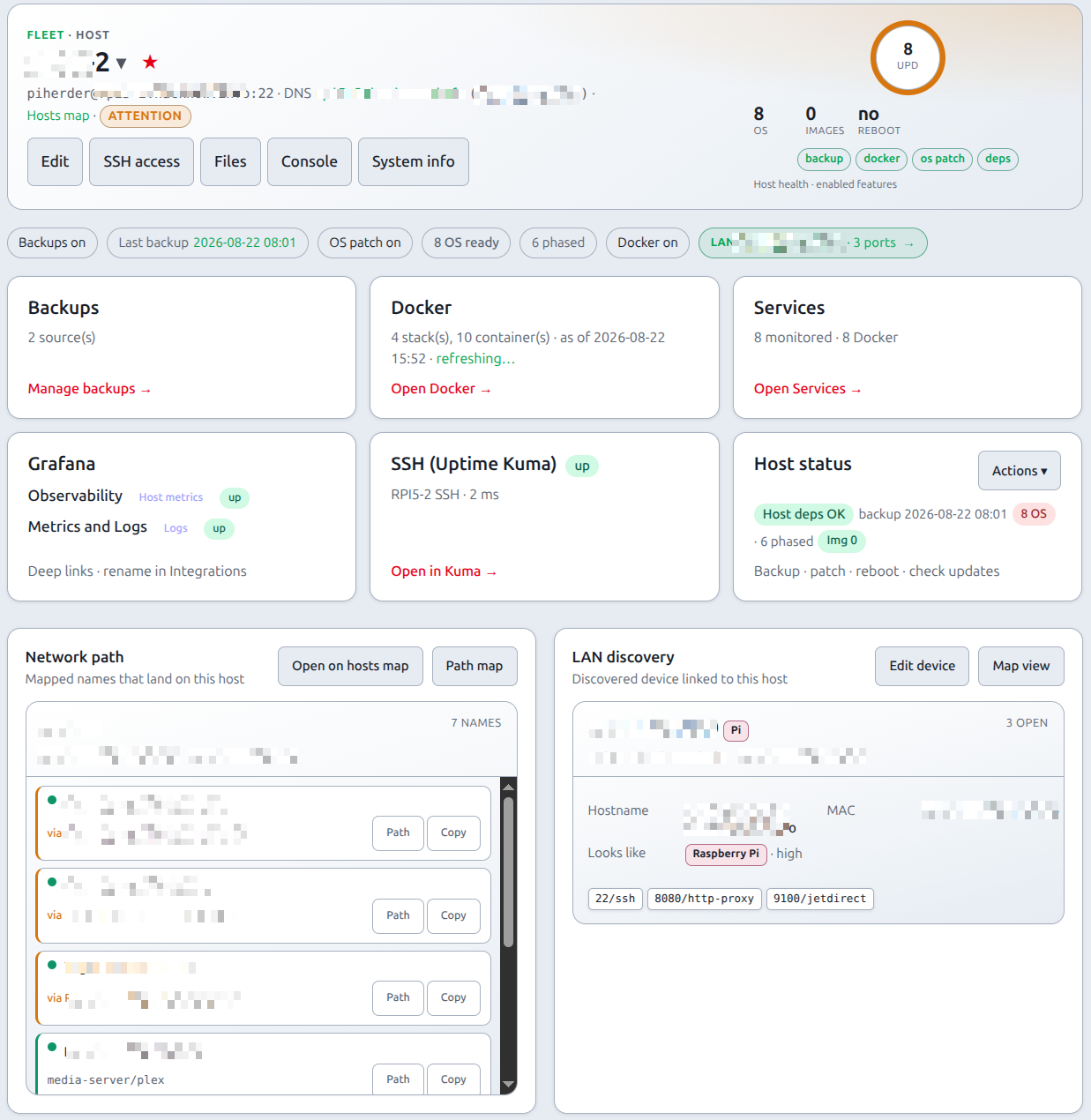
After onboarding, the server page uses the shared ops-hero plus equal destination cards (desktop grid): Backups, Docker, Services, optional Grafana / SSH (Uptime Kuma), and Host status (⋯ actions). Host dependency chips stay above as a snapshot; full SSH onboarding stays under SSH access. Child pages (Backups, Docker, Services) reuse the same hero width and card rhythm.
Below the dest cards, a two-column row (stacked on narrow screens) holds:
| Card | Purpose |
|---|---|
| Network path | Mapped app names that land on this host; Open on hosts map and Path map (matched secondary buttons) jump into Catalog → Network maps |
| LAN discovery | When linked — always-visible soft-embed card (IP, ports, kind; Edit device / Map view) matching Network path’s outer + inner card layout |
Feature flags
Wizard Features or Edit → Features — enable only what you need:
| Flag | Unlocks | Why a flag |
|---|---|---|
| Backups | rsync backup/restore UI + schedules | Hosts without files to protect stay quiet; needs rsync on the host (incl. HAOS SSH add-on) |
| OS updates (UI: OS patch / HA updates on HAOS) | Debian: apt check/apply. HAOS: Core / OS / Supervisor via ha CLI | Same feature flag; backend branches on host profile |
| Docker / containers | Docker page, container patch, template deploy targets | Leave off on pure HAOS — add-ons are not fleet Compose stacks |
| Console mux (v1.6) | Web SSH uses host tmux then screen when already installed | Default off. Hidden on HAOS. Public demo never muxes. PiHerder never apt installs the binary. Web SSH |
Disabled features are hard-hidden from dest cards and ⋯ menus. Console mux only changes how an already-enabled web SSH attaches; it is not a dest card.
On the Servers list, bulk actions (check/upgrade OS, check/patch containers, backup) only queue hosts with the matching flag enabled — see Bulk actions.
Schedules
Prefer check-only schedules first. Edit → Schedules on the server for cron detail. See Updates & patching.
Why start with checks only: scheduled apply is powerful; quiet weekly checks build trust before you automate upgrades.
Host dependency check
After key deploy / least-priv / test, PiHerder stores a dependency snapshot. Failures show install/privilege hints only — nothing is auto-installed on the remote (so a production host never gets surprise packages).
Host status / diagnostics
System Info on the server page is a stored snapshot (pretty OS, hardware, CPU, memory, disk) — not a live SSH on every open. Scheduler ~15 minutes; the modal refresh icon SSHs once. v1.6 persists those columns so Home Assistant can poll the DB and never SSH the fleet. Full why + fields: System Info. HACS: Home Assistant → PiHerder.
If the host is linked to a LAN Discovery device, a LAN link-style pill appears in the hero with the discovery IP (and open-port count when known). Open it to edit map name / type / role; Save or Cancel returns to this server (not the Integrations shell). The fuller LAN discovery card sits always open beside Network path (IP · ports, scripts, Edit device / Map view). Details: LAN Discovery — soft embed.
Related
- System Info — v1.6 host snapshot (OS / hardware / CPU / RAM / disk)
- HAOS hosts — appliance profile, System info, HA updates
- Remove a server — UI teardown + optional host cleanup
- Backups · Updates · Docker
- Journey A: Operator scenarios · Journey C2: HAOS