PWA & Web Push
What this is
PiHerder can be installed as a Progressive Web App and send Web Push notifications to enrolled devices when new in-app notifications open (and related resolve events). The home-screen name follows Settings → General → Instance when a name is set. Empty keeps PiHerder. The icon and the install theme color stay the official mark and red. See Appearance.
Why it exists
You are not always on the desktop when a backup fails or a monitor goes down. Push brings the same events as the bell inbox to a phone — but browsers only allow reliable push under trusted HTTPS and (on iOS) a home-screen install.
End-to-end: phone alerts
- Complete Trusted HTTPS with a stable
PIHERDER_PUBLIC_URL. - Confirm web logs show VAPID ready after startup.
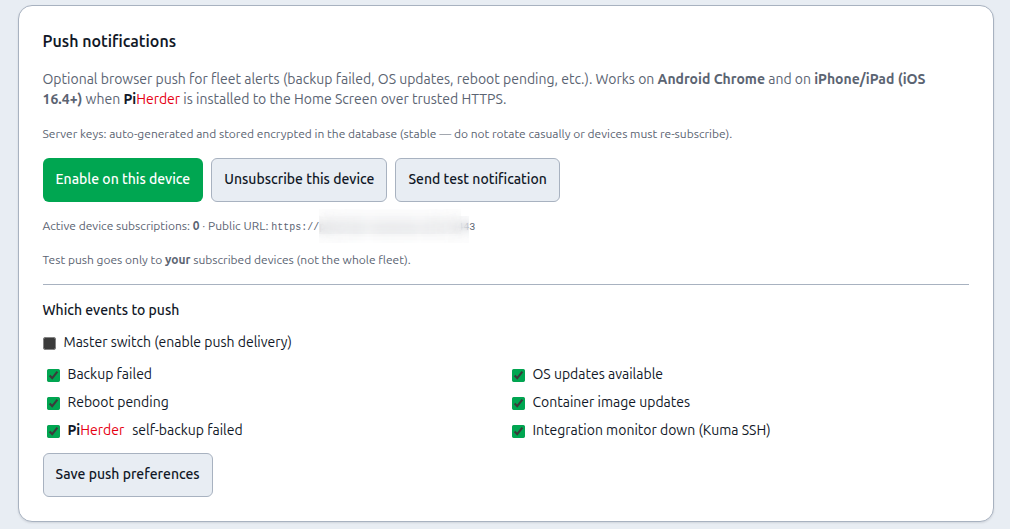
- On Android: open the site / install PWA → Account → Enable on this device → test.
- On iOS 16.4+: Add to Home Screen, open from icon, then enable.
- Toggle event types you care about and save.
- Trigger a test notification; confirm the bell and the OS banner.
Prerequisites
- Trusted HTTPS + stable
PIHERDER_PUBLIC_URL. - Web service running (VAPID auto-generated on startup).
VAPID (default)
On web startup PiHerder auto-generates a VAPID key pair once and stores it in Postgres (pushvapidconfig). Private key is Fernet-encrypted with PIHERDER_MASTER_KEY. No script required for normal use.
Logs: Web Push VAPID ready (source=generated) (or source=env if overriding).
Do not rotate keys casually
Changing the VAPID private key invalidates every device subscription; users must re-enable push.
Optional env pin
# Only if you intentionally pin keys after DB wipe
# VAPID_PUBLIC_KEY=...
# VAPID_PRIVATE_KEY=...
# VAPID_CONTACT=mailto:admin@yourdomain.com
Enable on a device
Android (Chrome)
- Install PWA if prompted.
- Account → Push notifications → Enable on this device.
- Send test notification (your devices only).
- Toggle event types and save.
iPhone / iPad (iOS 16.4+)
- Safari → Share → Add to Home Screen.
- Open the Home Screen icon (not a plain Safari tab).
- Account → Enable on this device.
Push does not work from a plain Safari tab.
When push fires
Only when a new open in-app notification is created (not on every fingerprint refresh). Resolve events may also push if preferences match.
In-app notifications without push
The bell inbox still works if VAPID is unavailable.